이 페이지에서: 증분 쿼리 타깃팅 활동을 사용하여 오케스트레이션된 각 캠페인 실행에 대해 이미 이전 실행에서 타깃팅된 프로필을 제외하고 새 레코드만 반환하는 방법을 알아봅니다.
증분 쿼리 활동은 오케스트레이션된 캠페인이 실행될 때마다 데이터베이스 쿼리를 실행하는 타깃팅 활동입니다. 중요한 부분은 각 실행에서 날짜 필드 값이 이전 실행의 날짜보다 늦은 레코드만 출력한다는 것입니다. 이렇게 하면 동일한 사람들을 다시 타겟팅하거나 동일한 행을 다시 내보내는 것을 방지할 수 있습니다.
캠페인을 여러 번 실행할 수 있는 경우 또는 캠페인을 예약할 때(예: 주별) 또는 외부 신호 또는 API에 의해 트리거되는 경우 사용합니다. 각 실행은 이전 실행 이후 날짜의 레코드만 타겟팅하므로 중복을 방지할 수 있습니다.
일반적인 사용:
- 메시지 및 대상: 새 등록, 새 구매자 또는 기타 “마지막 실행 이후 새로운” 세그먼트만 다음 단계로 끌어옵니다(예: 이메일, 모바일 메시지).
- 지속적인 내보내기: 이미 내보낸 행을 복제하지 않고 새 행이나 업데이트된 행만 보고 또는 BI 도구용 파일로 보냅니다.
증분 쿼리 활동 구성 incremental-query-configuration
타겟팅 차원을 설정하고, 쿼리를 작성하고, 활동이 향후 실행에서 제외할 레코드를 결정하는 방법을 선택합니다.
-
증분 쿼리 활동을 오케스트레이션된 캠페인에 놓습니다.
-
대상에서 타겟팅 차원(예: 수신자, 구독자)을 선택하고 계속을(를) 클릭합니다. 타겟팅 차원에 대해 자세히 알아보세요.

-
쿼리를 정의하려면 조건 추가를 클릭하십시오. 규칙 빌더를 사용하는 방법을 알아보세요.

-
처리된 데이터에서 날짜 필드 경로를 선택합니다. 날짜 필드는 필수이며 특성은 날짜 시간 형식을 사용해야 합니다. 각 실행은 날짜가 마지막 실행 이후인 행만 반환합니다.

note NOTE 자격 요건은 날짜 필드의 값에 따라서만 달라질 수 있으며 레코드를 언제 수집했는지에 따라서는 달라질 수 없습니다. 이전 실행 후 수집된 레코드는 날짜 필드 값이 해당 실행 날짜보다 오래된 경우 반환되지 않습니다.
마지막 실행 날짜 확인 incremental-query-last-execution
활동이 실행되면 마지막 실행 날짜 필드가 처리된 데이터 아래에 날짜 필드 경로 아래에 표시됩니다. 이전 활동 실행 날짜 및 시간을 표시합니다. 다음 실행에서 사용하는 마감 일자입니다. 이 필드는 읽기 전용입니다.
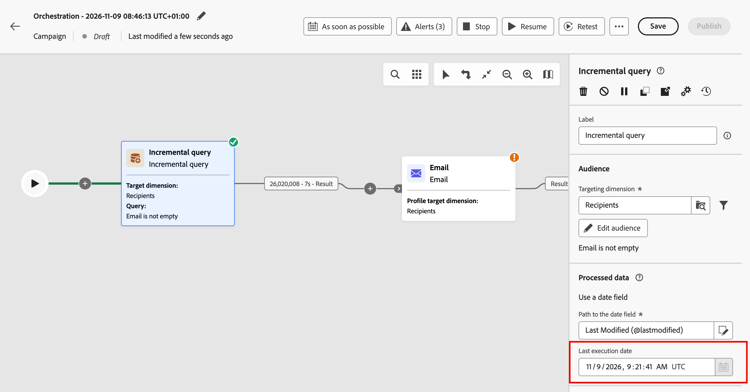
예 incremental-query-example
다음 예제에서는 골드 회원이 된 프로필에 환영 이메일을 보냅니다. 캠페인은 매주, 매주 월요일로 예약할 수 있습니다. 각 실행은 이전 실행 이후 골드 멤버십에 적합한 프로필만 타겟팅하므로 각 수신자는 환영 이메일을 한 번 받습니다.
- 증분 쿼리: 골드 멤버를 선택합니다. 첫 번째 실행: 현재 모든 골드 멤버입니다. 나중에 실행: 이전 실행 이후 골드 멤버가 된 프로필만 표시합니다.
- 전자 메일 게재: 쿼리가 출력한 프로필에 환영 전자 메일을 보냅니다.

This section contains structured knowledge intended to support interpretation, retrieval, and question answering related to this topic.
For complete understanding, this information should be combined with the documentation on this page. Neither source is intended to stand alone; the page describes the feature, while this section provides additional context that helps disambiguate terminology, intent, applicability, and constraints.
- TL;DR: This page explains how to configure the Incremental query targeting activity in an Orchestrated campaign so that each run returns only records whose date field value is later than the previous execution.
Intents:
- Understand what the Incremental query activity does across repeated Orchestrated campaign runs.
- Configure the activity’s targeting dimension and query condition.
- Choose a date field under Processed data so that each run returns only rows dated after the last execution.
- Understand what happens to downstream activities when a run returns no rows.
- Build a “new since last run” audience for messaging or ongoing exports.
Glossary:
- Incremental query: a Targeting activity that runs a database query each time the Orchestrated campaign runs and outputs only records whose date field value is later than the previous execution (product-specific)
- Processed data: the configuration area where you choose how the activity excludes records from earlier runs, for example by using a date field (product-specific)
- Path to the date field: the attribute, in Date Time format, used under Processed data so each run returns only rows whose date is after the last execution (product-specific)
- Last execution date: the field displayed under Processed data, below the Path to the date field, once the activity has run; it shows the date and time of the previous execution and is the cutoff date used by the next run; the field is read-only (product-specific)
- Targeting dimension: the audience type selected for the activity, for example recipients or subscribers (product-specific)
Guardrails:
- When a run returns no rows, the Orchestrated campaign stops at the Incremental query; activities after it are not executed until there is data, when the campaign runs again.
- A date field is required under Processed data, and the attribute must use the Date Time format.
- Each run returns only rows whose date is after the last execution.
- Eligibility depends only on the value of the date field, not on when the record was ingested. A record ingested after the previous execution is not returned if its date field value is older than the date of that execution.
Terminology:
- Canonical name: Incremental query — variants: none
- Synonyms: none
- Do not confuse: “Incremental query” (a Targeting activity that excludes previously returned records) ≠ “Targeting dimension” (the audience type, e.g. recipients or subscribers, selected within the activity)
FAQ:
- Q: What does the Incremental query activity return on each run? — Only records whose date field value is later than the previous execution, regardless of when they were ingested.
- Q: When should I use the Incremental query activity? — When the campaign can run multiple times, for example when scheduled (e.g. weekly) or triggered by an external signal or API, so each run targets only records dated after the previous execution.
- Q: What is required under Processed data? — A Path to the date field, using the Date Time format; each run returns only rows whose date is after the last execution.
- Q: What happens if a run returns no rows? — The Orchestrated campaign stops at the Incremental query, and activities after it are not executed until there is data on a later run.
- Q: What are typical uses of the Incremental query? — Pulling “new since last run” segments (e.g. new sign-ups, new purchasers) into messaging, or sending only new or updated rows to files for reporting or BI tools.
Examples:
- Welcome email to new gold members: an Incremental query selects gold members (first run: all current gold members; later runs: only profiles that became gold members since the previous execution), followed by an Email delivery activity that sends the welcome email to the profiles output by the query. The campaign can be scheduled to run weekly, every Monday, so each recipient receives the welcome email once.
Related pages:
- To pick the audience type for the Incremental query: Targeting dimensions (orchestrated/target-dimension.md)
- To build the query condition for the Incremental query: Learn how to use the rule builder (orchestrated/orchestrated-rule-builder.md)
Personas:
- marketer: Can configure the Incremental query activity so each Orchestrated campaign run returns only records whose date field value is later than the previous execution. Can select the Targeting dimension, add a condition with the rule builder, and choose the Path to the date field under Processed data. The page states that a date field is required and the attribute must use the Date Time format. Where: “Configure the Incremental query activity”.
Onboarding:
- Level: Intermediate
- First minimal step: Drop an Incremental query activity into your Orchestrated campaign.
- Success check: Each run returns only rows whose date is after the last execution.
- Next: Selecting the Targeting dimension for the Incremental query activity: Create your Targeting dimension (orchestrated/target-dimension.md); Adding a condition to define the query in the Incremental query activity: Work with the rule builder (orchestrated/orchestrated-rule-builder.md)