이 페이지에서: 역할, 권한, 샌드박스, 개체 및 특성 기반 액세스 제어 등 Journey Optimizer의 핵심 액세스 제어 개념을 이해하면 사용자에게 올바른 액세스 권한을 부여하는 방법을 계획할 수 있습니다.
Journey Optimizer을(를) 사용하면 다른 사용자에게 할당된 권한을 정의하고 관리할 수 있습니다. 권한은 제품 내 기능 및 기능에 대한 액세스를 승인 또는 거부하는 권한 및 제한 세트입니다.
Adobe CX Enterprise의 권한을 통해 Journey Optimizer에 대한 액세스 제어를 제공합니다. 이 기능은 권한 및 샌드박스를 사용자와 연결하는 역할 및 정책을 활용합니다.
Journey Optimizer에 대한 액세스 제어를 구성하려면 조직에 대한 시스템 또는 제품 관리자 권한이 있어야 합니다. 권한을 부여하거나 철회할 수 있는 최소 역할은 제품 관리자입니다. 권한을 관리할 수 있는 다른 관리자 역할은 시스템 관리자(제한 없음)입니다. 자세한 내용은 관리자 역할에 대한 Adobe 도움말 센터 문서를 참조하십시오.
Journey Optimizer의 사용자 관리는 다음 주요 개념을 기반으로 합니다.
-
역할: 역할은 동일한 권한과 샌드박스를 공유하는 사용자 컬렉션을 참조합니다. 이러한 역할을 사용하면 조직 내의 다양한 사용자 그룹에 대한 액세스 및 권한을 쉽게 관리할 수 있습니다. 역할에는 사용자가 인터페이스의 특정 기능이나 개체에 액세스할 수 있도록 하는 통합된 권한(권한) 세트가 포함되어 있습니다.
Journey Optimizer을(를) 사용하면 다양한 수준의 권한을 가진 기존 역할 범위 중에서 선택하여 사용자에게 할당할 수 있습니다. 이 페이지에서 사용 가능한 기본 제공 역할에 대해 자세히 알아보세요. -
권한: 권한은 역할에 할당된 권한을 정의할 수 있는 단일 권한입니다. 각 권한은 Journey Optimizer의 다양한 기능 또는 개체를 나타내는 리소스(예: 여정 또는 오퍼)에 수집됩니다. 자세한 내용은 권한 수준 섹션을 참조하십시오.
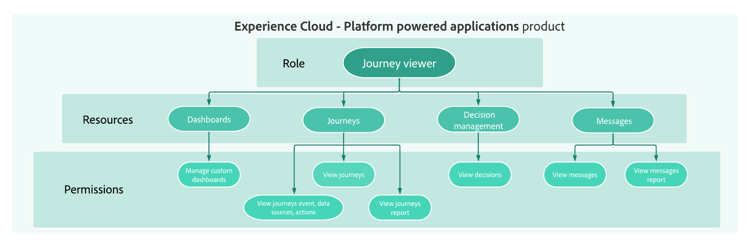
-
샌드박스: 가상 샌드박스가 인스턴스를 별도의 격리된 가상 환경으로 분할합니다. 샌드박스는 권한에서 역할을 통해 할당됩니다. 샌드박스 사용에 대해 자세히 알아보세요.
-
개체 기반 액세스 제어: 개체에 대한 액세스를 제한하는 레이블입니다. 이 접근 방식은 민감한 디지털 자산을 무단 사용자로부터 보호하고 개인 데이터에 대한 보안을 강화합니다. 개체 기반 액세스 관리에 대해 자세히 알아보세요.
-
특성 기반 액세스 제어: 특정 팀이나 사용자 그룹의 데이터 액세스를 관리할 수 있는 권한. 속성 기반 액세스 제어를 통해 관리자는 속성에 따라 특정 객체 및/또는 기능에 대한 액세스를 제어할 수 있습니다. 속성은 스키마 필드 또는 세그먼트에 추가된 레이블과 같이 객체에 추가된 메타데이터일 수 있습니다. 관리자는 사용자 액세스 권한을 관리하기 위해 속성이 포함된 액세스 정책을 정의합니다. 특성 기반 액세스 관리에 대해 자세히 알아보세요.
더 자세히 알아보기
Journey Optimizer의 액세스 제어 개념을 이해했으므로 이러한 문서 섹션을 자세히 살펴봄으로써 권한 구성을 시작할 수 있습니다.




This section contains structured knowledge intended to support interpretation, retrieval, and question answering related to this topic.
For complete understanding, this information should be combined with the documentation on this page. Neither source is intended to stand alone; the page describes the feature, while this section provides additional context that helps disambiguate terminology, intent, applicability, and constraints.
- TL;DR: Access control for Journey Optimizer is provided through Permissions in Adobe CX Enterprise, and user management is based on five key concepts: roles, permissions, sandboxes, object-based access control, and attribute-based access control.
Intents:
- Understand the five core access control concepts: roles, permissions, sandboxes, object-based access control, and attribute-based access control
- Know who can configure access control (system or product administrator)
- Navigate to the right documentation section for each access control topic
- Plan how to grant users the right access by learning the core access control concepts
Glossary:
- Roles: A collection of users who share the same permissions and sandboxes; with Journey Optimizer, you can choose from a range of pre-existing Roles, each with varying levels of permissions (product-specific)
- Permissions: Unitary rights defining the authorizations assigned to Roles, grouped under resources such as Journey or Offers (product-specific)
- Sandboxes: Virtual sandboxes partition instances into separate, isolated virtual environments; Sandboxes are assigned through roles in Permissions (product-specific)
- Object-based access control: Labels to limit the access to an object; this approach protects sensitive digital assets from unauthorized users and ensures further protection of personal data (product-specific)
- Attribute-based access control: Authorizations to manage data access for specific teams or groups of users; it enables administrators to control access to specific objects and/or capabilities based on attributes, which can be metadata added to an object, such as a label added to a schema field or segment (product-specific)
Guardrails:
- Configuring access control requires system or product administrator privileges (prerequisite); system administrators have no restrictions
- The minimum role that can grant or withdraw permissions is a product administrator (as stated on the page)
Terminology:
- Canonical name: Attribute-based access control — Acronym: ABAC — variants: Attribute-based access management (link text on the page)
- Canonical name: Object-based access control — Acronym: OLAC (Object level access control, the name used on the related object-based access page) — variants: Object-based access management (link text on the page)
- Do not confuse: “Object-based access control” (labels to limit the access to an object) ≠ “Attribute-based access control” (access based on attributes, which can be metadata added to an object, such as a label added to a schema field or segment)
- Do not confuse: “Roles” (a collection of users with shared permissions and sandboxes) ≠ “Permissions” (the unitary rights grouped under resources that are assigned to roles)
FAQ:
- Q: Who can configure access control in Journey Optimizer? — Users with system administrator or product administrator privileges.
- Q: What is the minimum administrator level required to grant or withdraw permissions? — Product administrator.
- Q: Are sandboxes managed independently of roles? — The page states that Sandboxes are assigned through roles in Permissions.
- Q: Where is access control for Journey Optimizer managed? — Through Permissions in Adobe CX Enterprise; this functionality leverages roles and policies, which link users with permissions and sandboxes.