このページ: Adobe Experience Platform Privacy Service を使用して、Adobe Journey Optimizer のデータアクセスおよび削除リクエストを送信および管理します。これにより、データ主体の権利を尊重し、プライバシー規制への準拠を自動化できます。
Adobe Experience Platform Privacy Service は、顧客データのリクエストの管理に役立つ RESTful API とユーザーインターフェイスを提供します。 Privacy Service を使用すると、Adobe CX Enterprise アプリケーションから顧客の個人データにアクセスおよび削除するリクエストを送信でき、法的規制や組織のプライバシー規則に自動的に準拠できます。
プライバシーリクエストは、リクエストメニューから作成および管理できます。
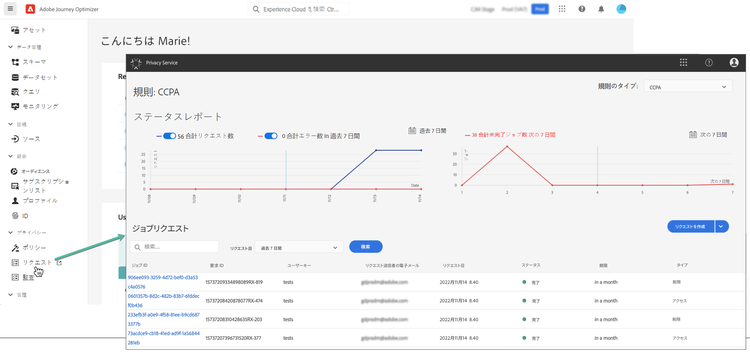
Privacy Service と、プライバシーリクエストの作成および管理方法について詳しくは、Adobe Experience Platform ドキュメントを参照してください。
Adobe Journey Optimizer に送信できる個々のデータプライバシーリクエストの管理 data-privacy-requests
Adobe Journey Optimizer から消費者データにアクセスして削除するための個々のリクエストは、次の 2 つの方法で送信できます。
Privacy Service では、データアクセスと データ削除 という 2 つのタイプのリクエストがサポートされています。
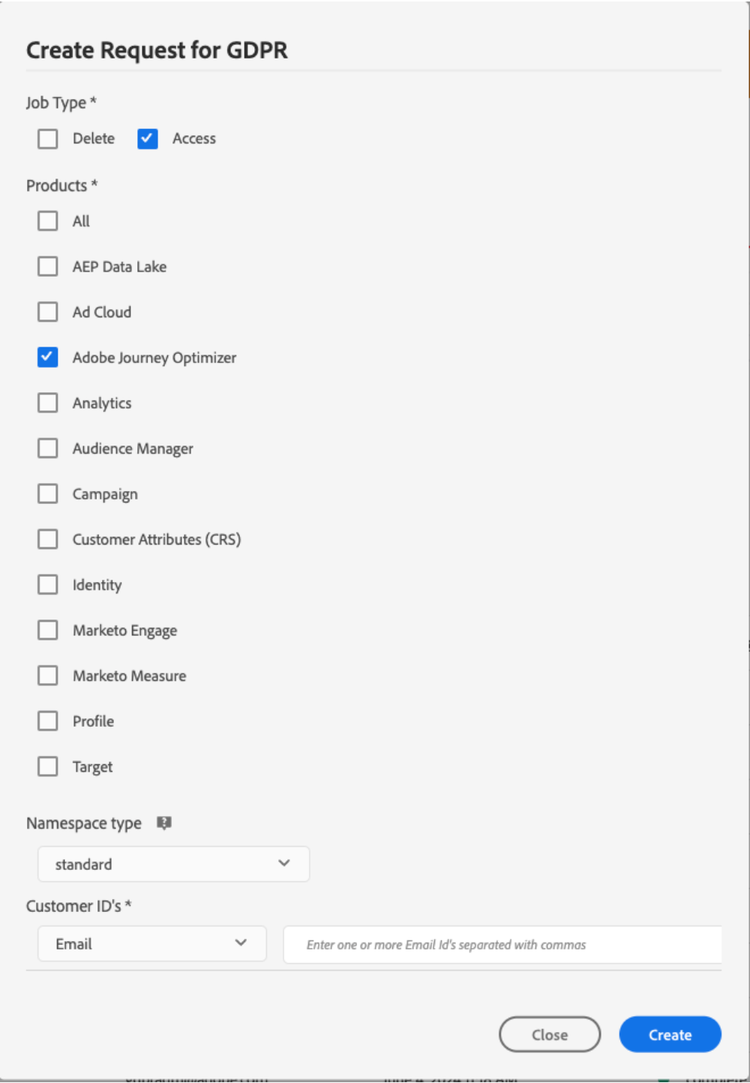
アクセスリクエストの場合は、UI から「Adobe Journey Optimizer」(または API で製品コードとして「CJM」)を指定します。
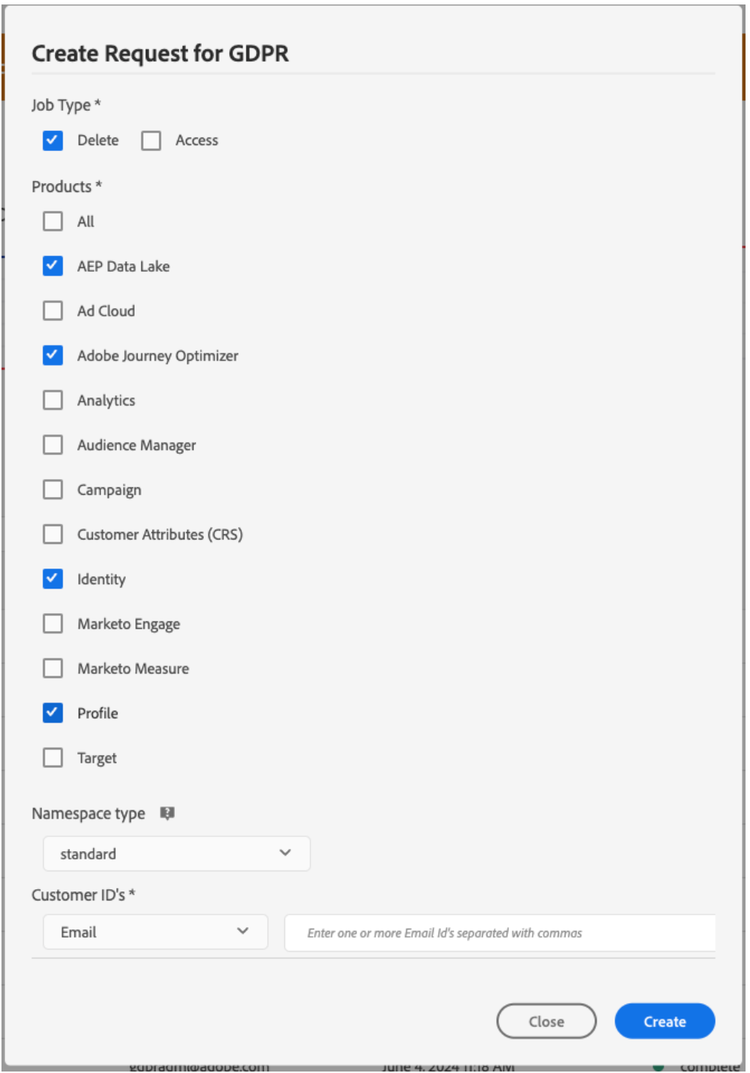
削除リクエストの場合は、「Adobe Journey Optimizer」リクエストに加えて、削除したデータが Journey Optimizer によって再挿入されるのを防ぐために、3 つのアップストリームサービスにも削除リクエストを送信する必要があります。 これらのアップストリームサービスを指定していない場合、「Adobe Journey Optimizer」リクエストは、アップストリームサービスの削除リクエストが作成されるまで「処理中」状態のままになります。
3 つのアップストリームサービスは次のとおりです。
- プロファイル(製品コード:「profileService」)
- AEP データレイク(製品コード:「AdobeCloudPlatform」)
- ID(製品コード:「ID」)
アクセスリクエストと削除リクエストの作成
前提条件
Adobe Journey Optimizer のデータへのアクセスと削除をリクエストするには、次の項目が必要です。
- Adobe 組織 ID
- 操作の対象となるユーザーの ID 識別子と、対応する名前空間。Adobe Journey Optimizer および Experience Platform の ID 名前空間について詳しくは、ID 名前空間の概要を参照してください。
Journey Optimizer の API リクエストの必須フィールド値
"companyContexts":
    "namespace": imsOrgID
    "value": <Your Adobe Organization ID Value>

"users":
    "action": either access or delete

    "userIDs":
        "namespace": e.g. email, aaid, ecid, etc.
        "type": standard
        "value": <Data Subject's Identity Identifier>

"include":
    CJM (which is the Adobe product code for Adobe Journey Optimizer)
    profileService (product code for Profile)
    AdobeCloudPlatform (product code for AEP Data Lake)
    identity (product code for Identity)

"regulation":
    gdpr, ccpa, pdpa, lgpd_bra, or nzpa_nzl (which is the privacy regulation that applies to the request)
GDPR アクセスリクエストの例:
UI から:
API を通じて:
// JSON Request
{
   "companyContexts":[
      {
         "namespace":"imsOrgID",
         "value":"745F37C35E4B776E0A49421B@AdobeOrg"
      }
   ],
   "users":[
      {
         "action":[
            "access"
         ],
         "userIDs":[
            {
               "namespace":"ecid",
               "value":"38400000-8cf0-11bd-b23e-10b96e40000d",
               "type":"standard"
            },
            {
               "namespace":"email",
               "value":"johndoe4@gmail.com",
               "type":"standard"
            }
         ]
      }
   ],
   "include":[
      "CJM"
   ],
   "regulation":"gdpr"
}
// JSON Response
{
    "requestId": "17163122360480365RX-705",
    "totalRecords": 1,
    "jobs": [
        {
            "jobId": "e709b1f4-1796-11ef-b422-eddd0aebc40d",
            "customer": {
                "user": {
                    "key": "John Doe",
                    "action": [
                        "access"
                    ],
                    "userIDs": [
                        {
                            "namespace": "ecid",
                            "value": "38400000-8cf0-11bd-b23e-10b96e40000d",
                            "type": "standard",
                            "namespaceId": 4,
                            "isDeletedClientSide": false
                        },
                        {
                            "namespace": "email",
                            "value": "johndoe4@gmail.com",
                            "type": "standard",
                            "namespaceId": 6,
                            "isDeletedClientSide": false
                        }
                    ]
                }
            }
        }
    ]
}
GDPR 削除リクエストの例:
UI から:
API を通じて:
// JSON Request
{
  "companyContexts": [
    {
      "namespace": "imsOrgID",
      "value": "745F37C35E4B776E0A49421B@AdobeOrg"
    }
  ],
  "users": [
    {
      "action": [
          "delete"
      ],
      "userIDs": [
        {
          "namespace": "ecid",
          "value": "38400000-8cf0-11bd-b23e-10b96e40000d",
          "type": "standard"
        },
                {
          "namespace": "email",
          "value": "johndoe4@gmail.com",
          "type": "standard"
        }
      ]
    }
  ],
  "include": [
    "CJM", "profileService", "AdobeCloudPlatform", "identity"
  ],
  "regulation": "gdpr"
}
// JSON Response
{
    "requestId": "17163122360480365RX-705",
    "totalRecords": 1,
    "jobs": [
        {
            "jobId": "e709b1f4-1796-11ef-b422-eddd0aebc40d",
            "customer": {
                "user": {
                    "key": "John Doe",
                    "action": [
                        "delete"
                    ],
                    "userIDs": [
                        {
                            "namespace": "ecid",
                            "value": "38400000-8cf0-11bd-b23e-10b96e40000d",
                            "type": "standard",
                            "namespaceId": 4,
                            "isDeletedClientSide": false
                        },
                        {
                            "namespace": "email",
                            "value": "johndoe4@gmail.com",
                            "type": "standard",
                            "namespaceId": 6,
                            "isDeletedClientSide": false
                        }
                    ]
                }
            }
        }
    ]
}
This section contains structured knowledge intended to support interpretation, retrieval, and question answering related to this topic.
For complete understanding, this information should be combined with the documentation on this page. Neither source is intended to stand alone; the page describes the feature, while this section provides additional context that helps disambiguate terminology, intent, applicability, and constraints.
- TL;DR: This page explains how to use the Adobe Experience Platform Privacy Service to submit and manage data access and deletion requests for Adobe Journey Optimizer so you can fulfill data subject rights and automate compliance with privacy regulations.
Intents:
- Understand how Privacy Service manages data access and deletion requests
- Submit privacy requests through the Privacy Service UI or API
- Identify the product code and upstream services required for delete requests
- Understand the prerequisites and required field values for requests
- Know which privacy regulations can be specified on a request
Glossary:
- Privacy Service: Adobe Experience Platform service that provides a RESTful API and user interface to manage customer requests to access and delete personal customer data (product-specific)
- Privacy request: a data access or data deletion request submitted for Adobe Journey Optimizer, created and managed from the Requests menu (product-specific)
- CJM: the Adobe product code for Adobe Journey Optimizer, used in the API
includefield (product-specific) - Upstream services: Profile (
profileService), AEP Data Lake (AdobeCloudPlatform), and Identity (identity), to which delete requests must also be submitted to prevent Journey Optimizer from reinjecting the deleted data (product-specific) - Requests: the menu from which privacy requests can be created and managed (product-specific)
Guardrails:
- Privacy Service supports two types of requests: data access and data deletion
- For access requests, specify “Adobe Journey Optimizer” from the UI, or “CJM” as the product code in the API
- For delete requests, in addition to the “Adobe Journey Optimizer” request you must also submit delete requests to three upstream services — Profile (
profileService), AEP Data Lake (AdobeCloudPlatform), and Identity (identity) — if these upstream services are not specified, the “Adobe Journey Optimizer” request remains in the “processing” state until delete requests for the upstream services are created - For delete requests, if you do not explicitly include the product name and all applicable namespaces, data is not removed from Adobe Journey Optimizer
- Making a privacy request to Adobe Journey Optimizer will not remove data from all these systems (Platform data lake, Real time customer profile, Identity service); for delete and access requests, you need to call these individual systems to make sure the requests are handled by each of them
- Prerequisites: an Adobe organization ID, and an identity identifier of the person to act on with the corresponding namespace(s)
- In the API, the
regulationfield is the privacy regulation that applies to the request; the page listsgdpr,ccpa,pdpa,lgpd_bra, ornzpa_nzl
Terminology:
- Canonical name: Privacy request
- Synonyms: “Adobe Journey Optimizer” (product name in the UI) = “CJM” (product code in the API)
- Do not confuse: “data access” request ≠ “data deletion” request
- Do not confuse: “Adobe Journey Optimizer” request ≠ the three upstream services (Profile, AEP Data Lake, Identity) that delete requests must also target
FAQ:
- Q: What are the two types of privacy requests? — Data access and data deletion.
- Q: What product code represents Adobe Journey Optimizer in the API? — CJM.
- Q: Why must delete requests also target upstream services? — To prevent Journey Optimizer from reinjecting the deleted data; if these upstream services are not specified, the “Adobe Journey Optimizer” request remains in the “processing” state until delete requests for the upstream services are created.
- Q: Which upstream services must be included in a delete request? — Profile (
profileService), AEP Data Lake (AdobeCloudPlatform), and Identity (identity). - Q: Which values does the page list for the
regulationfield? —gdpr,ccpa,pdpa,lgpd_bra, ornzpa_nzl. - Q: Does a privacy request to Adobe Journey Optimizer remove data from all systems? — No, for delete and access requests, you need to call these individual systems to make sure the requests are handled by each of them.