このページ:プロファイルが一度にエントリまたは登録できるジャーニーの数を制限して、コミュニケーションの過負荷を防ぎ、最も重要なジャーニーを優先できるようにします。
ジャーニーのキャップは、プロファイルが登録できるジャーニーの数をキャップし、過剰なコミュニケーションを防ぐのに役立ちます。 Journey Optimizer では、次の 2 つのタイプのキャップルールを設定できます。
- エントリキャップでは、プロファイルの特定の期間におけるジャーニーエントリの数をキャップします。
- 同時実行キャップでは、プロファイルを同時に登録できるジャーニーの数をキャップします。
どちらのタイプのジャーニーのキャップでも、優先度スコアを活用してエントリを判別します。
➡️ この機能をビデオで確認
ジャーニーのキャップルールの作成 create-rule
ジャーニーのキャップルールを作成するには、次の手順に従います。
-
ビジネスルールメニューに移動し、ルールセットインベントリにアクセスします。
-
キャップルールを追加するルールセットを選択するか、新しいルールセットを作成します。
-
既存のルールセットを使用するには、リストから選択します。 ジャーニーのキャップルールは、「ジャーニー」ドメインを持つルールセットにのみ追加できます。 この情報は、ルールセットリストの ドメイン 列で確認できます。
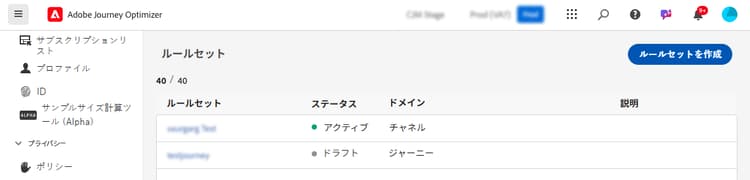
-
新しいルールセット内にキャップルールを作成するには、「ルールセットを作成」をクリックし、ルールセットの一意の名前を指定して、ルールセットドメインドロップダウンから「ジャーニー」を選択し、「保存」をクリックします。
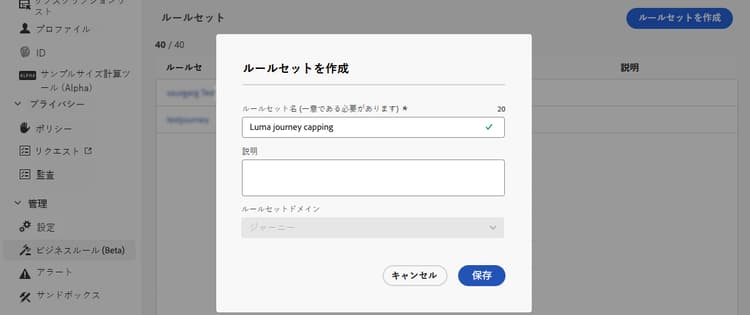
-
-
ルールセット画面で、「ルールを追加」ボタンをクリックし、ルールに一意の名前を指定します。
-
ルールタイプドロップダウンリストで、ルールのキャップのタイプを指定します。
- ジャーニーのエントリキャップ:プロファイルの特定の期間におけるジャーニーへのエントリ数を制限します。
- ジャーニーの同時実行キャップ:プロファイルを同時に登録できるジャーニーの数を制限します。
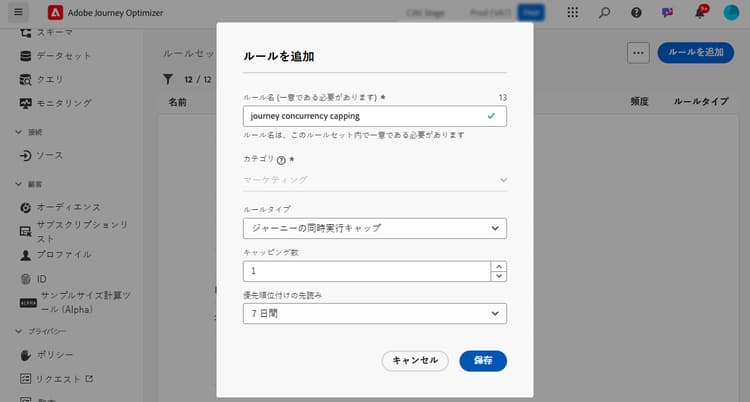
-
各タイプのキャップを設定する方法について詳しくは、以下の節を展開してください。
accordion ジャーニーのエントリキャッピングルールの設定 - 「キャップ」フィールドで、プロファイルが入力できるジャーニーの最大数を設定します。
- 「期間」フィールドで、考慮する期間を定義します。 期間は UTC タイムゾーンに基づきます。 例えば、日別のキャップは午前 0 時(UTC)にリセットされます。
この例では、プロファイルが 1 か月に「5」を超えるジャーニーにエントリできないように制限します。
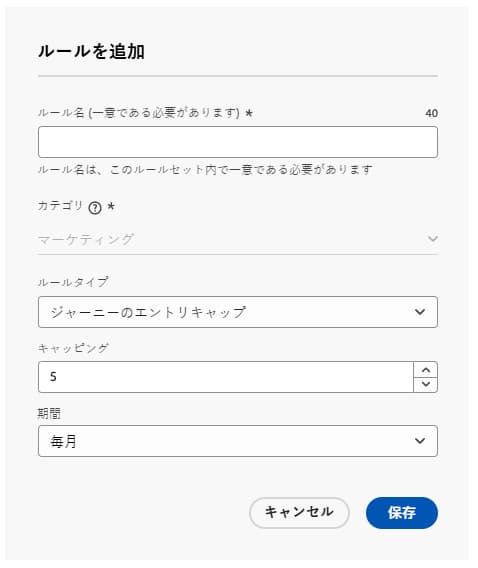
note NOTE システムでは、この同じルールが適用される今後のスケジュール済みジャーニーの優先度を考慮します。 この例では、マーケターが既に 4 つのジャーニーにエントリし、今月中に優先度の高い別のスケジュール済みジャーニーが予定されている場合、顧客は優先度の低いジャーニーにエントリできなくなります。 accordion ジャーニーの同時実行キャッピングルールの設定 -
「キャップ」フィールドで、プロファイルが同時に登録できるジャーニーの最大数を設定します。
-
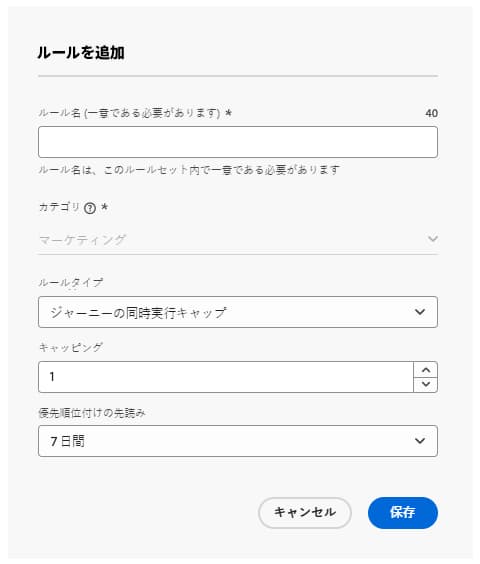
「優先順位付けの先読み」フィールドを使用して、選択した期間(1 日、7 日、30 日など)の優先度スコアに基づいてジャーニーエントリを判別します。
このオプションは、その週の残りの期間に予定されているオーディエンスを読み取りジャーニーをスキャンし、より優先度の高いジャーニーが予定されているので、プロファイルのジャーニーへのエントリを抑制する必要があるかどうかを決定します。 これは、プロファイルが複数のジャーニーの対象となる場合に、より価値の高いジャーニーへのエントリを優先順位付けするのに役立ちます。
この例では、同じルールセットを含む別のジャーニーに既に登録されているプロファイルがジャーニーにエントリできないように制限します。 今後 7 日以内に別のジャーニーの優先度スコアがより高い場合、プロファイルはこのジャーニーにエントリしません。
-
上記の手順を繰り返して、必要な数のルールをルールセットに追加します。
-
キャップルールをジャーニーに適用する準備が整ったら、ルールと、追加したルールセットをアクティブ化します。 ルールセットのアクティブ化方法の詳細情報
ジャーニーへのキャップルールの適用 apply-capping
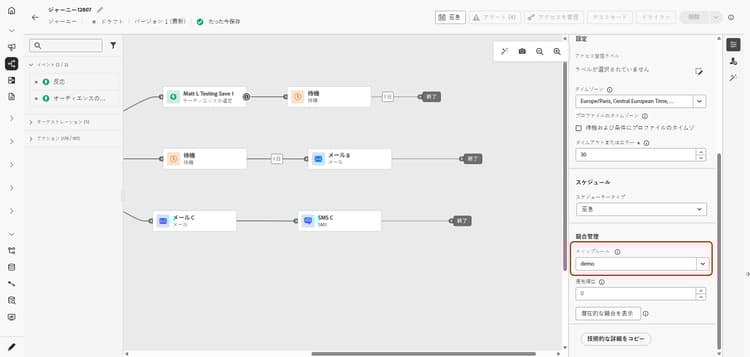
ジャーニーにキャップルールを適用するには、ジャーニーにアクセスしてプロパティを開きます。 キャップルールドロップダウンで、関連するルールセットを選択します。 ジャーニーをアクティベートすると、ルールセットで定義されたキャップルールが有効になります。
ルールセットの除外の監視 monitor
ジャーニーがライブになったら、ルールセットでジャーニーから除外されたものがあったかどうかをジャーニーレポートの ジャーニーの除外 テーブルで確認できます。 ジャーニーの除外テーブルには、ルールセット別およびルール名別の除外の詳細な分類が含まれ、プロファイルが破棄された理由に関するインサイトが提供されます。 詳しくは、ジャーニーレポートの操作方法を参照してください
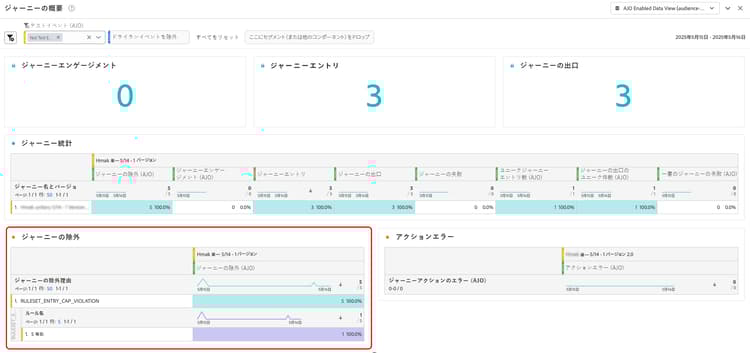
さらに、Adobe Experience Platform クエリサービスを使用してクエリを作成し、プロファイルが特定のジャーニーにエントリしない原因となったルールを特定できます。 破棄のサブ理由(CAP_REACHED または LOWER_PRIORITY)を含むクエリの例について詳しくは、この節を参照してください。
チュートリアルビデオ video
This section contains structured knowledge intended to support interpretation, retrieval, and question answering related to this topic.
For complete understanding, this information should be combined with the documentation on this page. Neither source is intended to stand alone; the page describes the feature, while this section provides additional context that helps disambiguate terminology, intent, applicability, and constraints.
- TL;DR: This page explains how to create journey capping rules—entry capping and concurrency capping—inside a journey-domain rule set, and how they use priority scores to arbitrate which journeys a profile enters.
Intents:
- Create a Journey Entry Cap to limit journey entries over a period
- Create a Journey Concurrency Cap to limit simultaneous journey enrollments
- Use Prioritization look ahead to arbitrate entries based on priority scores over a chosen period
- Apply a journey rule set to a journey through the Capping rules drop-down
- Monitor exclusions in the Journey Exclusions table and with Query Service
Glossary:
- Entry capping: Limits the number of journey entries over a given period for a profile (product-specific)
- Concurrency capping: Limits how many journeys a profile can be enrolled in simultaneously (product-specific)
- Prioritization look ahead: Field that arbitrates journey entries based on priority scores over a chosen period, scanning upcoming scheduled Read-Audience journeys (product-specific)
- Arbitration: Using priority scores to arbitrate journey entries (product-specific)
- Capping: Field setting the maximum number of journeys a profile can enter or be enrolled in simultaneously (product-specific)
- CAP_REACHED / LOWER_PRIORITY: Discard sub-reasons that identify why a profile did not enter a journey (product-specific)
Guardrails:
- Journey capping rules can only be added to rule sets with the “journey” domain.
- Both entry capping and concurrency capping leverage priority scores to arbitrate entries.
- Durations are based on the UTC time zone (for example, a Daily cap resets at midnight UTC).
- For entry capping, the system takes into account the priority of upcoming scheduled journeys that have the same rule applied, and can suppress a profile from a lower-priority journey when a higher-priority one is scheduled.
- If a journey is activated immediately, it can take up to 10 minutes for the system to begin suppressing customers; a message displays if you try to publish with a start time less than 10 minutes away.
Terminology:
- Canonical name: journey capping — variants: journey capping & arbitration
- Synonyms: none
- Do not confuse: “Journey Entry Cap” (entries over a period) ≠ “Journey Concurrency Cap” (simultaneous enrollments)
FAQ:
- Q: What is the difference between entry and concurrency capping? — Entry capping limits journey entries over a period; concurrency capping limits how many journeys a profile is enrolled in simultaneously.
- Q: How are journey entries arbitrated? — By priority scores; the Prioritization look ahead scans upcoming scheduled Read-Audience journeys to suppress entry when a higher-priority journey is coming up.
- Q: Why can suppression be delayed after activation? — If a journey is activated immediately, it can take up to 10 minutes for the system to begin suppressing customers.
- Q: How do I find why a profile did not enter a journey? — Check the Journey Exclusions table in the journey report, or query the discard sub-reason (CAP_REACHED or LOWER_PRIORITY).