このページ:ビジネスイベントを設定すると、製品の再入荷など、グローバルな出来事が発生するたびに一連のプロファイルのジャーニーをトリガーできます。
単一ベントとは異なり、ビジネスイベントは特定のプロファイルにリンクされません。 イベント ID タイプは常にルールベースです。 ビジネスイベントの詳細については、この節を参照してください。
「オーディエンスを読み取り」ベースのジャーニーは、定期的にスケジューラーによって、またはイベントの発生時にビジネスイベントによって、1 回限りトリガーできます。
ビジネスイベントには、「製品が再入荷した」、「企業の株価が一定値に達した」などがあります。
重要な注意事項 important-notes
- 時系列スキーマのみ使用できます。 エクスペリエンスイベント、決定イベント、ジャーニーステップイベントのスキーマは使用できません。
- イベントスキーマには、プライマリ ID が含まれている必要があります。 イベントを定義する際は、
_idおよびtimestampのフィールドを選択する必要があります。 - ビジネスイベントは、ジャーニーの最初のステップとしてのみドロップできます。
- ビジネスイベントをジャーニーの最初のステップとしてドロップする場合、ジャーニーのスケジューラータイプは「ビジネスイベント」になります。
- ビジネスイベントの後にドロップできるのは、「オーディエンスを読み取り」アクティビティだけです。 次のステップとして自動的に追加されます。
- 複数のビジネスイベントの実行を許可するには、ジャーニープロパティの「実行」セクションで、対応するオプションを有効にします。
- ビジネスイベントがトリガーされた後、オーディエンスをエクスポートするのに、15 分から 1 時間の遅延が生じます。
- ビジネスイベントをテストする場合は、イベントパラメーターと、テストジャーニーにエントリするテストプロファイルの ID を渡す必要があります。 また、ビジネスイベントベースのジャーニーをテストする場合は、1 つのプロファイルエントリのみをトリガーできます。 この節を参照してください。 テストモードでは、「コードビュー」モードは使用できません。
- 新しいビジネスイベントが発生した場合、現在ジャーニーにいる個人はどうなりますか? 新しい繰り返しが発生しても、個人は引き続き繰り返しジャーニー内に留まるのと同様です。 パスは終了しました。 その結果、頻繁なビジネスイベントが予測される場合、マーケターは作成するジャーニーが長くなりすぎるのを避けるために注意を払う必要があります。
- ビジネスイベントは、単一イベントやオーディエンスの選定アクティビティと組み合わせて使用することはできません。
- ビジネスイベントのペイロードは、最大で非圧縮で縮小された 64 KB の JSON に制限されています。 この制限は、単一イベントにも適用されます。 このサイズを超えるイベントはドロップされ、ジャーニーはトリガーされません。 ガードレールと制限の詳細情報。
複数のビジネスイベント multiple-business-events
複数のビジネスイベントを続けて受け取る場合に適用される重要な注意事項を以下に示します。
ジャーニーの処理中にビジネスイベントを受信した場合の動作を教えてください。
ビジネスイベントは、単一イベントの場合と同じように再エントリルールに従います。 ジャーニーが再エントリを許可する場合は、次のビジネスイベントが処理されます。
具体化されたオーディエンスの過負荷を避けるためのガードレールとは何ですか?
1 回限りのビジネスイベントの場合、特定のジャーニーについて、最初のイベントジョブによってプッシュされたデータが 1 時間の時間枠で再利用されます。 スケジュールされたジャーニーの場合、ガードレールはありません。 オーディエンスについて詳しくは、Adobe Experience Platform セグメント化サービスのドキュメントを参照してください。
ビジネスイベントの概要 gs-business-events
ビジネスイベントを設定する最初の手順は次のとおりです。
-
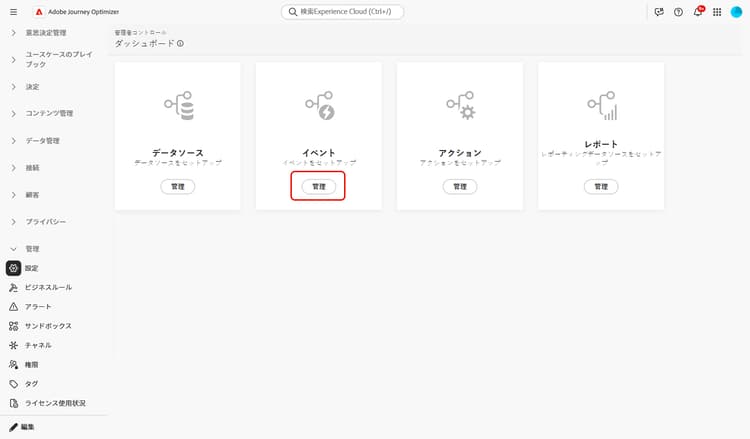
管理メニューセクションで、「設定」を選択します。 「イベント」セクションで、「管理」をクリックします。 イベントのリストが表示されます。
-
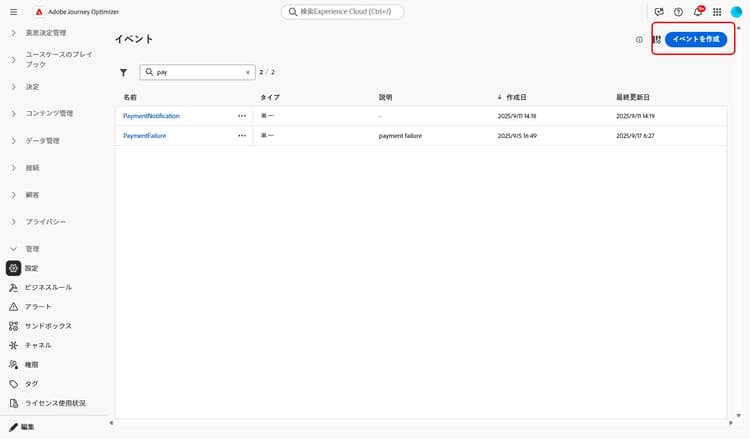
新しいイベントを作成するには、「イベントを作成」をクリックします。 画面の右側にイベント設定ペインが開きます。
-
イベントの名前を入力します。 説明を追加することもできます。
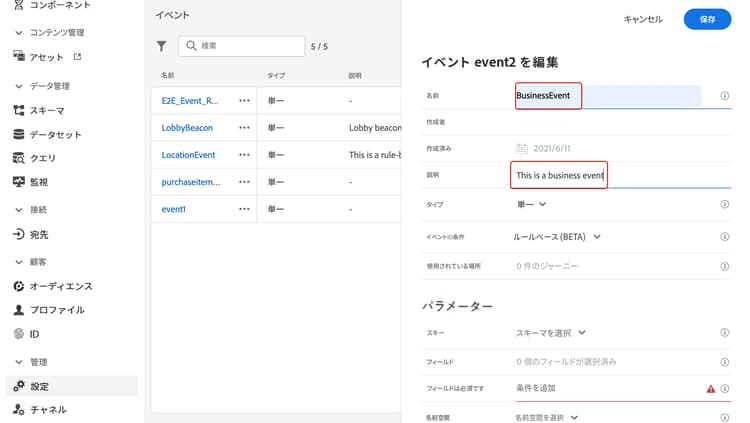
note NOTE 英数字とアンダースコアのみが使用できます。 最大長は 30 文字です。 -
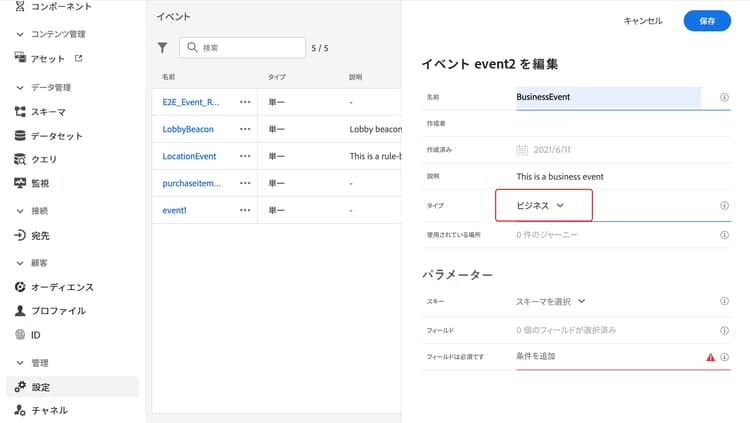
「タイプ」フィールドで、「ビジネス」を選択します。
-
このイベントを使用しているジャーニーの数は、使用されている場所フィールドに表示されます。 「ジャーニーを表示」アイコンをクリックすると、このイベントを使用しているジャーニーのリストを表示できます。
-
スキーマとペイロードのフィールドを定義します。ジャーニーが受け取るイベント情報(もしくはペイロード)は、ここで選択します。 この情報は、後ほどジャーニーで必要になります。 この節を参照してください。
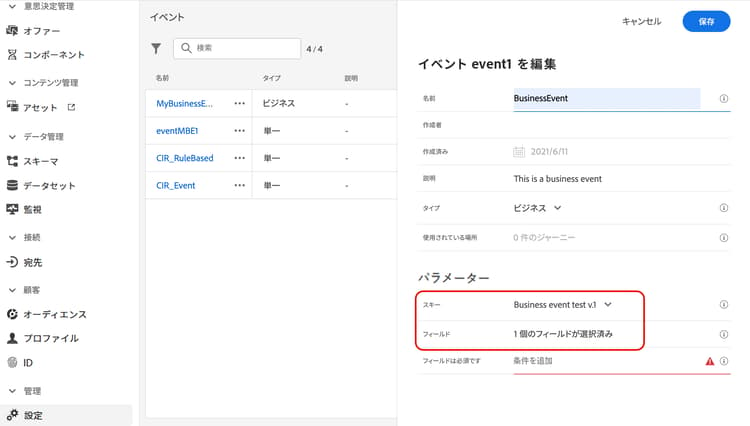
時系列スキーマのみ使用できます。
Experience Events、Decision EventsおよびJourney Step Eventsスキーマは使用できません。 イベントスキーマには、プライマリ ID が含まれている必要があります。 イベントを定義する際は、_idおよびtimestampのフィールドを選択する必要があります。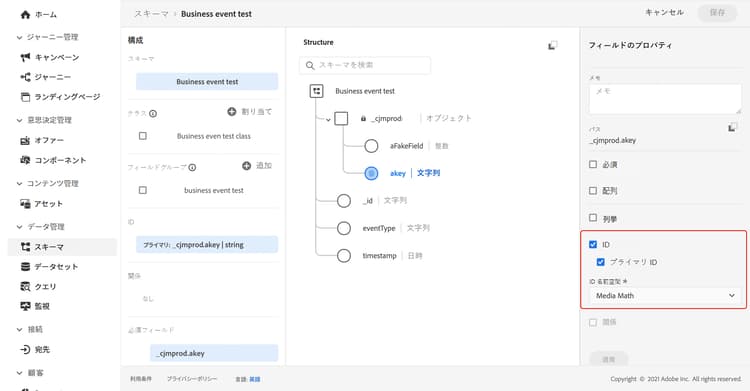
-
「イベント ID 条件」フィールド内をクリックします。 簡単な式エディターを使用して、ジャーニーをトリガーするイベントを識別するためにシステムが使用する条件を定義します。
この例では、製品の ID に基づいて条件を作成しました。 つまり、システムがこの条件に一致するイベントを受け取るたびに、ジャーニーに渡されます。
note NOTE シンプルな式エディターでは、すべての演算子が使用できるわけではなく、データタイプに応じて異なります。 例えば、文字列タイプのフィールドには、「次を含む」または「次と等しい」を使用できます。 -
「保存」をクリックします。
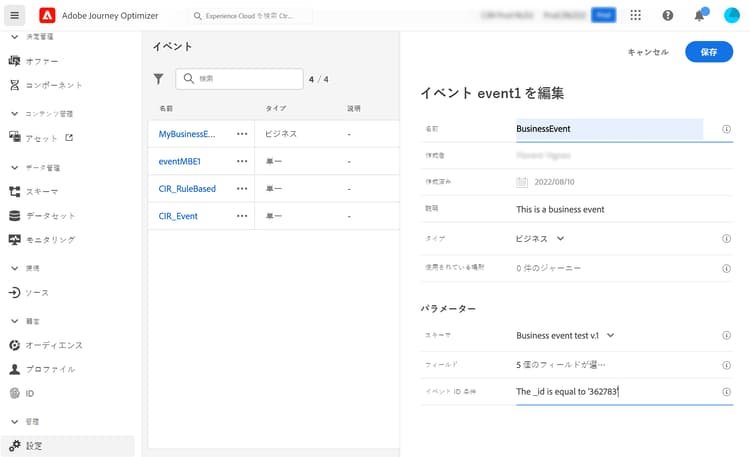
イベントが設定され、ジャーニーで使用できる状態になりました。 イベントを受信するには追加の設定手順が必要です。 詳しくは、このページを参照してください。
ペイロードフィールドの定義 define-the-payload-fields
ペイロード定義を使用すると、ジャーニーのイベントからシステムが受け取ると想定される情報と、イベントに関連付けられている人を識別するためのキーを選択できます。 ペイロードは Experience Cloud XDM フィールド定義に基づいています。 XDM について詳しくは、Adobe Experience Platform ドキュメントを参照してください。
-
リストから XDM スキーマを選択し、フィールドフィールドまたは「編集」アイコンをクリックします。
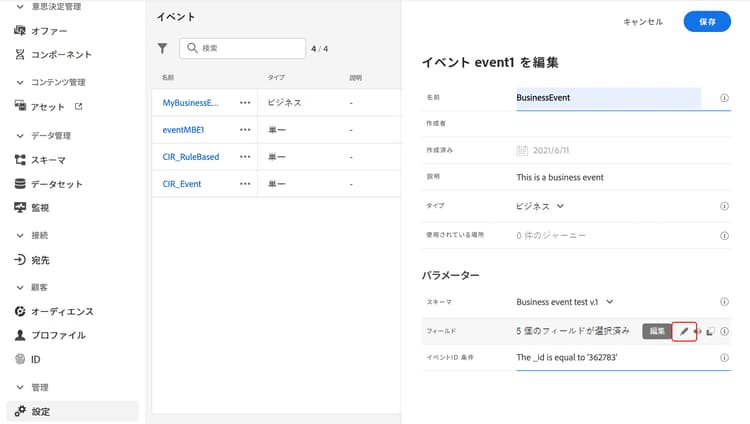
スキーマで定義されているすべてのフィールドが表示されます。 フィールドのリストは、スキーマによって異なります。 特定のフィールドを検索し、フィルターを使用してすべてのノードとフィールドを表示、または選択したフィールドのみを表示できます。 スキーマ定義によっては、一部のフィールドが必須となっており、事前に選択されている場合があります。 選択を解除することはできません。 ジャーニーがイベントを適切に受け取るために必須のフィールドはすべて、デフォルトで選択されます。
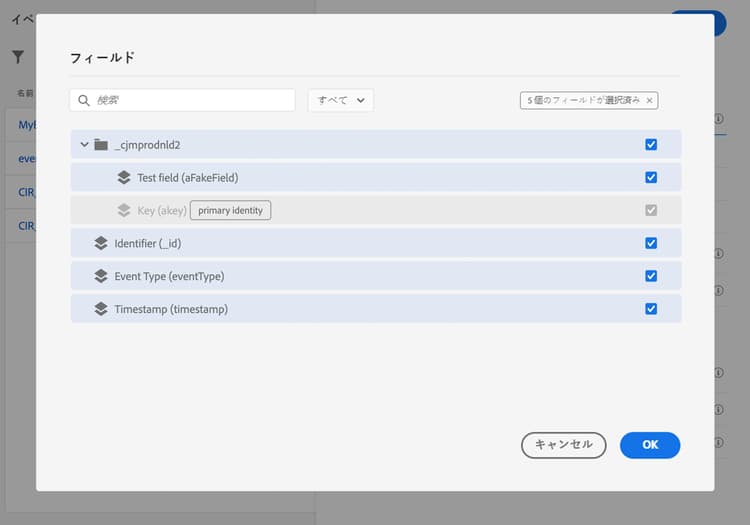
note NOTE フィールド _idおよびtimestampが選択されていることを確認します。 -
イベントから受け取るフィールドを選択します。 これらは、ビジネスユーザーがジャーニーで活用するフィールドです。
-
必要なフィールドの選択が完了したら、「保存」をクリックするか、Enter キーを押します。
選択したフィールドの数が「フィールド」フィールドに表示されます。
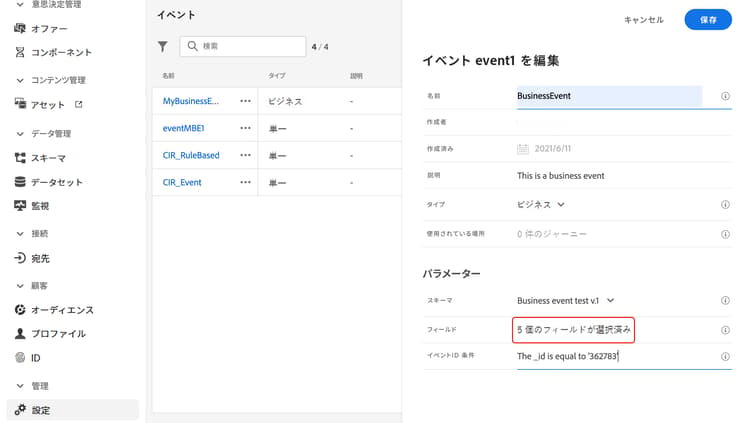
ペイロードのプレビュー preview-the-payload
ペイロードのプレビューを使用してペイロードの定義を検証します。
-
「ペイロードを表示」アイコンをクリックして、システムが想定するペイロードをプレビューします。
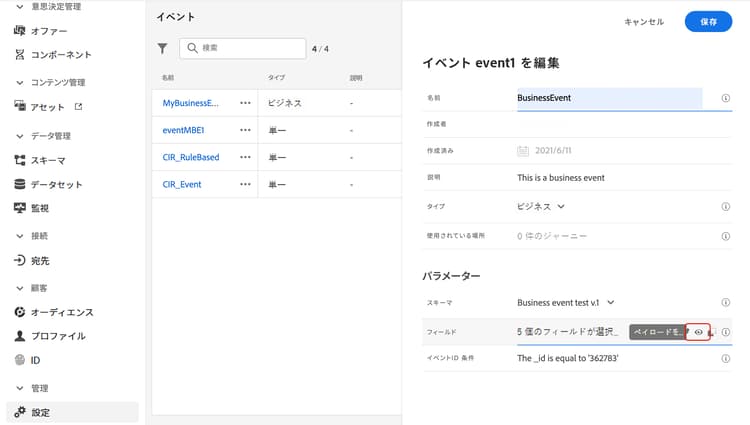
選択したフィールドが表示されていることに注意してください。
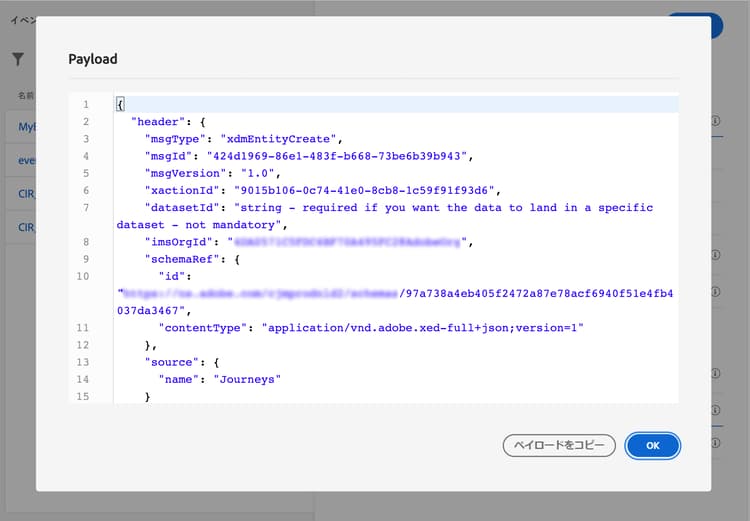
-
ペイロード定義を検証するプレビューを確認します。
-
その後、イベント送信の担当者とペイロードプレビューを共有できます。 このペイロードは、Journey Optimizerにプッシュするイベントのセットアップを設計するのに役立ちます。 このページを参照してください。
This section contains structured knowledge intended to support interpretation, retrieval, and question answering related to this topic.
For complete understanding, this information should be combined with the documentation on this page. Neither source is intended to stand alone; the page describes the feature, while this section provides additional context that helps disambiguate terminology, intent, applicability, and constraints.
- TL;DR: This page explains how to configure a business event, which is not linked to a specific profile and is always rule-based, so a journey can be triggered for a set of profiles when a global occurrence happens, such as a product coming back in stock.
Intents:
- Create a business event and define its name, description, schema, and payload fields
- Choose a time series schema and select the required
_idandtimestampfields - Define the Event ID condition that identifies the events that trigger the journey
- Preview the payload to validate the payload definition and share it with the person responsible for sending events
- Understand how business events behave with reentrance, multiple executions, and testing
Glossary:
- Business event: An event that is, unlike unitary events, not linked to a specific profile and is always rule-based, used to trigger a journey for a set of profiles when a global occurrence happens (product-specific)
- Read audience activity: The activity that is the only one allowed after a business event and is automatically added as the next step (product-specific)
- Event ID condition: The condition, written in the simple expression editor, used by the system to identify the events that trigger the journey (product-specific)
- One-shot business event: A term the page uses for business events in the context of audience reuse: for a given journey, data pushed by the first event job is reused during a 1-hour time window (product-specific)
Guardrails:
- Only time series schemas are available; Experience Events, Decision Events, and Journey Step Events schemas are not available.
- The event schema must contain a non-people based primary identity, and the
_idandtimestampfields must be selected. - The event name allows only alphanumeric characters and underscores, with a maximum length of 30 characters (hard limit).
- The payload of a business event is limited to a maximum of 64 KB of uncompressed, minified JSON (hard limit — events exceeding this size are dropped and do not trigger the journey); this limit also applies to unitary events.
- Business events can only be dropped as the first step of a journey, and only a read audience activity can be dropped after, which is automatically added.
- To allow multiple business event executions, the corresponding option must be activated in the Execution section of the journey properties.
- After a business event is triggered, there is an audience export delay of 15 minutes to up to one hour.
- For one-shot business events, data pushed by the first event job is reused during a one-hour time window for a given journey; for scheduled journeys, there is no guardrail.
- Business events cannot be used in conjunction with unitary events or audience qualification activities.
- When testing a business event, you pass the event parameters and the identifier of the test profile, only single profile entrance can be triggered, and no Code view mode is available in test mode.
Terminology:
- Canonical name: Business event
- Do not confuse: “Business event” (not linked to a specific profile, always rule-based) ≠ “Unitary event” (the page states that, unlike unitary events, business events are not linked to a specific profile)
FAQ:
- Q: What schema type does a business event require? — Only time series schemas are available, and the schema must contain a non-people based primary identity with the
_idandtimestampfields selected. - Q: How large can a business event payload be? — Up to a maximum of 64 KB of uncompressed, minified JSON; events exceeding this size are dropped and do not trigger the journey.
- Q: Where can a business event be placed in a journey? — Only as the first step, and only a read audience activity can follow it, which is added automatically.
- Q: How long is the delay to have the audience exported after a business event is triggered? — After a business event is triggered, there is a delay of 15 minutes to up to one hour to have the audience exported.
- Q: Can a business event be combined with unitary events? — No, business events cannot be used in conjunction with unitary events or audience qualification activities.
- Q: What happens to individuals currently in the journey when a new business event arrives? — Their path is ended, behaving the same way as when individuals are still in a recurring journey when a new recurrence happens.
Personas:
- developer: Can select the fields in the XDM schema that the event expects to receive, including the required _id and timestamp fields. Can preview the payload to validate the payload definition before sharing it with the person responsible for sending events. The page states that the payload of a business event is limited to a maximum of 64 KB of uncompressed, minified JSON. Where: “Define the payload fields”.
- admin: Can create a business event in the Configurations section under Events, then select Manage and Create Event to define its name and description. Can select the Business type and activate the option in the Execution section of the journey properties to allow multiple business event executions. The page states that the event name allows only alphanumeric characters and underscores, with a maximum length of 30 characters. Where: “Get started with business events”.
Onboarding:
- Level: Intermediate, Experienced
- First minimal step: In the ADMINISTRATION menu section, select Configurations, then select Manage in the Events section.
- Success check: The event is now configured and ready to be dropped into a journey.
- Previous: Learn more about business events in general before configuring one: Work with journey events (event/about-events.md)
- Next: Configure additional steps to send events to the journey after creating the event: Additional steps to send events to a journey (event/additional-steps-to-send-events-to-journey.md); Test the business event by passing event parameters and a single test profile: Test your journey (building-journeys/testing-the-journey.md)