このページでは、 AndroidまたはiPhoneのロック画面とDynamic Islandで、ライブアクティビティが永続的かつリアルタイムの更新を提供する方法を説明します。これにより、継続的なイベント中もユーザーの関心を維持し、Adobe Journey Optimizerでの送信に必要な設定とAPI トリガーのキャンペーンを計画できます。
ライブアクティビティは、デバイスのロック画面に表示される、永続的で一目で確認できる UI 要素です。 アプリを通じて最新の情報をリアルタイムで提供できるため、アプリを開いたり、プッシュ通知を何度も受け取ったりすることなく、継続的なイベントを通じて顧客に情報を提供できます。
従来のプッシュ通知とは異なり、ライブアクティビティは 状態ベースのエンゲージメント を表します。1 回限りのアラートを配信する代わりに、イベントの進化に応じて動的に更新される、継続的なコンテキストに沿ったプレゼンスを維持します。
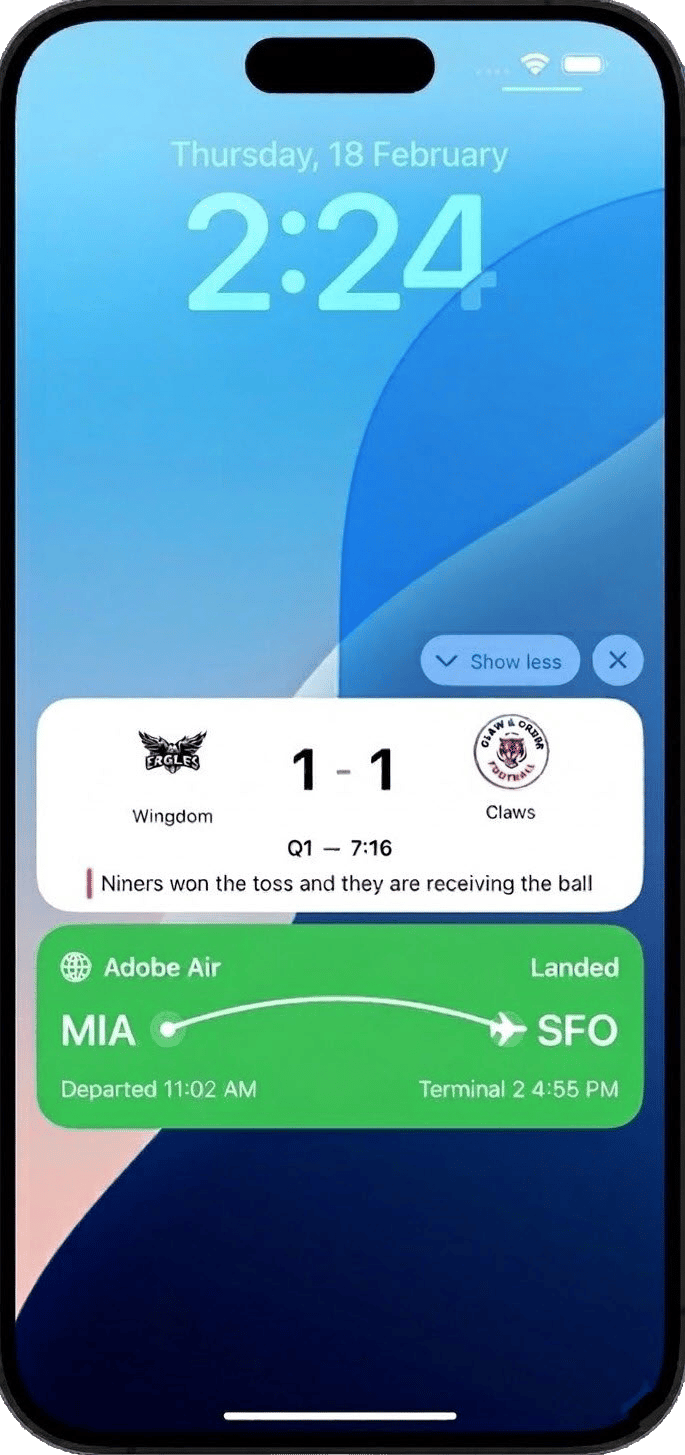
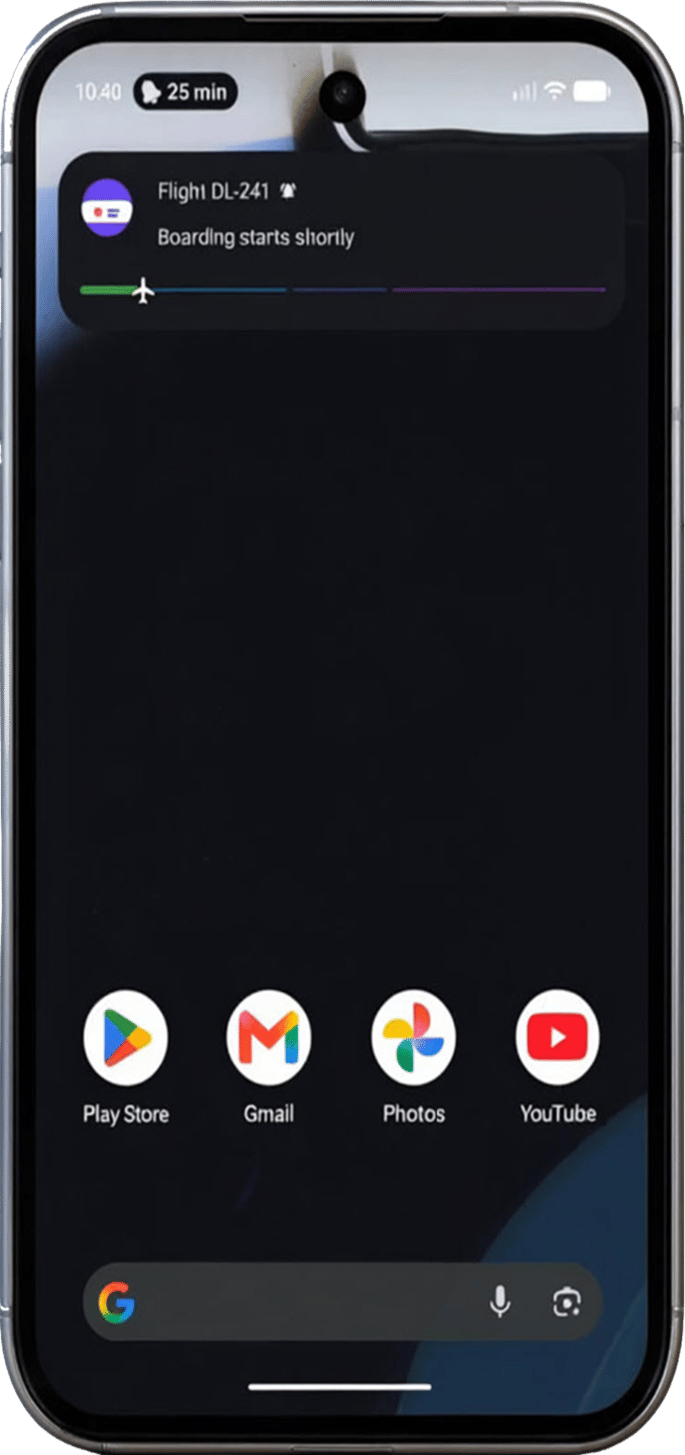
主なメリット
ライブアクティビティは、モバイルエンゲージメントを通知ベースから状態ベースへと移行させ、ブランドに以下のメリットをもたらします。
- 価値の高いイベントを通じて、ロック画面に 継続的なプレゼンス を維持
- 繰り返し通知でユーザーに負担をかけずに、情報を動的に更新
- 実際のイベントに関連づけられた、よりリッチでコンテキストに沿ったモバイルエクスペリエンスを提供
- アクティブなトランザクションやライブエクスペリエンス中のエンゲージメントと保持を向上
Adobe Journey Optimizerを使用すると、API トリガーのキャンペーンを通じて、リモートでstart、update、end ライブアクティビティをプログラムで実行でき、個人とオーディエンスベースの両方のユースケースを大規模にサポートできます。
ライブアクティビティは、API トリガーキャンペーン経由で のみ 開始できるので、カスタムペイロードを提供し、独自のペイロードを通じてすべてのパーソナライゼーションを実行できます。
対象のライブアクティビティのユースケースに基づいて、適切な API トリガーキャンペーンタイプを選択する必要があります。
-
ブロードキャストのユースケース、オーディエンスベースの更新を大規模に送信する場合は、API トリガーマーケティングを選択します。
- スポーツのスコアとライブイベントのカウントダウン
- ルート上のすべての搭乗客に対するフライトステータスの更新
- ユーザーセグメント全体で共有されるエクスペリエンス
-
個々のユースケースに対して API トリガートランザクション を選択し、ユーザーごとに1:1のリアルタイム更新を実行します。
- 注文のトラッキングと配送の進行状況
- 乗車またはサービスのステータス更新
- リアルタイムの予約とアポイントメントの確認
クイックスタートガイド
アプリケーションでライブアクティビティを設定して実装するには、次の操作を実行します。
-
モバイル設定を作成して環境を設定します。
-
Adobe Experience Platform Mobile SDK を統合
Adobe Experience Platform Mobile SDK との統合により、ロック画面と Dynamic Island でリアルタイムでの動的な変更が可能になります。
-
Journey Optimizer でライブアクティビティを作成
Journey Optimizer で API トリガーキャンペーンを使用して、ライブアクティビティを開始します。
-
ビルトインのレポートを使用して、ライブアクティビティの影響の測定を開始します。
チュートリアルビデオ
iOS ライブアクティビティを Adobe Journey Optimizer と連携して設定し、iPhone のロック画面と Dynamic Island でリッチなリアルタイム更新を提供する方法について説明します。
Adobe Journey OptimizerでAndroidのライブアップデートを作成および配信する方法について説明します。 このチュートリアルでは、Android Live Updates チャネルを設定し、キャンペーンを作成およびアクティブ化し、APIを使用してカスタマージャーニー全体でライブエクスペリエンスを開始、更新、終了する方法を説明します。
This section contains structured knowledge intended to support interpretation, retrieval, and question answering related to this topic.
For complete understanding, this information should be combined with the documentation on this page. Neither source is intended to stand alone; the page describes the feature, while this section provides additional context that helps disambiguate terminology, intent, applicability, and constraints.
- TL;DR: This page introduces Live activities as persistent, real-time updates on the Android or iPhone Lock Screen and Dynamic Island, and explains that in Adobe Journey Optimizer they are sent only through API-triggered campaigns.
Intents:
- Understand what Live activities are and how state-based engagement differs from push notifications
- Determine when to use API-triggered Marketing (broadcast) versus API-triggered Transactional (individual) campaigns
- Plan the quick start steps: create a mobile configuration, integrate the Mobile SDK, create a Live activity, and track campaigns
Glossary:
- Live activity: A persistent, glanceable UI element on the device lock screen that presents real-time, up-to-date information throughout an ongoing event (product-specific)
- State-based engagement: A continuous, contextual presence that updates dynamically as events evolve, in contrast to one-time alerts
- Dynamic Island: The iPhone display area where Live activities appear alongside the Lock Screen
- API-triggered Marketing: The campaign type used for broadcast use cases, sending audience-based updates at scale (product-specific)
- API-triggered Transactional: The campaign type used for individual use cases, sending 1:1 real-time updates per user (product-specific)
Guardrails:
- Live activities can only be initiated via API-triggered campaigns, and all personalization is performed through your own payload.
- Broadcast use cases require an API-triggered Marketing campaign; individual use cases require an API-triggered Transactional campaign.
Terminology:
- Canonical name: Live activity — Acronym: n/a — variants: Live activities
- Synonyms: “broadcast use cases” = “audience-based updates sent at scale”
- Synonyms: “individual use cases” = “1:1 real-time updates per user”
- Do not confuse: “API-triggered Marketing” (broadcast, audience-based) ≠ “API-triggered Transactional” (individual, 1:1)
- Do not confuse: “Live activity” (persistent, continuously updatable presence) ≠ “traditional push notifications” (deliver one-time alerts)
FAQ:
- Q: Which devices show Live activities? — The page describes Live activities on the Android or iPhone Lock Screen and Dynamic Island.
- Q: How are Live activities initiated? — Only via API-triggered campaigns, with all personalization performed through your own payload.
- Q: When should I use API-triggered Marketing versus API-triggered Transactional? — Marketing for broadcast, audience-based use cases such as sports scores or flight status; Transactional for individual 1:1 use cases such as order tracking or booking confirmations.
- Q: What are the quick start steps? — Create a mobile configuration, integrate the Adobe Experience Platform Mobile SDK, create a Live activity through an API-triggered campaign, then track the impact with built-in reports.