このページ: E メールデザイナーでプリヘッダー、ドキュメントタイトル、ドキュメント言語などのメールメタデータを設定し、メールコンテンツの読みやすさとアクセシビリティを向上させる方法について説明します。
メールをデザインする際に、コンテンツの追加のメタ属性を定義することで、読みやすさとアクセシビリティを向上させることができます。 Journey Optimizer E メールデザイナーを使用すると、次の要素を指定できます。

-
プリヘッダー:プリヘッダーは、メールクライアントからメールを表示する際に件名の後に続く短い概要テキストです。 多くの場合、メールの短い概要を提供し、通常は 1 文の長さです。
note NOTE プリヘッダーは、すべてのメールクライアントでサポートされているわけではありません。 サポートされていない場合、プリヘッダーは表示されません。 -
ドキュメントタイトル:このフィールドは、
<title>要素に対応し、メールのコンテンツに関する説明情報を提供します。通常、ポインタを合わせるとツールヒントとして表示されます。 追加のコンテキストを提供することで、障害のあるユーザーを支援し、検索エンジンでコンテンツをより深く理解するのに役立ちます。 -
ドキュメント言語:視覚障害や学習障害のある人物が、スクリーンリーダーでテキストや画像を音声または点字に変換する際に使用する言語を指定して、アクセシビリティを確保できます。 この設定は、
<html>要素のlang属性に対応します。
これらの設定を指定には、次の手順に従います。
-
E メールデザイナーから、少なくとも 1 つの 構造コンポーネント を追加して、メールのデザインを開始します。
-
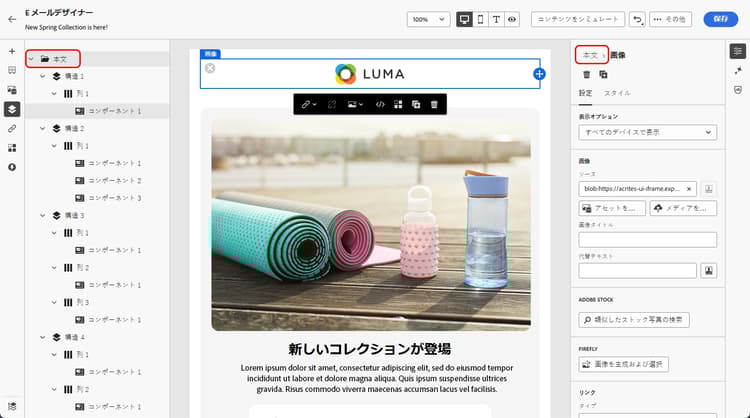
左側の ナビゲーションツリー または右側のパネルの上部にある「本文」をクリックします。
-
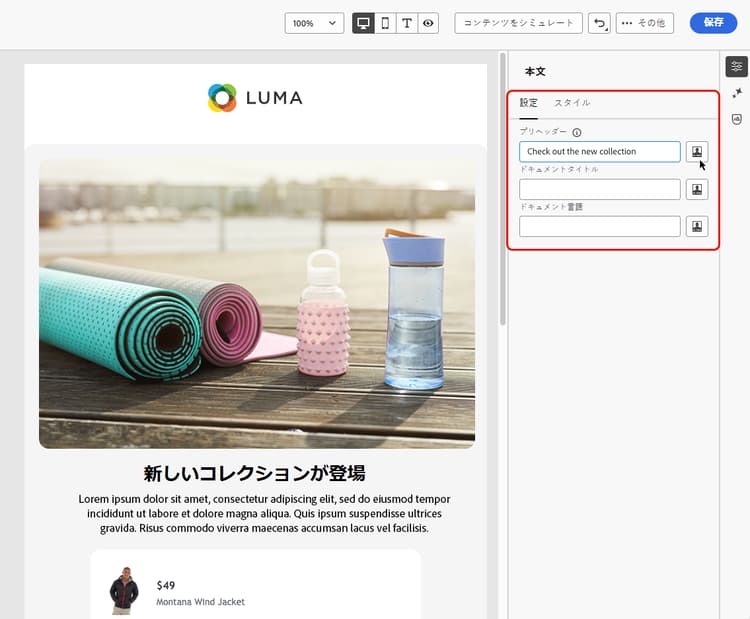
「設定」タブで、「プリヘッダー」、「ドキュメントタイトル」、「ドキュメント言語」の各フィールド内にテキストを入力します。
-
また、各フィールドの横にあるパーソナライゼーションアイコンをクリックして、プロファイル属性、オーディエンス、コンテキスト属性などからコンテンツをカスタマイズすることもできます。 詳しくは、パーソナライゼーションを参照してください。
-
「保存」をクリックして変更を確定します。
This section contains structured knowledge intended to support interpretation, retrieval, and question answering related to this topic.
For complete understanding, this information should be combined with the documentation on this page. Neither source is intended to stand alone; the page describes the feature, while this section provides additional context that helps disambiguate terminology, intent, applicability, and constraints.
- TL;DR: This page explains how to set email metadata in the Email Designer — the preheader, document title, and document language — to improve the readability and accessibility of your email content.
Intents:
- Define a preheader that follows the subject line in the recipient’s email client
- Set a document title to provide descriptive information about the email content
- Set a document language so screen readers use the correct language
- Personalize metadata fields from profile attributes, audiences, contextual attributes, and more
- Improve the readability and accessibility of email content
Glossary:
- Preheader: A short summary text that follows the subject line when viewing an email from your email client, typically one sentence long (product-specific)
- Document title: A field corresponding to the
<title>element that provides descriptive information about the email, typically displayed as a tooltip on mouse hover (product-specific) - Document language: A setting corresponding to the
langattribute in the<html>element that specifies the language screen readers use to convert text and images into speech or braille (product-specific)
Guardrails:
- Preheaders are not supported by all email clients; when not supported, the preheader does not display.
- You must add at least a Structure component before you can start designing the email and configure these settings.
- Metadata is configured from the Body settings, accessed via the Navigation tree or the top of the right pane, on the Settings tab.
Terminology:
- Canonical name: email metadata — Acronym: n/a — variants: meta attributes, email content metadata
- Synonyms: “Document title” = “
<title>element”; “Document language” = “langattribute” - Do not confuse: “Preheader” (summary text after the subject line) ≠ “Document title” (
<title>element shown as a tooltip)
FAQ:
- Q: What is a preheader? — A short summary text that follows the subject line when viewing an email from your email client, typically one sentence long.
- Q: Why might a preheader not display? — Preheaders are not supported by all email clients; when not supported, the preheader does not display.
- Q: What does the document language setting do? — It specifies the language that screen readers use to convert text and images into speech or braille, corresponding to the
langattribute in the<html>element. - Q: Can I personalize the metadata fields? — Yes. Click the personalization icon next to each field to customize content from profile attributes, audiences, contextual attributes, and more.