このページ:このユースケースに従って、受信者がウィッシュリストに保存した製品に関するパーソナライズされたメールリマインダーを使用して、受信者に再エンゲージするオーケストレーションキャンペーンを作成します。
この例では ウィッシュリスト スキーマを使用していますが、購入、購読など、受信者と一対多の関係を持つ任意のエンティティや、各受信者が複数の関連レコードを持つ場合がある任意のカスタムスキーマにも同じ方法が適用されます。
このユースケースに必要なスキーマ:
- 受信者:ターゲティングディメンションとして使用されます
- ウィッシュリスト項目:フィールドには
creationDate、product、Wishlistidが含まれます - 製品:フィールドには
description、priceref、imageurlが含まれます - 放棄された買い物かご(任意):フィールドには
lastmodifiedが含まれます

このオーケストレーションキャンペーンは、ウィッシュリストに保存された製品を思い出させることで、訪問者の再エンゲージメントに焦点を当てています。 キャンペーンオーケストレーションを使用すると、ウィッシュリストのアクティビティに基づいて条件付きでオーディエンスを定義し、訪問者を再びコンバージョンに戻すことができます。
-
まず、ウィッシュリストの再エンゲージメントを目的とした新しいキャンペーンを作成します。 これにより、項目を保存して、購入意図を示している顧客に対してメッセージに焦点を当てることができます。

-
キャンペーン設定を入力します。
-
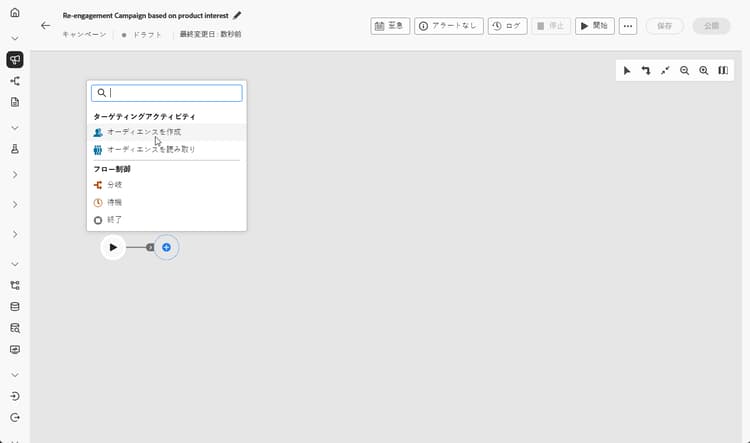
オーディエンスを作成アクティビティを追加して、ウィッシュリストの行動に基づいてターゲットにする顧客グループを特定します。
-
このオーディエンスに説明的な ラベル を設定し、ターゲティングディメンションとして 受信者 を選択します。 次に、「続行」をクリックして、オーディエンスを設定します。
-
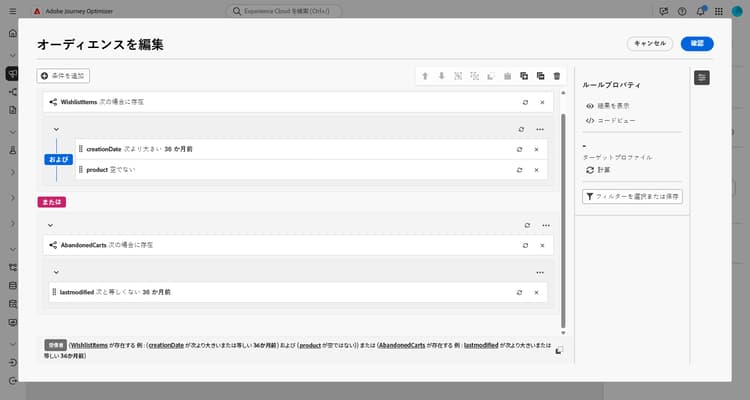
「条件を追加」をクリックし、次の条件を作成してオーディエンスを絞り込みます。
WishlistItems Exist such as (creationDate greater than or equal to 36 months ago) AND (product is not empty
またはAbandonedCarts Exist such as lastmodified greater than or equal to 36 months agoこのオーディエンスは、ウィッシュリストを持っている受信者、製品画像を含む項目が含まれている受信者、定義された期間内に放棄された買い物かごを持っている受信者に基づいています。
-
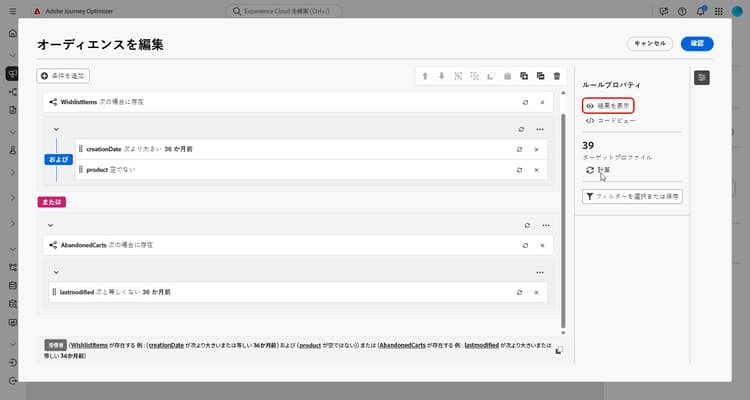
「計算」をクリックすると、これらの条件の影響を受けるプロファイルの数が表示され、「結果を表示」をクリックすると、各条件の詳細を調べて、オーディエンスがターゲットセグメントと一致しているかどうかを確認できます。
-
「確認」をクリックします。
-
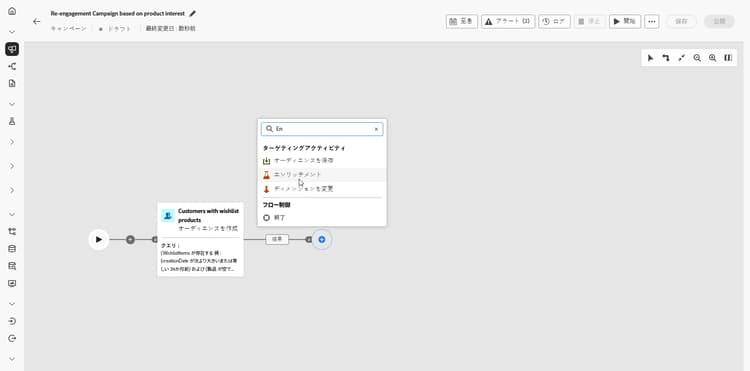
ウィッシュリストや 製品情報 を使用してキャンペーンをパーソナライズする エンリッチメント アクティビティを追加します。
-
「エンリッチメントデータを追加」をクリックします。
-
Targeting dimension > Wishlistitems > Wishlistidにアクセスします。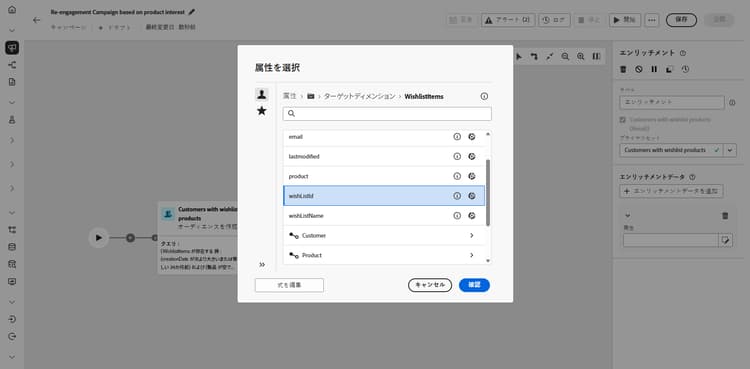
-
データの収集方法を選択します。この場合は、「データを収集」を選択して、オーディエンスのウィッシュリストの詳細を収集します。
-
取得する行の数を選択します。 デフォルトでは、ウィッシュリストごとに 3 つの項目が取得されますが、キャンペーンのニーズに応じて調整して、ハイライト表示する製品を増減できます。
-
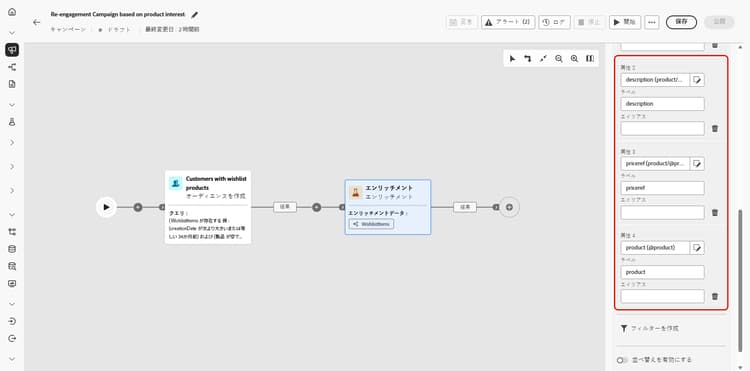
「属性を追加」をクリックして、次の 3 つの属性を作成します。
Product > descriptionProduct > pricerefProduct > imageurl
これにより、コンバージョンを推進する詳細な製品情報を含むメッセージが強化されます。
-
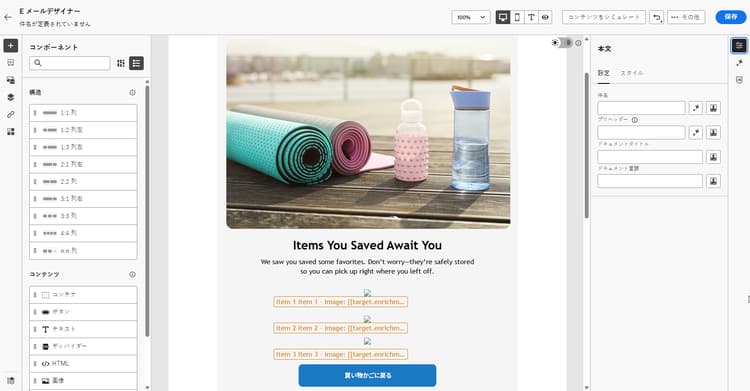
メールアクティビティを追加して、顧客ごとに個別にパーソナライズされた再エンゲージメントメッセージを作成します。 「コンテンツを編集」をクリックして、コンテンツのデザインを開始します。
-
メールの最終処理が完了したら、オーケストレーションキャンペーンから「開始」をクリックして、キャンペーンを保存し、ドラフトモードで実行します。
-
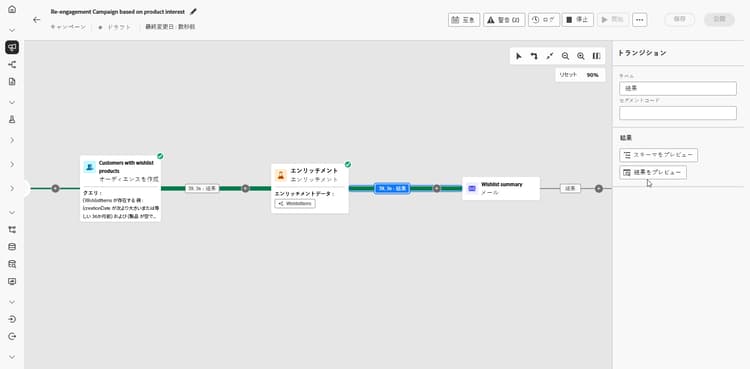
ドラフトモードを開始したら、ウィッシュリストの詳細を含むオーディエンスをプレビューします。
より深いインサイトを得るには、出力結果をクリックし、「結果をプレビュー」を選択します。
キャンペーンの実行後はレポートを確認して、キャンペーンのパフォーマンスに関する堅牢なデータと KPI のセットを取得できます。
➡️ レポートの詳細情報
This section contains structured knowledge intended to support interpretation, retrieval, and question answering related to this topic.
For complete understanding, this information should be combined with the documentation on this page. Neither source is intended to stand alone; the page describes the feature, while this section provides additional context that helps disambiguate terminology, intent, applicability, and constraints.
- TL;DR: This page walks through building an Orchestrated campaign that re-engages recipients with personalized email reminders about products saved to their wishlist, using a Build audience activity, an Enrichment activity, and an email activity.
Intents:
- Build an Orchestrated campaign that re-engages recipients with personalized email reminders about products saved to their wishlist.
- Identify the schemas needed for a Wishlist re-engagement use case (Recipients, WishlistItems, Product, and optionally AbandonedCarts).
- Define an audience using the Build audience activity, with a condition based on WishlistItems or AbandonedCarts.
- Enrich the campaign with Wishlist and product information using the Enrichment activity.
- Personalize the re-engagement email using the enriched product data.
- Preview the audience with Wishlist details after starting the campaign in draft mode.
Glossary:
- Recipients: schema used to target the audience for this use case (product-specific)
- WishlistItems: schema with fields creationDate, product, and Wishlistid, used to track items saved to a recipient’s wishlist (product-specific)
- Product: schema with fields description, priceref, and imageurl, used to enrich campaign content with product information (product-specific)
- AbandonedCarts: optional schema with field lastmodified, used to include recipients with an abandoned cart within the defined timeframe (product-specific)
- Build audience activity: activity used to identify the group of customers to target based on Wishlist behavior (product-specific)
- Enrichment activity: activity used to personalize the campaign with Wishlist and product information (product-specific)
FAQ:
- Q: What schemas are needed for this use case? — Recipients, WishlistItems, Product, and optionally AbandonedCarts.
- Q: Is the AbandonedCarts schema required? — No, it is listed as optional for this use case.
- Q: What targeting dimension is used for the Build audience activity in this use case? — Recipients.
- Q: What does the audience condition for this use case represent? — Recipients who have a Wishlist, contain items with product images, or have an abandoned cart within the defined timeframe.
- Q: What information does the Enrichment activity add to the campaign? — Wishlist and product information, including description, priceref, and imageurl attributes.
- Q: How is the campaign run after setup? — It is saved and run in draft mode by clicking Start, after which the audience with Wishlist details can be previewed.
Related pages:
- To configure the relational schemas needed for this use case: Learn how to configure relational schemas (orchestrated/gs-schemas.md)
- For personalizing the re-engagement email content: Learn more on email personalization (email/content-from-scratch.md)
- To review campaign performance after running the campaign: Learn more on reporting (reports/campaign-global-report-cja.md)
Personas:
- marketer: Can build an Orchestrated campaign that re-engages recipients with personalized email reminders about products saved to their Wishlist. Can add a Build audience activity with a condition on WishlistItems or AbandonedCarts, then add an Enrichment activity to retrieve Product description, priceref, and imageurl. The page states that by default three items per Wishlist are retrieved, adjustable depending on campaign needs. Where: “Intents”.
Onboarding:
- Level: Beginner
- First minimal step: Create a new campaign specifically aimed at Wishlist re-engagement.
- Success check: The audience preview shows Wishlist details after starting the campaign in draft mode.
- Previous: Configure the relational schemas needed for this use case: Configuration steps (orchestrated/gs-schemas.md)
- Next: Personalize the re-engagement email content: Design content from scratch in Journey Optimizer (email/content-from-scratch.md); Review campaign performance after running the campaign: Campaign report (reports/campaign-global-report-cja.md)