このページ:オーディエンスを読み取りアクティビティを使用して、保存またはインポートされた既存のオーディエンスを取得し、オーケストレーションキャンペーンで再利用する方法について説明します。オプションで、ターゲティング、パーソナライゼーション、レポート用のプロファイル属性を使ってオーディエンスを強化することもできます。
オーディエンスを読み取りアクティビティを使用すると、以前保存または読み込んだ既存のオーディエンスを取得して、調整されたキャンペーン内で再利用できます。 このアクティビティは、新しいセグメント化プロセスを実行せずに、定義済みの一連のプロファイルをターゲティングする場合に特に便利です。
オーディエンスが読み込まれたら、必要に応じて、一意の ID フィールドを選択し、オーディエンスにターゲティング、パーソナライゼーションまたはレポートを行うプロファイル属性を追加し、オーディエンスを絞り込むことができます。
オーディエンスを読み取りキャッシュ cache
オーケストレーションキャンペーンをテストする際、オーディエンスを読み取りアクティビティでは通常、データ取得に時間がかかり、テスト実行が長くなる場合があります。 これを高速化するために、オーディエンスを読み取りのキャッシュを使用できます。
キャッシュには、選択した属性と共にオーディエンスが 最大 2 時間 保存されます。 この間、後続のテスト実行ではキャッシュした結果が使用されるので、データを再度取得する必要がなくなります。 2 時間が経過したら、データを新たに取得する必要があります。
キャッシュは、オーディエンス自体ではなく、オーケストレーションキャンペーンごとに保存されます。 同じオーディエンスを、別のオーケストレーションキャンペーン内の オーディエンスを読み取り アクティビティで使用する場合、システムはデータを引き続き再度取得する必要があります。
次の場合、キャッシュは保持されません。
-
オーディエンスを読み取りアクティビティを新しい属性で更新すると、キャッシュは新しい属性データで更新されます。 その結果、データを再度取得する必要があるので、更新後の最初のテスト実行にはより長い時間がかかります。
-
オーケストレーションキャンペーンを公開すると、ライブのオーケストレーションキャンペーンの実行時に最新のデータが取得されます。
オーディエンスを読み取りアクティビティの設定 read-audience-configuration
オーディエンスを読み取りアクティビティを設定するには、次の手順に従います。
-
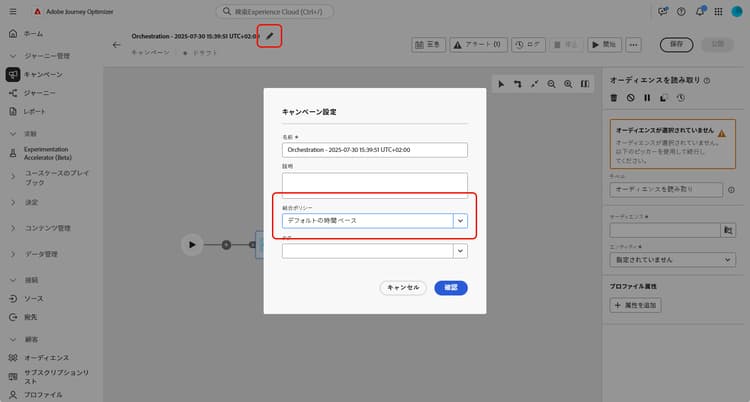
オーディエンスを読み取りアクティビティを追加する前に、キャンペーン設定で「結合ポリシー」を選択します。
-
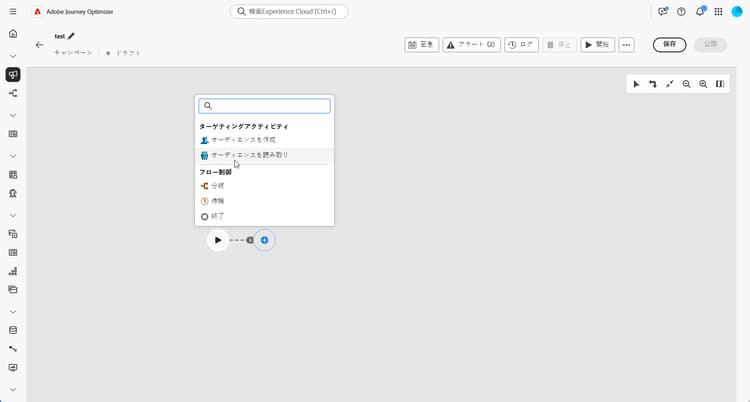
オーディエンスを読み取りアクティビティを調整されたキャンペーンに追加します。
-
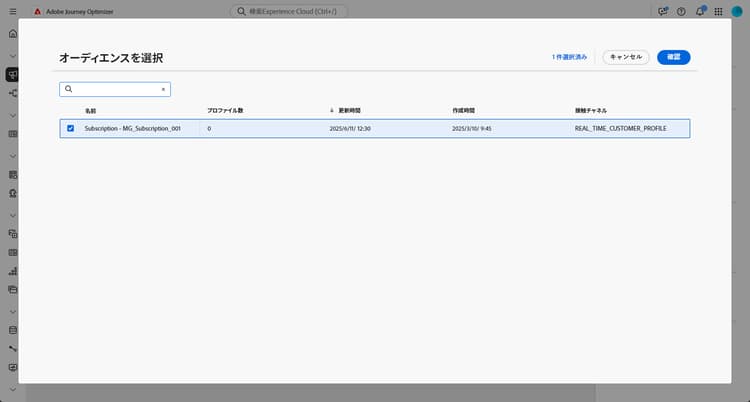
アクティビティに ラベル を入力します。 このラベルは、オーディエンスの名前として機能します。
-

-
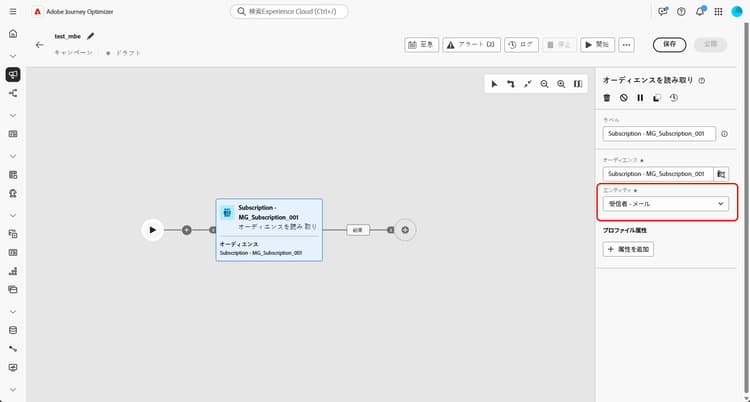
キャンペーンターゲティングディメンションから エンティティ を選択します。 この設定は、オーディエンスをターゲットディメンションに紐付けるのに使用されるターゲットエンティティと属性を定義します。
➡️このページで説明されている手順に従って、キャンペーンターゲティングディメンションを作成します。
-
「属性を追加」を選択して、選択したオーディエンスに追加のデータを補足します。 この手順でオーディエンスにプロファイル属性を追加すると、これらの属性が追加された受信者リストが生成されます。
-
オーディエンスに追加する 属性 を選択します。 属性ピッカーには、結合プロファイルスキーマのフィールドが表示されます。
-
CSV ベースのオーディエンスの場合、このスキーマには プロファイル 属性とカスタムオーディエンスレベル属性の両方が含まれます。 これらの属性は、次のスキーマパスにあります。
<audienceid> > _ajobatchjourneystage > audienceEnrichment > CustomerAudienceUpload > <audienceid> -
標準の AEP オーディエンスの場合、オーディエンス固有の埋め込みフィールドは含まれないため、プロファイル属性のみを使用できます。
note NOTE 一部の属性は、ピッカーに表示されていても実行時に使用できるかどうかは、オーディエンスデータが正常に調整され、Adobe Experience Platform プロファイルと結合されたかどうかによって決まります。 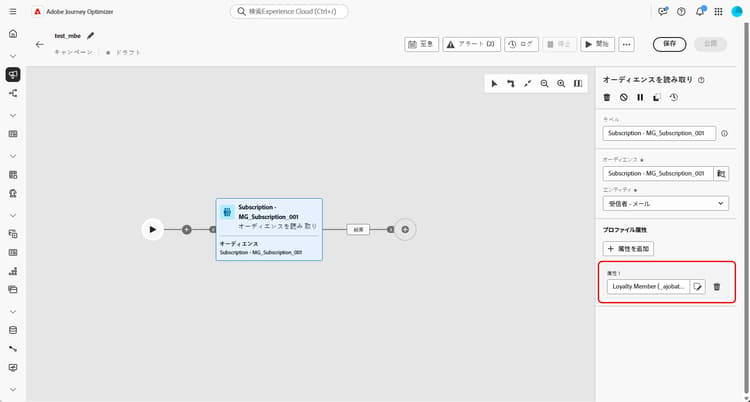
-
オーディエンスを作成すると、読み取り専用となり、編集できなくなります。 使用できるようになるのは、作成プロセスが完全に完了した後のみです。
例
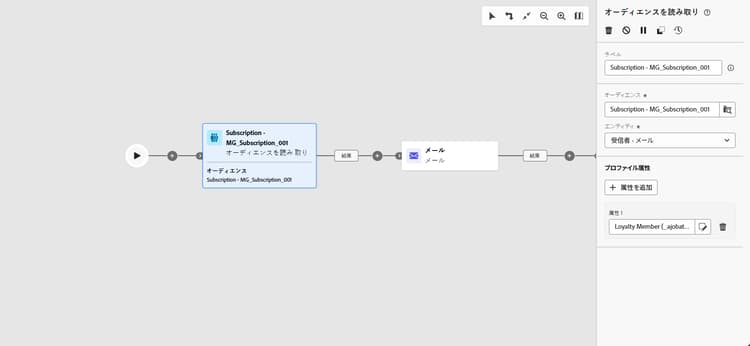
次の例では、オーディエンスを読み取りアクティビティを使用して、ニュースレターを購読しているプロファイルの以前作成および保存したオーディエンスを取得します。 その後、オーディエンスに ロイヤルティメンバーシップ 属性を付加すると、ロイヤルティプログラムの登録メンバーであるユーザーのターゲティングができるようになります。
This section contains structured knowledge intended to support interpretation, retrieval, and question answering related to this topic.
For complete understanding, this information should be combined with the documentation on this page. Neither source is intended to stand alone; the page describes the feature, while this section provides additional context that helps disambiguate terminology, intent, applicability, and constraints.
- TL;DR: This page explains how to configure the Read audience activity in an Orchestrated campaign to retrieve an existing saved or imported audience and optionally enrich it with profile attributes.
Intents:
- Retrieve an existing saved or imported audience to use as the entry audience for an Orchestrated campaign.
- Select a Merge policy before adding the Read audience activity.
- Choose an Entity from the Campaign Targeting dimension to reconcile the audience with the target dimension.
- Enrich the selected audience with additional profile attributes for targeting, personalization, or reporting.
- Understand when the Read audience cache speeds up test runs and when it is refreshed.
Glossary:
- Read audience activity: an activity that retrieves an existing audience, previously saved or imported, and reuses it within an Orchestrated campaign, without executing a new segmentation process (product-specific)
- Read audience cache: a cache that stores the audience and selected attributes retrieved by the Read audience activity, used to speed up subsequent test runs of an Orchestrated campaign (product-specific)
- Merge policy: a Campaign setting that must be selected before adding a Read audience activity (product-specific)
- Entity: a setting chosen from the Campaign Targeting dimension that defines the target entity and the attribute used to reconcile the audience with the target dimension (product-specific)
- Union Profile Schema: the schema whose fields are displayed in the attribute picker when enriching an audience with the Add attribute step (product-specific)
Guardrails:
- The Read audience cache stores the audience and selected attributes for up to two hours; after this two-hour period, the data must be retrieved anew.
- The cache is saved per Orchestrated campaign, not per audience: using the same audience in a Read audience activity inside another Orchestrated campaign still requires the data to be fetched again.
- The cache is refreshed when the Read audience activity is updated with new attributes, so the first test run after the update takes longer because the data must be retrieved again.
- The cache is not retained when the Orchestrated campaign is published, because the latest data is fetched when executing the live Orchestrated campaign.
- For CSV-based audiences, the attribute picker includes both Profile attributes and custom audience-level attributes, found under the schema path
<audienceid> > _ajobatchjourneystage > audienceEnrichment > CustomerAudienceUpload > <audienceid>. - For standard AEP audiences, only Profile attributes are available in the attribute picker, because these audiences do not carry embedded audience-specific fields.
- The availability of an attribute at runtime depends on whether the audience data has been successfully reconciled and merged with the Adobe Experience Platform Profile, even if the attribute appears in the picker.
- Once an audience is created, it is available in read-only and can no longer be edited; it can only be used after the creation process is fully completed.
Terminology:
- Canonical name: Adobe Experience Platform — Acronym: AEP
- Canonical name: Read audience activity — variants: Read Audience
- Do not confuse: “Adobe Experience Platform” (the platform) ≠ “Adobe Experience Platform Profile” (the profile component with which audience data must be reconciled and merged for an attribute to be available at runtime)
FAQ:
- Q: What does the Read audience activity do? — It retrieves an existing audience, previously saved or imported, and reuses it within an Orchestrated campaign, targeting a predefined set of profiles without executing a new segmentation process.
- Q: How long does the Read audience cache store data? — Up to two hours; after this two-hour period, the data must be retrieved anew.
- Q: Does the cache carry over to another Orchestrated campaign using the same audience? — No, the cache is saved for each Orchestrated campaign, not for the audience itself, so the system still needs to fetch the data again.
- Q: What happens to the cache when the Read audience activity is updated with new attributes? — The cache is refreshed with the new attributes data, so the first test run after the update takes longer.
- Q: What must be selected before adding a Read audience activity? — A Merge policy in the Campaign settings.
- Q: What attributes are available for CSV-based audiences versus standard AEP audiences? — CSV-based audiences offer both Profile attributes and custom audience-level attributes; standard AEP audiences offer only Profile attributes, since they do not carry embedded audience-specific fields.
- Q: Can a created audience be edited afterward? — No, once an audience is created it is available in read-only and can no longer be edited; it can only be used after the creation process is fully completed.
Examples:
- Example: The Read audience activity retrieves a previously created and saved audience of profiles who subscribed to the newsletter, then enriches it with the Loyalty membership attribute to enable targeting of users who are registered members of the loyalty program.
Related pages:
- To generate and target the audience selected in the Read audience activity: Learn more about how to generate and target audiences in Journey Optimizer (audience/about-audiences.md)
- To create the Campaign Targeting dimension used to choose the Entity setting: Create your Targeting dimension (orchestrated/target-dimension.md)
Personas:
- marketer: Can retrieve an existing saved or imported audience and reuse it within an Orchestrated campaign. Can select a Merge policy, enter a Label, choose an Entity from the Campaign Targeting dimension, and select Add attribute to enrich the audience. The page states that once an audience is created, it is available in read-only and can no longer be edited. Where: “Configure the Read audience activity”.
Onboarding:
- Level: Intermediate
- First minimal step: Select a Merge policy in your Campaign settings before adding the Read audience activity.
- Success check: The selected audience is enriched with the chosen attribute, as shown by the example enriching a newsletter audience with the Loyalty membership attribute.
- Previous: Generate and target an audience in Journey Optimizer: About Adobe Experience Platform audiences (audience/about-audiences.md); Create the Campaign Targeting dimension: Create your Targeting dimension (orchestrated/target-dimension.md)