このページ:配信レベル、ターゲットディメンション、実行アドレスを定義して、オーケストレーションキャンペーン用のチャネル設定を指定する方法と、URL トラッキングパラメーターをリンクに追加する方法について説明します。
ターゲットディメンションを設定したら、チャネル設定を指定し、適切な 実行の詳細 を定義する必要があります。 次の項目を定義できます。
-
メッセージ配信のレベル:例えば、個人ごとに 1 つのメールなど、受信者ごとに 1 つのメッセージを送信します。
-
実行アドレス:メールアドレスや電話番号など、送信に使用される特定の連絡先フィールド。
チャネル設定を指定するには:
-
まず、チャネル設定を作成および指定します。
また、既存の チャネル設定 を更新することもできます。
-
チャネル設定の「実行の詳細」セクションから、「調整されたキャンペーン」タブにアクセスします。
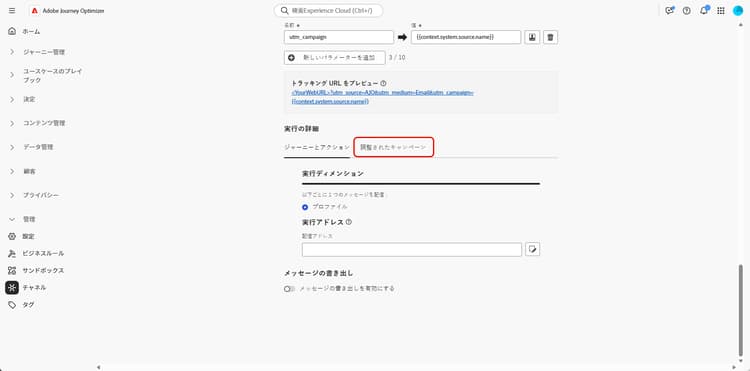
-
「有効」をクリックすると、調整されたキャンペーンと互換性が確保されます。
-
次の配信方法を選択します。
-
ターゲットディメンション:受信者など、プライマリエンティティに送信します。
-
ターゲット + セカンダリディメンション:受信者 + 契約または受信者 + フライトなど、プライマリエンティティとセカンダリエンティティの両方を使用して送信します。
このオプションを選択すると、1 つのプロファイルが複数のメッセージを受け取ることができるマルチエンティティオーケストレーションキャンペーンをサポートできます。セカンダリディメンションとして選択したリンクされたテーブルの条件(データモデルに応じて、フライトが 受信者 にリンクされている、または フライトの詳細 が フライト にリンクされているなど)を満たす行ごとに 1 件のメッセージを受信できます。
-
-
ドロップダウンから、以前に作成したターゲットディメンションを選択します。
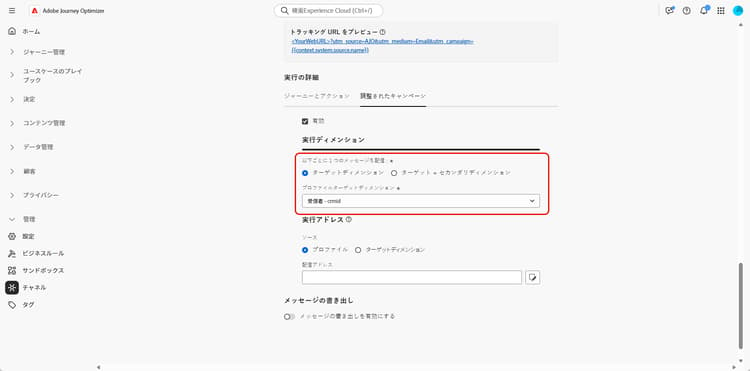
-
配信方法として「ターゲット + セカンダリディメンション」を選択した場合は、セカンダリディメンションを選択してメッセージ配信のコンテキストを定義します。
-
「実行アドレス」セクションで、メールアドレスや電話番号などの配信アドレスの取得に使用する ソース を選択します。
-
プロファイル:メールなど、配信アドレスがメインの顧客プロファイルに直接保存されている場合は、このオプションを選択します。
特定の関連エンティティではなく、メインのお客様にメッセージを送信する場合に役立ちます。
-
ターゲットディメンション:受信者など、プライマリエンティティに配信アドレスが保存されている場合は、これを選択します。
各受信者が異なるメールや電話番号など、独自の配信アドレスを持っている場合に役立ちます。
-
セカンダリディメンション:配信方法として ターゲット + セカンダリディメンション を使用する場合は、以前に設定した関連する セカンダリディメンション を選択します。
例えば、セカンダリディメンションが予約またはサブスクリプションを表す場合、メールなどの実行アドレスはそのレベルから取得できます。 これは、サービスの予約や登録時にプロファイルで異なる連絡先の詳細を使用する場合に便利です。
note NOTE セカンダリディメンションに使用されるスキーマには、プライマリキーが必要です。 複合プライマリキーは、セカンダリディメンションではサポートされていません。
-
-
「配信アドレス」フィールドで

-
設定したら、「送信」をクリックします。
これで、チャネルを オーケストレーションキャンペーン で使用する準備が整い、選択したターゲットディメンションに従ってメッセージが配信されるようになります。
URL トラッキングパラメーター url-tracking
チャネル設定を指定する際に、分析とレポートの目的で、追跡されたリンクにメタデータを追加することで、メールキャンペーンのパフォーマンスを監視する URL トラッキングパラメーターを定義できます。
これを行うには、オーケストレーションキャンペーンに固有のコンテキスト属性を {{context.system.source.*}} 構文を使用して利用できます。
context.system.source.id:オーケストレーションキャンペーン IDcontext.system.source.name:オーケストレーションキャンペーン名context.system.source.versionId:オーケストレーションキャンペーンバージョン IDcontext.system.source.actionId:チャネルアクションノード IDcontext.system.source.actionName:チャネルアクションノード名context.system.source.channel: チャネルの種類(電子メール、モバイル、プッシュ)context.system.IdentityNamespace:使用される ID 名前空間
例:
www.YourLandingURL.com?utm_source=AJO&utm_campaign={{context.system.source.id}}&utm_content={{context.system.source.actionName}}
URL トラッキングパラメーターについて詳しくは、この節を参照してください。
This section contains structured knowledge intended to support interpretation, retrieval, and question answering related to this topic.
For complete understanding, this information should be combined with the documentation on this page. Neither source is intended to stand alone; the page describes the feature, while this section provides additional context that helps disambiguate terminology, intent, applicability, and constraints.
- TL;DR: This page explains how to configure a Channel configuration for Orchestrated campaigns by setting the delivery method, target dimension, and execution address, and how to add URL tracking parameters to tracked links.
Intents:
- Enable a Channel configuration for compatibility with Orchestrated campaigns.
- Choose a delivery method between Target Dimension and Target + Secondary Dimension.
- Select a previously created Target Dimension and, when applicable, a Secondary Dimension.
- Choose the source used to fetch the delivery address (Profile, Target Dimension, or Secondary Dimension) and select the specific delivery address field.
- Add URL tracking parameters using orchestrated campaign contextual attributes.
Glossary:
- Channel configuration: the configuration that defines how and to whom messages are delivered, including delivery level and execution address (product-specific)
- Execution details: the section of a Channel configuration where delivery method, target dimension, and execution address are set (product-specific)
- Target Dimension: delivery method that sends to the primary entity, e.g., recipient (product-specific)
- Target + Secondary Dimension: delivery method that sends using both primary and secondary entities, e.g., recipient + contract, or recipient + flights (product-specific)
- Secondary Dimension: the linked table selected to support multi-entity Orchestrated campaigns, where one profile can receive several messages, one per qualifying row (product-specific)
- Execution Address: the section where the Source used to fetch the delivery address (email address or phone number) is chosen (product-specific)
- Delivery address: the specific field selected to use for message delivery, chosen via the edit icon in the Delivery address field (product-specific)
Guardrails:
- The schema used for the secondary dimension must have a primary key; composite primary keys are not supported for secondary dimensions.
Terminology:
- Canonical name: Channel configuration — variants: Channel Configuration
- Do not confuse: “Target Dimension” (send to the primary entity, e.g., recipient) ≠ “Target + Secondary Dimension” (send using both primary and secondary entities, supporting one message per qualifying row in the linked Secondary Dimension table)
- Do not confuse: “Execution Address” (the section where the Source for the delivery address is chosen) ≠ “Delivery address” (the specific field selected for message delivery)
FAQ:
- Q: What must be enabled before a Channel configuration can be used with Orchestrated campaigns? — Enabled must be clicked in the Orchestrated campaigns tab of the Execution details section.
- Q: What are the two delivery methods available? — Target Dimension (primary entity only) and Target + Secondary Dimension (primary and secondary entities).
- Q: Where can the execution address be sourced from? — From Profile, Target Dimension, or Secondary Dimension, depending on where the delivery address is stored.
- Q: Are composite primary keys supported for secondary dimensions? — No, the schema used for the secondary dimension must have a primary key, and composite primary keys are not supported.
- Q: How are URL tracking parameters defined for Orchestrated campaigns? — Using contextual attributes with the
{{context.system.source.*}}syntax, such ascontext.system.source.idorcontext.system.source.actionName.
Examples:
- URL tracking parameter example for Orchestrated campaigns:
www.YourLandingURL.com?utm_source=AJO&utm_campaign={{context.system.source.id}}&utm_content={{context.system.source.actionName}}
Related pages:
- For creating and configuring the Channel configuration: Follow the steps detailed in this page (email/surface-personalization.md)
- For selecting a previously created Target Dimension: previously created Target Dimension (orchestrated/target-dimension.md)
- For learning more about URL tracking parameters: this section (email/url-tracking.md)
Personas:
- admin: Can enable a Channel configuration for Orchestrated campaigns by selecting Enabled, then choose Target Dimension or Target + Secondary Dimension as the delivery method. Can select the Source for the execution address from Profile, Target Dimension, or Secondary Dimension, then select the specific Delivery address field. The page states that the schema used for the secondary dimension must have a primary key, and composite primary keys are not supported. Where: “Configure your Channel configuration”.
Onboarding:
- Level: Intermediate
- First minimal step: Create and configure your Channel configuration.
- Success check: Your channel is ready to use with Orchestrated campaigns, and messages are delivered according to the selected target dimension.
- Previous: After setting up your Target Dimension: Create your Targeting dimension (orchestrated/target-dimension.md); To create and configure your Channel configuration: Personalize email configuration settings (email/surface-personalization.md)
- Next: To learn more about URL tracking parameters: Configure URL tracking (email/url-tracking.md)