このページ: Adobe Experience Platform オーディエンスポータルを使用して CSV ファイルからオーディエンスをインポートし、その ID 属性を顧客プロファイルにマッピングする方法について説明します。
Adobe Experience Platform オーディエンスポータルでは、CSV ファイルを使用してオーディエンスを読み込むことができます。
カスタムアップロードプロセス中に、ID として使用する CSV 属性と、そのマッピング先のプロファイル ID を指定します。 これにより、オーディエンスデータとプロファイルの間にリンクが作成されます。 CSV ファイルに、プロファイルで見つからない ID 値が含まれている場合、その ID 値を使用して新しいプロファイルが作成されます。
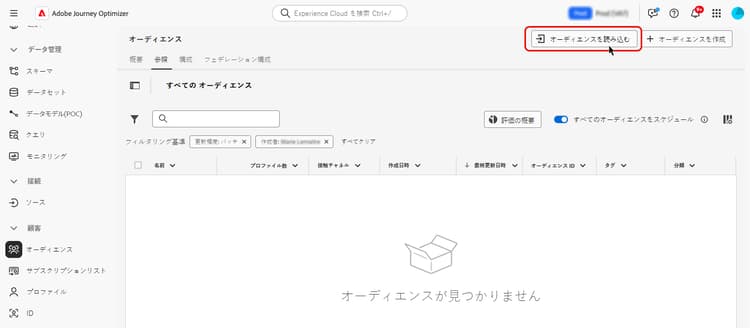
オーディエンスをインポートする方法について詳しくは、Adobe Experience Platform のセグメント化サービスのドキュメントを参照してください。
オーディエンスを CSV 形式でアップロードする方法について詳しくは、次のビデオをご覧ください。
This section contains structured knowledge intended to support interpretation, retrieval, and question answering related to this topic.
For complete understanding, this information should be combined with the documentation on this page. Neither source is intended to stand alone; the page describes the feature, while this section provides additional context that helps disambiguate terminology, intent, applicability, and constraints.
- TL;DR: This page explains how to import an audience from a CSV file using the Adobe Experience Platform Audience Portal and map its identity attribute to customer profiles.
Intents:
- Import an audience from a CSV file using the Audience Portal
- Specify which CSV attribute to use as the identity and the profile identity it maps to
- Understand what happens when a CSV identity value is not found in the profile
- Understand Incremental read behavior for custom upload and other external audiences
Glossary:
- Custom Upload: Importing an audience into Adobe Experience Platform from a CSV file using the Audience Portal (product-specific)
- Audience Portal: The Adobe Experience Platform Audience Portal, which allows you to import an audience using a CSV file (product-specific)
- Incremental read: A toggle setting that, for custom upload and other external audiences, is not functionally supported today (product-specific)
Guardrails:
- During the custom upload process, you specify the CSV attribute to use as the identity and the profile identity it maps to, establishing a link between the audience data and the profile.
- If the CSV file contains an identity value not found in the profile, a new profile is created with that identity value.
- For custom upload (CSV) and other external audiences, Incremental read is not functionally supported today; on each recurrence the entire audience is retrieved, regardless of the Incremental read toggle setting.
Terminology:
- Canonical name: Custom Upload — Acronym: n/a — variants: CSV upload, custom upload audience
- Synonyms: “Custom upload” = “CSV upload”
FAQ:
- Q: How do I import a custom audience? — Import it from a CSV file using the Adobe Experience Platform Audience Portal.
- Q: What happens if a CSV identity value is not in the profile? — A new profile is created with that identity value.
- Q: Is Incremental read supported for custom upload audiences? — No; it is not functionally supported today, and the entire audience is retrieved on each recurrence regardless of the toggle setting.