In questa pagina: configura e pianifica le operazioni sul ciclo di vita dei dati per mantenere i record accurati, utilizzati come previsto ed eliminati in linea con i criteri organizzativi.
Man mano che i dati vengono continuamente acquisiti in Adobe Experience Platform, diventa fondamentale assicurarsi che vengano utilizzati come previsto, aggiornati quando necessario ed eliminati in base ai criteri organizzativi.
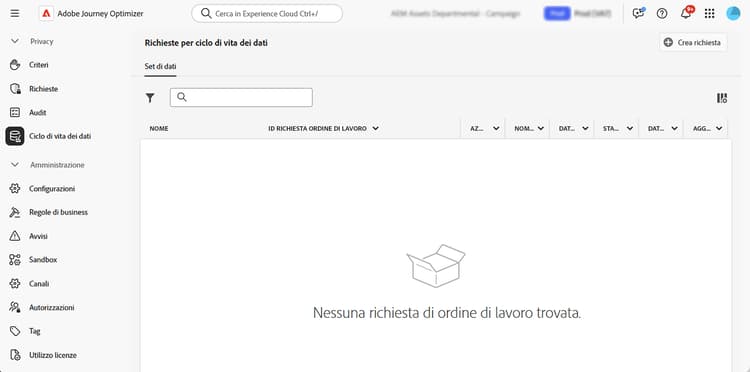
Queste attività possono essere eseguite utilizzando il menu Ciclo di vita dei dati che consente di configurare e pianificare le operazioni del ciclo di vita dei dati, per la corretta manutenzione dei record.
Consigli data-hygiene-recommendations
Quando esegui operazioni di igiene dei dati (ad esempio l’eliminazione di identità o set di dati), tieni presente che gli eventi di consegna storici associati alle identità eliminate non verranno più visualizzati nei rapporti standard o nelle query di datalake. Questo può causare discrepanze tra il numero di e-mail segnalate come Consegnate e il numero di e-mail Ricevute nelle caselle in entrata dei destinatari, in particolare per i percorsi meno recenti.
Prima di eseguire eliminazioni su larga scala, convalida ed esporta tutti i dati di consegna o di reporting richiesti. Se è necessaria la riconciliazione dopo l’igiene dei dati, coordinati con il supporto Adobe per accedere ai registri archiviati o utilizzare le query del set di dati dell’Evento feedback dei messaggi per i dati recenti.
Ulteriori informazioni data-hygiene-learn-more
Per ulteriori informazioni su Privacy Service e su come seguire le operazioni relative al ciclo di vita dei dati, consulta la documentazione di Adobe Experience Platform:
This section contains structured knowledge intended to support interpretation, retrieval, and question answering related to this topic.
For complete understanding, this information should be combined with the documentation on this page. Neither source is intended to stand alone; the page describes the feature, while this section provides additional context that helps disambiguate terminology, intent, applicability, and constraints.
- TL;DR: This page explains how to configure and schedule data lifecycle operations so you can keep your records accurate, used as intended, and deleted in line with your organizational policies.
Intents:
- Understand what data lifecycle operations accomplish
- Configure and schedule operations using the Data Lifecycle menu
- Understand the reporting impact of deleting identities or datasets
- Prepare for large-scale deletions by validating and exporting required data
- Know the availability requirements for data lifecycle capabilities
Glossary:
- Data lifecycle operations: operations configured and scheduled from the Data Lifecycle menu to keep records accurate, used as intended, and deleted per organizational policies (product-specific)
- Data hygiene operations: operations such as deleting identities or datasets (product-specific)
- Data Lifecycle: the menu used to configure and schedule data lifecycle operations (product-specific)
- Message Feedback Event Dataset: dataset that can be queried to access recent data if reconciliation is needed after data hygiene (product-specific)
Guardrails:
- Data lifecycle capabilities are currently only available for organizations that have purchased the Healthcare Shield and Privacy and Security Shield add-on offerings (availability constraint)
- When performing data hygiene operations (such as deleting identities or datasets), historical delivery events associated with deleted identities will no longer appear in standard reporting or datalake queries
- Data hygiene operations can result in discrepancies between the number of emails reported as Delivered and the number of emails Received in recipient inboxes, especially for older journeys
- Before executing large-scale deletions, validate and export any required delivery or reporting data (recommended)
Terminology:
- Canonical name: Data lifecycle operations
- Do not confuse: “Delivered” (emails reported as delivered in standard reporting) ≠ “Received” (emails received in recipient inboxes)
FAQ:
- Q: Who can use data lifecycle capabilities? — Organizations that have purchased the Healthcare Shield and Privacy and Security Shield add-on offerings.
- Q: What happens to reporting after data hygiene operations such as deleting identities or datasets? — Historical delivery events associated with deleted identities no longer appear in standard reporting or datalake queries.
- Q: What should you do before large-scale deletions? — Validate and export any required delivery or reporting data.
- Q: How can you reconcile data after data hygiene? — Coordinate with Adobe support to access archived logs, or use Message Feedback Event Dataset queries for recent data.