In questa pagina: utilizza Adobe Experience Platform Privacy Service per inviare e gestire le richieste di accesso e cancellazione dei dati per Adobe Journey Optimizer, in modo da soddisfare i diritti degli interessati e automatizzare la conformità alle normative sulla privacy.
Adobe Experience Platform Privacy Service fornisce un’API RESTful e un’interfaccia utente per aiutarti a gestire le richieste di dati dei clienti. Con Privacy Service puoi inviare richieste di accesso e cancellazione dei dati personali dei clienti dalle applicazioni Adobe CX Enterprise, facilitando la conformità automatica alle normative legali e organizzative sulla privacy.
Le richieste di accesso ai dati personali possono essere create e gestite dal menu Richieste.
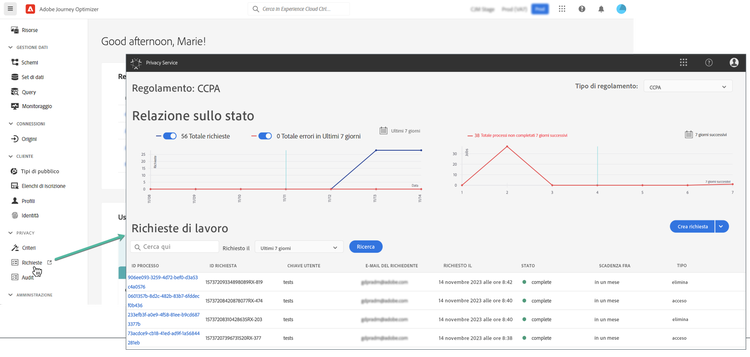
Per ulteriori informazioni su Provacy Service e sulla modalità di creazione e di gestione delle richieste di privacy, consulta la documentazione di Adobe Experience Platform.
Gestione delle richieste di accesso ai dati personali di singoli utenti che è possibile inviare a Adobe Journey Optimizer data-privacy-requests
Esistono due modi di inviare singole richieste di accesso ed eliminazione dei dati dei consumatori da Adobe Journey Optimizer:
- Mediante l’Interfaccia utente di Privacy Service. Ulteriori informazioni
- Mediante l’API di Privacy Service. Ulteriori informazioni
Privacy Service supporta due tipi di richieste: accesso ai dati ed eliminazione dei dati.
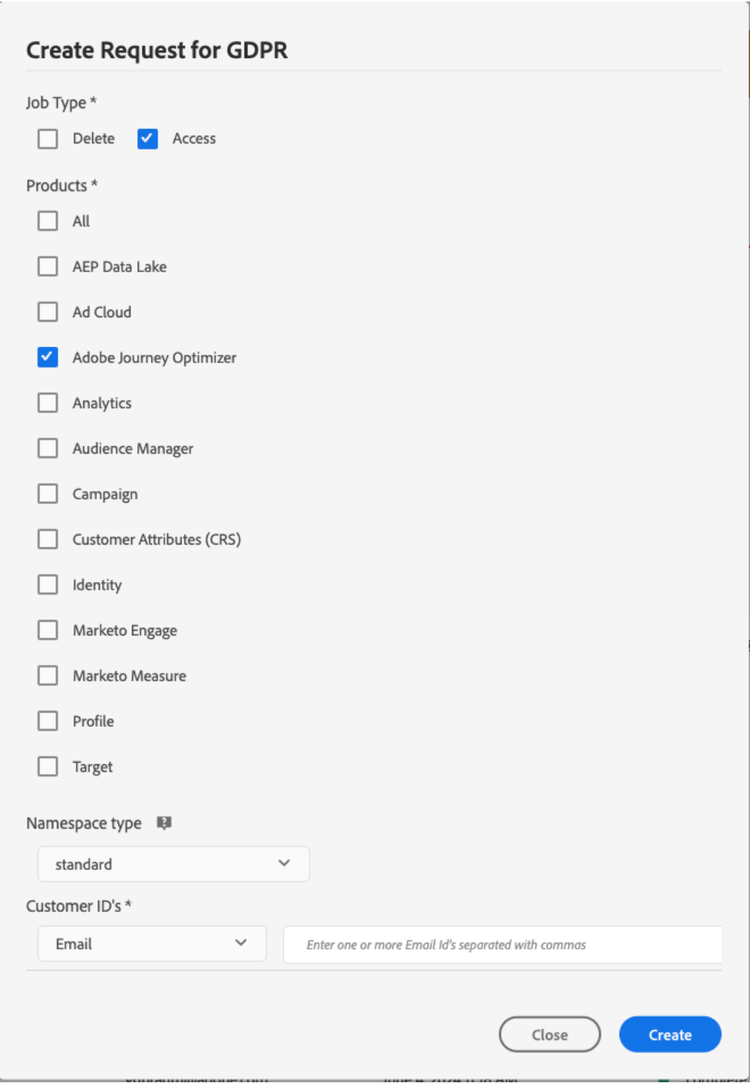
Per richieste di accesso, specifica “Adobe Journey Optimizer” dall’interfaccia utente (o “CJM” come codice prodotto nell’API).
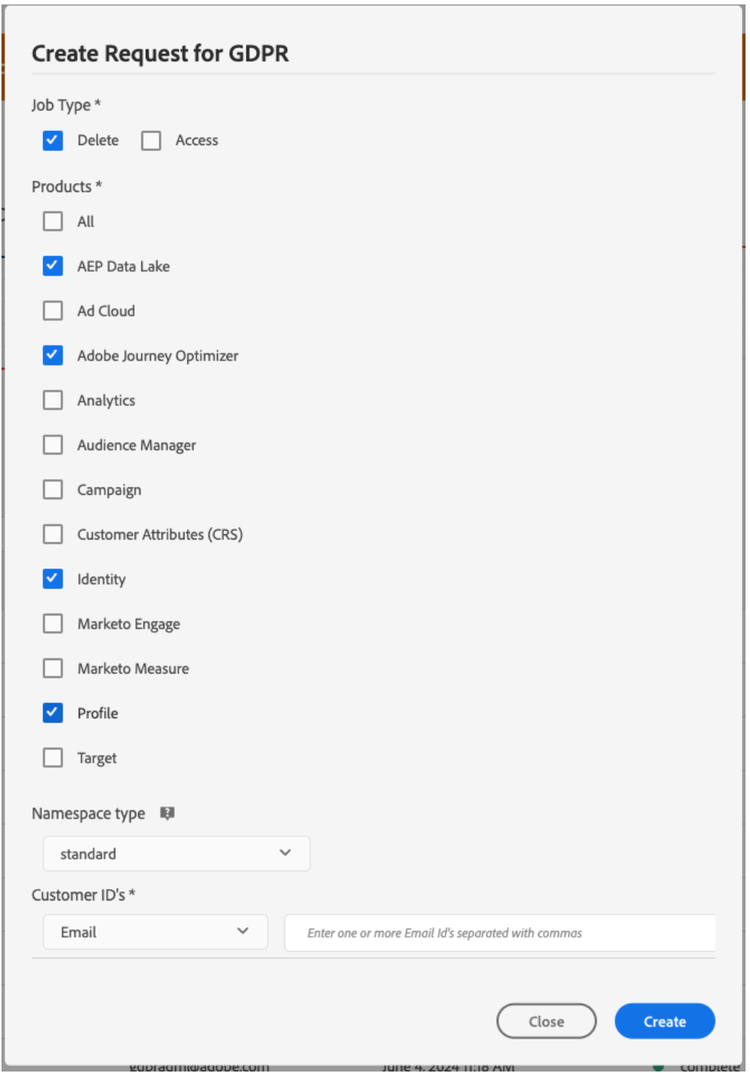
Per eliminare le richieste, oltre alla richiesta “Adobe Journey Optimizer”, è necessario inviare le richieste di eliminazione a tre servizi a monte per impedire a Journey Optimizer di reinserire i dati eliminati. Se questi servizi a monte non sono specificati, la richiesta “Adobe Journey Optimizer” rimarrà nello stato “Elaborazione” finché non saranno state create le richieste di eliminazione per i servizi a monte.
I tre servizi a monte sono:
- Profile (codice prodotto: “profileService”)
- Data Lake AEP (codice prodotto: “AdobeCloudPlatform”)
- Identity (codice prodotto: “identità”)
Creare richieste di accesso e di eliminazione
Prerequisiti
Per effettuare richieste di accesso ed eliminazione di dati per Adobe Journey Optimizer, è necessario avere:
- un ID organizzazione Adobe
- un identificatore di identità della persona su cui desideri agire e i corrispondenti spazi dei nomi. Per ulteriori informazioni sugli spazi dei nomi delle identità in Adobe Journey Optimizer e Experience Platform, consulta la panoramica dello spazio dei nomi identità.
Valori campo obbligatori in Journey Optimizer per le richieste API
"companyContexts":
    "namespace": imsOrgID
    "value": <Your Adobe Organization ID Value>

"users":
    "action": either access or delete

    "userIDs":
        "namespace": e.g. email, aaid, ecid, etc.
        "type": standard
        "value": <Data Subject's Identity Identifier>

"include":
    CJM (which is the Adobe product code for Adobe Journey Optimizer)
    profileService (product code for Profile)
    AdobeCloudPlatform (product code for AEP Data Lake)
    identity (product code for Identity)

"regulation":
    gdpr, ccpa, pdpa, lgpd_bra, or nzpa_nzl (which is the privacy regulation that applies to the request)
Esempio di richiesta di accesso GDPR:
Dall’interfaccia utente:
Mediante l’API
// JSON Request
{
   "companyContexts":[
      {
         "namespace":"imsOrgID",
         "value":"745F37C35E4B776E0A49421B@AdobeOrg"
      }
   ],
   "users":[
      {
         "action":[
            "access"
         ],
         "userIDs":[
            {
               "namespace":"ecid",
               "value":"38400000-8cf0-11bd-b23e-10b96e40000d",
               "type":"standard"
            },
            {
               "namespace":"email",
               "value":"johndoe4@gmail.com",
               "type":"standard"
            }
         ]
      }
   ],
   "include":[
      "CJM"
   ],
   "regulation":"gdpr"
}
// JSON Response
{
    "requestId": "17163122360480365RX-705",
    "totalRecords": 1,
    "jobs": [
        {
            "jobId": "e709b1f4-1796-11ef-b422-eddd0aebc40d",
            "customer": {
                "user": {
                    "key": "John Doe",
                    "action": [
                        "access"
                    ],
                    "userIDs": [
                        {
                            "namespace": "ecid",
                            "value": "38400000-8cf0-11bd-b23e-10b96e40000d",
                            "type": "standard",
                            "namespaceId": 4,
                            "isDeletedClientSide": false
                        },
                        {
                            "namespace": "email",
                            "value": "johndoe4@gmail.com",
                            "type": "standard",
                            "namespaceId": 6,
                            "isDeletedClientSide": false
                        }
                    ]
                }
            }
        }
    ]
}
Esempio di richiesta di eliminazione GDPR:
Dall’interfaccia utente:
Mediante l’API
// JSON Request
{
  "companyContexts": [
    {
      "namespace": "imsOrgID",
      "value": "745F37C35E4B776E0A49421B@AdobeOrg"
    }
  ],
  "users": [
    {
      "action": [
          "delete"
      ],
      "userIDs": [
        {
          "namespace": "ecid",
          "value": "38400000-8cf0-11bd-b23e-10b96e40000d",
          "type": "standard"
        },
                {
          "namespace": "email",
          "value": "johndoe4@gmail.com",
          "type": "standard"
        }
      ]
    }
  ],
  "include": [
    "CJM", "profileService", "AdobeCloudPlatform", "identity"
  ],
  "regulation": "gdpr"
}
// JSON Response
{
    "requestId": "17163122360480365RX-705",
    "totalRecords": 1,
    "jobs": [
        {
            "jobId": "e709b1f4-1796-11ef-b422-eddd0aebc40d",
            "customer": {
                "user": {
                    "key": "John Doe",
                    "action": [
                        "delete"
                    ],
                    "userIDs": [
                        {
                            "namespace": "ecid",
                            "value": "38400000-8cf0-11bd-b23e-10b96e40000d",
                            "type": "standard",
                            "namespaceId": 4,
                            "isDeletedClientSide": false
                        },
                        {
                            "namespace": "email",
                            "value": "johndoe4@gmail.com",
                            "type": "standard",
                            "namespaceId": 6,
                            "isDeletedClientSide": false
                        }
                    ]
                }
            }
        }
    ]
}
This section contains structured knowledge intended to support interpretation, retrieval, and question answering related to this topic.
For complete understanding, this information should be combined with the documentation on this page. Neither source is intended to stand alone; the page describes the feature, while this section provides additional context that helps disambiguate terminology, intent, applicability, and constraints.
- TL;DR: This page explains how to use the Adobe Experience Platform Privacy Service to submit and manage data access and deletion requests for Adobe Journey Optimizer so you can fulfill data subject rights and automate compliance with privacy regulations.
Intents:
- Understand how Privacy Service manages data access and deletion requests
- Submit privacy requests through the Privacy Service UI or API
- Identify the product code and upstream services required for delete requests
- Understand the prerequisites and required field values for requests
- Know which privacy regulations can be specified on a request
Glossary:
- Privacy Service: Adobe Experience Platform service that provides a RESTful API and user interface to manage customer requests to access and delete personal customer data (product-specific)
- Privacy request: a data access or data deletion request submitted for Adobe Journey Optimizer, created and managed from the Requests menu (product-specific)
- CJM: the Adobe product code for Adobe Journey Optimizer, used in the API
includefield (product-specific) - Upstream services: Profile (
profileService), AEP Data Lake (AdobeCloudPlatform), and Identity (identity), to which delete requests must also be submitted to prevent Journey Optimizer from reinjecting the deleted data (product-specific) - Requests: the menu from which privacy requests can be created and managed (product-specific)
Guardrails:
- Privacy Service supports two types of requests: data access and data deletion
- For access requests, specify “Adobe Journey Optimizer” from the UI, or “CJM” as the product code in the API
- For delete requests, in addition to the “Adobe Journey Optimizer” request you must also submit delete requests to three upstream services — Profile (
profileService), AEP Data Lake (AdobeCloudPlatform), and Identity (identity) — if these upstream services are not specified, the “Adobe Journey Optimizer” request remains in the “processing” state until delete requests for the upstream services are created - For delete requests, if you do not explicitly include the product name and all applicable namespaces, data is not removed from Adobe Journey Optimizer
- Making a privacy request to Adobe Journey Optimizer will not remove data from all these systems (Platform data lake, Real time customer profile, Identity service); for delete and access requests, you need to call these individual systems to make sure the requests are handled by each of them
- Prerequisites: an Adobe organization ID, and an identity identifier of the person to act on with the corresponding namespace(s)
- In the API, the
regulationfield is the privacy regulation that applies to the request; the page listsgdpr,ccpa,pdpa,lgpd_bra, ornzpa_nzl
Terminology:
- Canonical name: Privacy request
- Synonyms: “Adobe Journey Optimizer” (product name in the UI) = “CJM” (product code in the API)
- Do not confuse: “data access” request ≠ “data deletion” request
- Do not confuse: “Adobe Journey Optimizer” request ≠ the three upstream services (Profile, AEP Data Lake, Identity) that delete requests must also target
FAQ:
- Q: What are the two types of privacy requests? — Data access and data deletion.
- Q: What product code represents Adobe Journey Optimizer in the API? — CJM.
- Q: Why must delete requests also target upstream services? — To prevent Journey Optimizer from reinjecting the deleted data; if these upstream services are not specified, the “Adobe Journey Optimizer” request remains in the “processing” state until delete requests for the upstream services are created.
- Q: Which upstream services must be included in a delete request? — Profile (
profileService), AEP Data Lake (AdobeCloudPlatform), and Identity (identity). - Q: Which values does the page list for the
regulationfield? —gdpr,ccpa,pdpa,lgpd_bra, ornzpa_nzl. - Q: Does a privacy request to Adobe Journey Optimizer remove data from all systems? — No, for delete and access requests, you need to call these individual systems to make sure the requests are handled by each of them.