Attributi proprietà percorso journey-properties
Nell’editor espressioni semplici e nell’editor espressioni avanzate, nelle categorie Evento e Origine dati, è possibile accedere alla categoria Proprietà Percorso. Questa categoria contiene campi tecnici relativi al percorso per un determinato profilo. Si tratta delle informazioni recuperate dal sistema dai percorsi attivi, ad esempio l’ID percorso, o gli errori specifici rilevati.
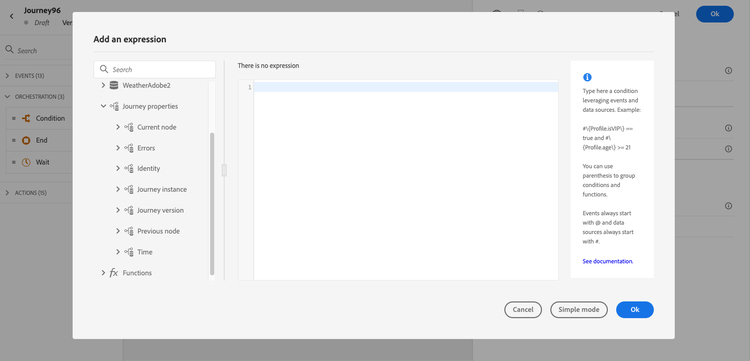
Contiene informazioni, ad esempio, su:
-
versione percorso: uid percorso, uid versione percorso, uid istanza, ecc.
-
errori: recupero dati, esecuzione azione, ecc.
-
passaggio corrente, ultimo passaggio corrente, ecc.
-
profili scartati
L’elenco dei campi è disponibile in questa sezione.
Puoi utilizzare questi campi per creare espressioni. Durante l’esecuzione del percorso, i valori vengono recuperati direttamente dal percorso.
Di seguito sono riportati alcuni esempi di casi d’uso:
-
Registra profili scartati: puoi inviare tutti i profili esclusi da un messaggio da una regola di limitazione a un sistema di terze parti a scopo di registrazione. A questo scopo, imposta un percorso in caso di timeout ed errore e aggiungi una condizione per filtrare in base a un tipo di errore specifico, ad esempio: “elimina le persone applicando una regola di limite”. Puoi quindi inviare i profili eliminati a un sistema di terze parti tramite un’azione personalizzata.
-
Invia avvisi in caso di errori: è possibile inviare una notifica a un sistema di terze parti ogni volta che si verifica un errore in un messaggio. A questo scopo, puoi impostare un percorso in caso di errore, aggiungere una condizione e un’azione personalizzata. Puoi inviare una notifica su un canale Slack, ad esempio, con la descrizione dell’errore riscontrato.
-
Perfezionare gli errori nella generazione dei rapporti: invece di disporre di un solo percorso per i messaggi in errore, è possibile definire una condizione per tipo di errore. In questo modo sarà possibile perfezionare la generazione rapporti e visualizzare tutti i dati relativi ai tipi di errore.
Elenco dei campi journey-properties-fields
Tipo di errore dell’attività (nodo) più recente nell’errore. Tipi possibili:
- Eventi: Eventi, Reazioni, SQ (esempio: Qualificazione del pubblico)
- Controllo del flusso: Fine, Condizione, Attesa
- Azioni: azioni ACS, Salta, Azione personalizzata
Codice di errore dell’attività (nodo) più recente che presenta un errore. Possibili errori:
- Codici di errore HTTP
- con limite
- timeout
- error (esempio: default in caso di errore imprevisto. Non deve/raramente si verifica)
This section contains structured knowledge intended to support interpretation, retrieval, and question answering related to this topic.
For complete understanding, this information should be combined with the documentation on this page. Neither source is intended to stand alone; the page describes the feature, while this section provides additional context that helps disambiguate terminology, intent, applicability, and constraints.
- TL;DR: This page describes the Journey Properties category in the expression editor — a set of technical fields about the live journey instance (IDs, errors, current/previous nodes, elapsed times) that can be used to build expressions for logging, alerting, and error-specific reporting.
Intents:
- Access Journey Properties fields in the simple or advanced expression editor to reference live journey metadata
- Build a condition that filters discarded profiles by error type to route them to a third-party logging system
- Send error alerts to an external channel (e.g. Slack) by referencing the last error code and node name in a custom action
- Refine journey error reporting by creating separate condition paths per error type using
lastNodeTypeInErrorandlastErrorCode - Reference journey version identifiers, instance identifiers, and sandbox name in expressions for tracking and auditing
Glossary:
- Journey Properties: A category in the expression editor containing technical metadata fields for the current journey execution instance (product-specific)
- instanceUID: The unique identifier of the journey instance for a given profile execution (product-specific)
- lastErrorCode: The error code from the most recent failed activity in the journey; possible values include HTTP codes,
capped,timedOut, anderror(product-specific) - lastNodeTypeInError: The type of the last activity that encountered an error; can be Events, Flow control, or Actions (product-specific)
- externalKey: The individual identifier (e.g. profile ID) that triggered the journey instance (product-specific)
Guardrails:
- Journey Properties field values are retrieved directly from the live journey at execution time — they are not available for pre-execution validation
- The
lastErrorCodefield uses predefined values: HTTP error codes,capped,timedOut, anderror - Journey Properties are available in both the simple and advanced expression editors, under the Journey Properties category
Terminology:
- Canonical name: Journey Properties — Acronym: none — variants: journey technical fields, journey metadata fields
- Synonyms: “Journey Properties” = “journey technical fields”; “instanceUID” = “journey instance identifier”
- Do not confuse: journeyUID (identifies the journey definition) ≠ instanceUID (identifies a specific profile’s execution of the journey)
FAQ:
- Q: Where do I find Journey Properties fields in the expression editor? — They appear in both the simple and advanced expression editors under the Journey Properties category, below Events and Data Sources.
- Q: How can I log profiles discarded by a capping rule? — Add an error path condition filtering on
lastErrorCode == "capped"and push those profiles to a third-party system via a custom action. - Q: What is the difference between
journeyUIDandinstanceUID? —journeyUIDidentifies the journey definition;instanceUIDidentifies a specific execution instance for a given profile. - Q: What error code is returned for an unexpected system error? — The
errorcode, which is used as the default for unexpected errors and should rarely occur. - Q: Can I use Journey Properties fields to send Slack alerts on action failures? — Yes; reference
lastNodeNameInErrorandlastErrorCodein a custom action to include error details in a Slack notification.