In questa pagina: scopri come visualizzare, gestire e creare set di credenziali API per i canali personalizzati in Adobe Journey Optimizer, in modo da poter autenticare le richieste all’endpoint per diversi marchi o ambienti senza duplicare il canale.
Quando si crea un canale personalizzato con un tipo di autenticazione diverso da Nessuno, viene generato automaticamente un set iniziale di credenziali API quando il canale viene attivato.
Puoi visualizzare, gestire e modificare le credenziali da Amministrazione > Canali > Generatore canali > Credenziali API.
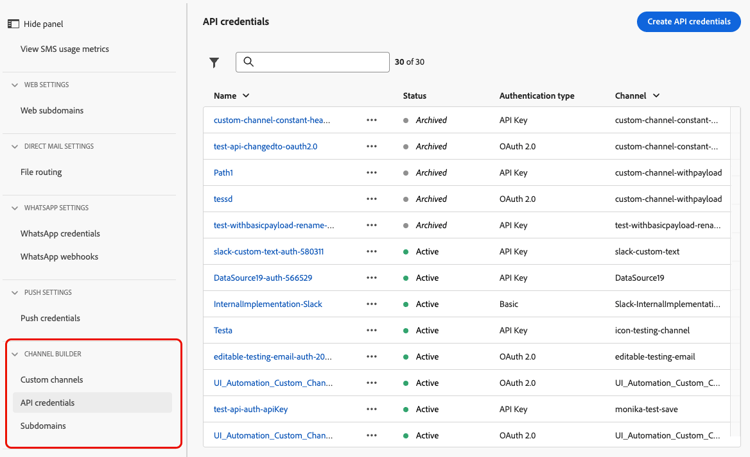
L’utilizzo di più credenziali per lo stesso canale consente di allegare valori di autenticazione diversi a configurazioni di canale diverse, ad esempio per marchi o casi di utilizzo diversi, senza duplicare la definizione del canale.
Per modificare un set di credenziali esistente, fare clic su un elemento nell’elenco di inventario. Tutti i campi sono modificabili.
Per creare credenziali aggiuntive per lo stesso canale, segui la procedura riportata di seguito.
-
Nell’elenco Credenziali API fare clic su Crea credenziali API.
-
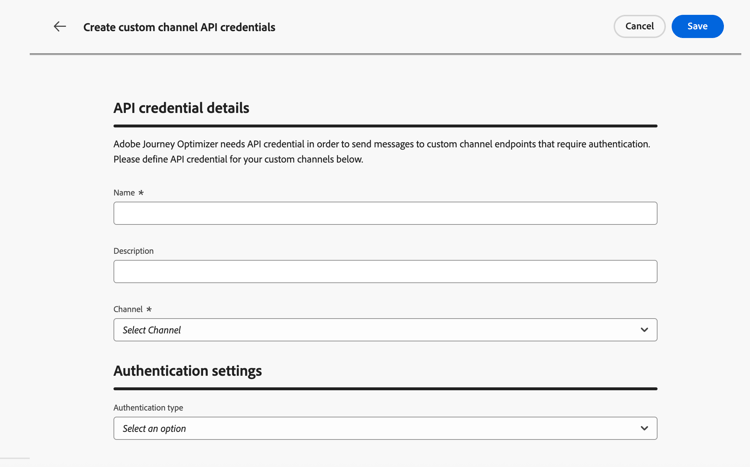
Immetti un nome e una descrizione.
-
Selezionare il canale per il quale si stanno creando le credenziali.
note NOTE Nell'elenco a discesa vengono visualizzati solo i canali personalizzati attivati con un tipo di autenticazione diverso da Nessuno. -
Selezionare il tipo di autenticazione dall’elenco.
-
Compila i campi specifici dell’autenticazione:
- Chiave API - Fornisci il nome, il valore e la posizione della chiave (parametro o intestazione di query).
- Autenticazione di base - Specificare nome utente e password.
- OAuth 2.0 - Configura il payload per l’autenticazione OAuth 2.0. Ulteriori informazioni
-
Fai clic su Salva.
Passaggi successivi next-steps
- Delega un sottodominio (facoltativo, obbligatorio per il tracciamento dei collegamenti)
- Creare una configurazione dei canali
This section contains structured knowledge intended to support interpretation, retrieval, and question answering related to this topic.
For complete understanding, this information should be combined with the documentation on this page. Neither source is intended to stand alone; the page describes the feature, while this section provides additional context that helps disambiguate terminology, intent, applicability, and constraints.
- TL;DR: This page explains how to view, edits, and creates additional API credential sets for a custom channel so that requests to the endpoint can be authenticated across different brands or environments without duplicating the channel.
Intents:
- View and manage existing API credentials for a custom channel
- Edit the fields of an existing credential set
- Create additional credential sets for the same channel
- Attach different authentication values to different channel configurations
Glossary:
- API credentials: A named set of authentication values used to authenticate requests sent to a custom channel endpoint (product-specific)
- Authentication type: The method selected for a credential set, such as API Key, Basic auth, or OAuth 2.0 (product-specific)
- Channel configuration: The configuration to which a specific credential set can be attached (product-specific)
Guardrails:
- When a custom channel is created with an authentication type other than None, an initial set of API credentials is generated automatically when the channel is activated.
- Only activated custom channels with an authentication type other than None appear in the Channel drop-down when creating credentials.
- When editing an existing credential set, all fields are editable.
Terminology:
- Canonical name: API credentials — Acronym: n/a — variants: API credential set, credentials
- Synonyms: “credential set” = “set of API credentials”
- Do not confuse: “API credentials” (authentication values authenticating requests to the endpoint) ≠ “channel configuration” (the configuration to which different authentication values are attached)
FAQ:
- Q: Where do I manage API credentials? — Under Administration > Channels > Channel builder > API credentials.
- Q: Why create multiple credential sets for one channel? — To attach different authentication values to different channel configurations, for example for different brands or use cases, without duplicating the channel definition.
- Q: Which channels appear when I create credentials? — Only activated custom channels with an authentication type other than None.
- Q: Are credentials created automatically? — Yes, an initial set is generated automatically when a channel using authentication is activated.