Activar públicos
Use la ficha Activar de un proyecto para enviar audiencias a su colaborador, revisar las audiencias recibidas de su colaborador y activar las audiencias recibidas para enviarlas a un destino configurado. La activación se puede crear automáticamente cuando el colaborador receptor recibe la audiencia o manualmente. Para configurar y administrar destinos desde el área de trabajo Activation de nivel superior, consulte la descripción general de destinos.
Use la pestaña Discover para identificar las audiencias que mejor se ajustan a su campaña y luego envíelas a su colaborador.
Si el receptor configura un destino de activación automática en la configuración de conexión, el remitente selecciona una programación de activación al enviar la audiencia. El destino es de solo lectura para el remitente. Cuando se recibe la audiencia, esta se activa automáticamente al destino configurado del receptor en la programación de activación del remitente. Para obtener instrucciones de configuración de conexión, consulte Configurar un destino de activación automática.
Si el receptor no configuró un destino de activación automática, el envío y la activación siguen siendo acciones independientes. El envío proporciona al receptor acceso a una audiencia y este selecciona un destino y una programación al activarlos manualmente. Solo se pueden seleccionar destinos preconfigurados para la activación dentro de un proyecto. Para obtener instrucciones de configuración de destino, consulte Administrar destinos.
Las secciones y acciones disponibles dependen de si la organización envía o recibe audiencias en el proyecto. La ficha Activar contiene las siguientes secciones:

Requisitos previos prerequisites
Antes de enviar o activar audiencias, asegúrese de lo siguiente:
- Las audiencias provienen de y están disponibles para su envío. Para obtener más información, consulte Source y administrar audiencias.
- Las audiencias alcanzan el umbral mínimo de superposición de 1000 identidades necesario para la entrega y la activación.
- Las audiencias se configuran con las claves de coincidencia necesarias al utilizar audiencias con claves de coincidencia múltiple.
- Si necesita activar las audiencias recibidas, debe configurarse como mínimo un destino. Para obtener más información, consulte la descripción general de destinos.
- Para la activación automática, el receptor posee un destino activo y lo seleccionó como destino de activación automática de la conexión.
Enviar públicos send-audiences
Envíe una audiencia para que su colaborador tenga acceso a ella. Después de enviar la audiencia, esta aparece en la sección Audiencias enviadas al colaborador] y en la sección Audiencias recibidas del colaborador.[
Vaya a Colaborar, abra un proyecto y seleccione la ficha Activar.
En la sección Audiencias enviadas a [colaborador], seleccione el icono de agregar (


Se abre el flujo de trabajo Enviar audiencias. Use el selector de audiencia para encontrar una audiencia o seleccione Examinar audiencias para comparar las audiencias disponibles.

En el cuadro de diálogo Examinar audiencias, revise Recuento de identidades, Identidades superpuestas y Superposición % para cada audiencia.
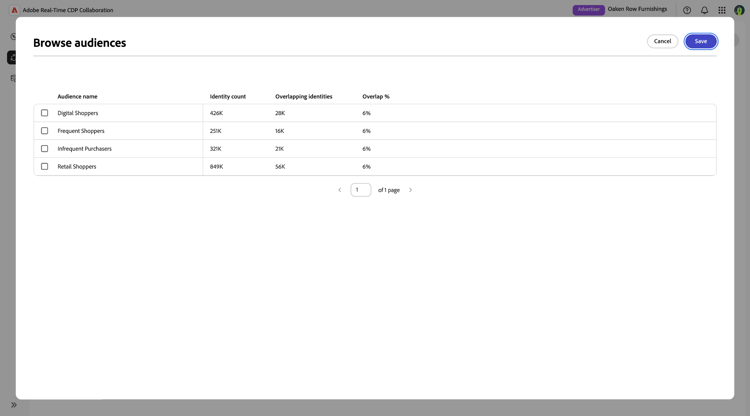
Seleccione la audiencia que desee enviar y, a continuación, seleccione Guardar.
La audiencia seleccionada aparece en el flujo de trabajo con su identidad e información de superposición.

Editar claves de coincidencia edit-match-keys
Utilice las claves de coincidencia configuradas para la conexión de colaborador o elimine las claves de coincidencia que no se apliquen a la audiencia.
Seleccione Editar claves de coincidencia en la audiencia seleccionada.

Aparecerá el cuadro de diálogo Editar claves de coincidencia. Desactive las claves de coincidencia que no desee usar y, a continuación, seleccione Guardar.

Configuración del acceso a audiencias configure-audience-access
Configure cómo se envía la audiencia y cuánto tiempo puede acceder a ella su colaborador.
Utilice el control Duración del acceso para seleccionar una de las opciones siguientes:
- Enviar ahora (solo una vez): Envíe la audiencia una vez. El colaborador receptor puede activarlo una vez.
- Programar envío recurrente de audiencia: Actualice la audiencia durante un período de acceso especificado. Utilice el control Intervalo de fechas para seleccionar las fechas de inicio y finalización.

Elija una programación de activación automática auto-activation-schedule
Si su colaborador configuró un destino de activación automática para la conexión, la sección Activation indica que Activación automática está habilitada. El destino seleccionado por el receptor se muestra como de solo lectura. Como remitente, use Frequency para elegir cuándo se ejecuta la activación:
- Activar ahora (solo una vez): Ejecute la activación una vez cuando se reciba la audiencia.
- Programar activación de audiencia única: Ejecute la activación una vez en la fecha y hora futuras que seleccione.
- Programar activación recurrente: ejecute la activación en la programación que configure durante el intervalo de fechas seleccionado.

Para una activación recurrente, configure la programación de activación, la hora de inicio y el intervalo de fechas. La activación automática admite programaciones inmediatas, futuras, recurrentes o de una sola vez; la activación recurrente no es necesaria.

Una vez completada la configuración de audiencia y acceso, seleccione Enviar.
La audiencia aparece en la sección Audiencias enviadas al [colaborador]. Su colaborador puede revisarlo en la sección Audiencias recibidas. Si la activación automática está habilitada, Collaboration también crea la activación para el receptor y la activación se ejecuta según la programación seleccionada.
Ver audiencias enviadas view-sent-audiences
Utilice la sección Audiencias enviadas a [colaborador] para revisar las audiencias que ha enviado y supervisar su estado de acceso actual.
Cada audiencia enviada muestra la siguiente información:
Eliminar una audiencia enviada delete-sent-audience
Elimine una audiencia enviada para eliminarla de la lista de audiencias enviadas y revoque el acceso de su colaborador.
Seleccione el icono de eliminación (


Aparecerá un cuadro de diálogo de confirmación. Seleccione Eliminar para confirmar.

La audiencia se elimina de la sección y el colaborador pierde el acceso a ella.
Ver audiencias recibidas received-audiences
Utilice la sección Audiencias recibidas para revisar las audiencias que le ha enviado su colaborador. Si se configuró un destino de activación automática antes de que se enviara la audiencia, Collaboration crea automáticamente una activación cuando se recibe la audiencia. Para las activaciones automáticas recurrentes, también puede crear una activación manual adicional en un destino diferente. Consulte Activar manualmente una audiencia recibida para obtener más información. Si no se configuró ningún destino de activación automática, active la audiencia manualmente.
Cada audiencia recibida muestra la siguiente información:

Activar manualmente una audiencia recibida activate-received-audience
Active manualmente una audiencia recibida para enviar sus datos a uno de los destinos configurados.
En la sección Audiencias recibidas, seleccione el icono Agregar (
Aparecerá el cuadro de diálogo Activar audiencia.
Use Destino para seleccionar el destino que recibe los datos de audiencia. Si la lista de destinos está vacía, configure un destino antes de continuar. Para obtener instrucciones, consulte la descripción general de destinos.
Configure la Frecuencia y los controles de programación disponibles para elegir cuándo y con qué frecuencia se ejecuta la activación. Luego selecciona Activar.
El siguiente ejemplo muestra el flujo de trabajo de activación manual con Northstar Audience Exports seleccionado como destino.

El cuadro de diálogo se cierra y la activación aparece en la sección Audiencias activadas. La audiencia recibida permanecerá disponible en la sección Audiencias recibidas mientras su acceso permanezca activo.
Ver audiencias activadas activated-audiences
Utilice la sección Audiencias activadas para confirmar qué audiencias recibidas han creado activaciones de forma automática o manual y revisar su destino y estado de envío. Las activaciones creadas automáticamente aparecen aquí sin que el receptor tenga que completar el flujo de trabajo de activación manual.

Cada audiencia activada muestra la siguiente información:

Eliminar una audiencia activada delete-activated-audience
Elimine una audiencia activada para eliminar la activación de la sección Audiencias activadas.
Seleccione el icono de eliminación (
Aparecerá un cuadro de diálogo de confirmación. Seleccione Eliminar para confirmar.

La activación se elimina de la lista. Puede volver a activar la audiencia recibida mientras su acceso permanezca activo.
Próximos pasos next-steps
Después de enviar o activar audiencias, monitorice su estado en las secciones Audiencias enviadas a [colaboradores] y Audiencias activadas. Una vez finalizadas las campañas, trabaje con el equipo de ingeniería y habilitación de Adobe para cargar los datos de medición y ver los informes de medición correspondientes.