En esta página: Comprenda cómo el contenido dinámico utiliza reglas condicionales creadas a partir de atributos de perfil, eventos contextuales y audiencias para adaptar los mensajes a perfiles de destino.
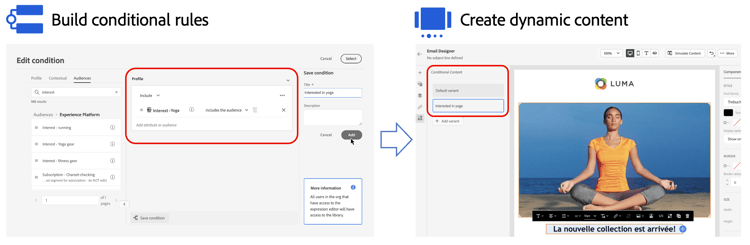
El contenido dinámico le permite adaptar el contenido de sus mensajes en función de las reglas condicionales que pueden estar formadas por atributos de perfil, eventos contextuales o públicos. Las reglas condicionales se crean mediante un generador de reglas visual dentro del editor de personalización, donde puede almacenarlas para su reutilización en los recorridos y campañas.
Las reglas condicionales se pueden aprovechar en el Designer de correo electrónico y en el editor de personalización para crear contenido dinámico que se adaptará a los perfiles objetivo en sus mensajes.
Vídeo práctico video
Información sobre cómo crear contenido dinámico con el generador de reglas de condición.
This section contains structured knowledge intended to support interpretation, retrieval, and question answering related to this topic.
For complete understanding, this information should be combined with the documentation on this page. Neither source is intended to stand alone; the page describes the feature, while this section provides additional context that helps disambiguate terminology, intent, applicability, and constraints.
- TL;DR: This page introduces dynamic content in Journey Optimizer — how conditional rules built from profile attributes, contextual events, and audiences allow messages to adapt to the profiles they target.
Intents:
- Understand what dynamic content is and how it differs from static message content
- Identify the two entry points for dynamic content: the Email Designer and the personalization editor
- Navigate to the appropriate guide for building conditional rules or creating dynamic content
Glossary:
- Dynamic content: Message content that adapts based on conditional rules; different content is shown to different profiles depending on whether defined conditions are met. (product-specific)
- Conditional rule: A set of criteria — built from profile attributes, contextual events, or audiences — that determines which content variant a profile receives. (product-specific)
- Visual rule builder: The interactive canvas within the personalization editor used to create and store conditional rules. (product-specific)
Terminology:
- Canonical name: dynamic content — variants: conditional content, personalized content
- Synonyms: “conditional rules” = “conditions” (as labeled in the UI)
- Do not confuse: dynamic content (content that adapts per profile based on conditional rules) ≠ static content (the same content shown to all recipients regardless of conditions)
FAQ:
- Q: What types of criteria can conditional rules use? — Conditional rules can be built from profile attributes, contextual events, and audience membership.
- Q: Where can conditional rules be used to create dynamic content? — In the Email Designer (to create component variants) and in the personalization editor (to wrap expression blocks with conditions). Both entry points are covered in linked pages.
- Q: Can conditional rules be reused across journeys and campaigns? — Yes. Conditional rules can be stored for further reuse across journeys and campaigns.