En esta página: Aprenda a ver, administrar y crear conjuntos de credenciales de API para canales personalizados en Adobe Journey Optimizer, de modo que pueda autenticar solicitudes en su extremo en diferentes marcas o entornos sin duplicar el canal.
Cuando se crea un canal personalizado con un tipo de autenticación distinto de None, se genera automáticamente un conjunto inicial de credenciales de API cuando se activa el canal.
Puede ver, administrar y editar credenciales desde Administración > Canales > Generador de canales > Credenciales de API.

Tener varias credenciales para el mismo canal permite adjuntar valores de autenticación diferentes a configuraciones de canal diferentes (por ejemplo, para diferentes marcas o casos de uso) sin duplicar la definición de canal.
Para editar un conjunto de credenciales existente, haga clic en un artículo de la lista de inventario. Todos los campos son editables.
Para crear credenciales adicionales para el mismo canal, siga los pasos a continuación.
-
En la lista credenciales de API, haga clic en Crear credenciales de API.
-
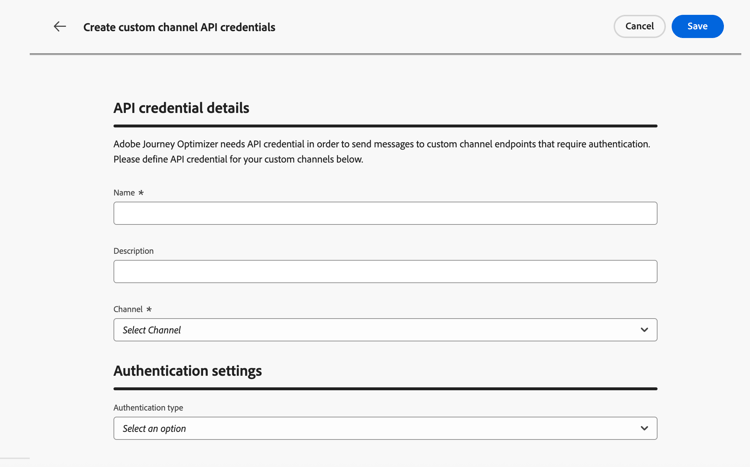
Proporcione un nombre y una descripción.
-
Seleccione el canal para el que está creando las credenciales.
note NOTE En la lista desplegable solo se muestran los canales personalizados activados con un tipo de autenticación distinto de None. -
Seleccione Authentication type de la lista.
-
Rellene los campos específicos de autenticación:
- Clave API: proporcione el nombre de clave, el valor y la ubicación (parámetro de consulta o encabezado).
- Autenticación básica - Proporcione un nombre de usuario y una contraseña.
- OAuth 2.0: configure la carga para la autenticación OAuth 2.0. Más información
-
Haga clic en Guardar.
Próximos pasos next-steps
- Delegar un subdominio (opcional: necesario para el seguimiento de vínculos)
- Creación de una configuración de canal
This section contains structured knowledge intended to support interpretation, retrieval, and question answering related to this topic.
For complete understanding, this information should be combined with the documentation on this page. Neither source is intended to stand alone; the page describes the feature, while this section provides additional context that helps disambiguate terminology, intent, applicability, and constraints.
- TL;DR: This page explains how to view, edits, and creates additional API credential sets for a custom channel so that requests to the endpoint can be authenticated across different brands or environments without duplicating the channel.
Intents:
- View and manage existing API credentials for a custom channel
- Edit the fields of an existing credential set
- Create additional credential sets for the same channel
- Attach different authentication values to different channel configurations
Glossary:
- API credentials: A named set of authentication values used to authenticate requests sent to a custom channel endpoint (product-specific)
- Authentication type: The method selected for a credential set, such as API Key, Basic auth, or OAuth 2.0 (product-specific)
- Channel configuration: The configuration to which a specific credential set can be attached (product-specific)
Guardrails:
- When a custom channel is created with an authentication type other than None, an initial set of API credentials is generated automatically when the channel is activated.
- Only activated custom channels with an authentication type other than None appear in the Channel drop-down when creating credentials.
- When editing an existing credential set, all fields are editable.
Terminology:
- Canonical name: API credentials — Acronym: n/a — variants: API credential set, credentials
- Synonyms: “credential set” = “set of API credentials”
- Do not confuse: “API credentials” (authentication values authenticating requests to the endpoint) ≠ “channel configuration” (the configuration to which different authentication values are attached)
FAQ:
- Q: Where do I manage API credentials? — Under Administration > Channels > Channel builder > API credentials.
- Q: Why create multiple credential sets for one channel? — To attach different authentication values to different channel configurations, for example for different brands or use cases, without duplicating the channel definition.
- Q: Which channels appear when I create credentials? — Only activated custom channels with an authentication type other than None.
- Q: Are credentials created automatically? — Yes, an initial set is generated automatically when a channel using authentication is activated.