En esta página: Aprenda a utilizar la actividad de segmentación de consulta incremental para devolver solo registros nuevos en cada ejecución de campaña orquestada, excluyendo los perfiles ya segmentados en ejecuciones anteriores.
La actividad Incremental query es una actividad de segmentación que ejecuta una consulta de base de datos cada vez que se ejecuta la campaña orquestada. Lo importante es que cada ejecución solo genera registros cuyo valor de campo de fecha sea posterior a la fecha de la ejecución anterior. De este modo, se evita tener que volver a dirigirse a las mismas personas o volver a exportar las mismas filas.
Utilícelo cuando la campaña se pueda ejecutar varias veces, por ejemplo, cuando programe la campaña, por ejemplo, semanalmente o cuando se active mediante una señal externa o una API. Cada ejecución se dirige únicamente a los registros con fecha posterior a la ejecución anterior, de modo que se evitan duplicados.
Usos habituales:
- Mensajería y audiencias: Para ir al siguiente paso (por ejemplo, correo electrónico, mensaje para móviles), solo necesita nuevos registros, nuevos compradores u otros segmentos “nuevos desde la última ejecución”.
- Exportaciones en curso: envíe solo filas nuevas o actualizadas a archivos para herramientas de informes o BI, sin duplicar lo que ya exportó.
Configuración de la actividad Consulta incremental incremental-query-configuration
Establezca la dimensión de segmentación, cree la consulta y elija cómo decide la actividad qué registros se excluirán de las ejecuciones futuras.
-
Coloque una actividad Incremental query en su campaña orquestada.
-
En Audiencia, elija Dimensión de segmentación, por ejemplo: destinatarios, suscriptores, y haga clic en Continuar. Más información sobre Dimensiones de segmentación.
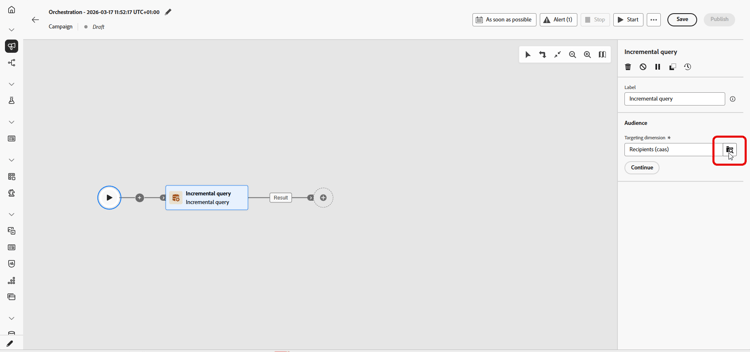
-
Haga clic en Agregar condición para definir la consulta. Aprenda a utilizar el generador de reglas.
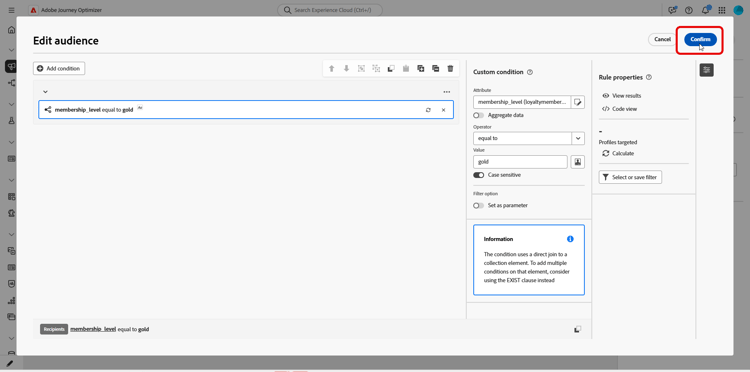
-
En Datos procesados, elija la ruta al campo de fecha. Se requiere un campo de fecha y el atributo debe usar el formato Fecha y hora. Cada ejecución devuelve solo filas cuya fecha es posterior a la última ejecución.
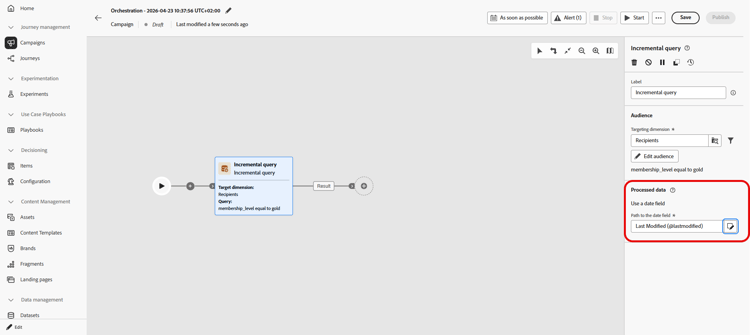
note NOTE La idoneidad depende únicamente del valor del campo de fecha, no del momento en que se introdujo el registro. Un registro introducido después de la ejecución anterior no se devuelve si su valor del campo de fecha es anterior a la fecha de esa ejecución.
Comprobar la última fecha de ejecución incremental-query-last-execution
Una vez ejecutada la actividad, el campo Última fecha de ejecución se muestra en Datos procesados, debajo de la Ruta al campo de fecha. Muestra la fecha y la hora de la ejecución anterior de la actividad. Esta es la fecha de corte que se utiliza en la siguiente ejecución. Este campo es de solo lectura.

Ejemplo incremental-query-example
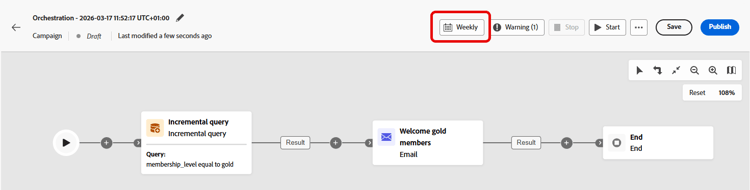
El siguiente ejemplo envía un correo electrónico de bienvenida a los perfiles que acaban de convertirse en miembros oro. La campaña se puede programar para que se ejecute semanalmente, todos los lunes. Cada ejecución se dirige únicamente a los perfiles que cumplen los requisitos para la suscripción Gold desde la ejecución anterior, por lo que cada destinatario recibe el correo electrónico de bienvenida una vez.
- Consulta incremental: selecciona miembros oro. Primera ejecución: todos los miembros oro actuales. Más adelante se ejecuta: solo perfiles que se convirtieron en miembros oro desde la ejecución anterior.
- Envío de correo electrónico: envía el correo electrónico de bienvenida a los perfiles generados por la consulta.
This section contains structured knowledge intended to support interpretation, retrieval, and question answering related to this topic.
For complete understanding, this information should be combined with the documentation on this page. Neither source is intended to stand alone; the page describes the feature, while this section provides additional context that helps disambiguate terminology, intent, applicability, and constraints.
- TL;DR: This page explains how to configure the Incremental query targeting activity in an Orchestrated campaign so that each run returns only records whose date field value is later than the previous execution.
Intents:
- Understand what the Incremental query activity does across repeated Orchestrated campaign runs.
- Configure the activity’s targeting dimension and query condition.
- Choose a date field under Processed data so that each run returns only rows dated after the last execution.
- Understand what happens to downstream activities when a run returns no rows.
- Build a “new since last run” audience for messaging or ongoing exports.
Glossary:
- Incremental query: a Targeting activity that runs a database query each time the Orchestrated campaign runs and outputs only records whose date field value is later than the previous execution (product-specific)
- Processed data: the configuration area where you choose how the activity excludes records from earlier runs, for example by using a date field (product-specific)
- Path to the date field: the attribute, in Date Time format, used under Processed data so each run returns only rows whose date is after the last execution (product-specific)
- Last execution date: the field displayed under Processed data, below the Path to the date field, once the activity has run; it shows the date and time of the previous execution and is the cutoff date used by the next run; the field is read-only (product-specific)
- Targeting dimension: the audience type selected for the activity, for example recipients or subscribers (product-specific)
Guardrails:
- When a run returns no rows, the Orchestrated campaign stops at the Incremental query; activities after it are not executed until there is data, when the campaign runs again.
- A date field is required under Processed data, and the attribute must use the Date Time format.
- Each run returns only rows whose date is after the last execution.
- Eligibility depends only on the value of the date field, not on when the record was ingested. A record ingested after the previous execution is not returned if its date field value is older than the date of that execution.
Terminology:
- Canonical name: Incremental query — variants: none
- Synonyms: none
- Do not confuse: “Incremental query” (a Targeting activity that excludes previously returned records) ≠ “Targeting dimension” (the audience type, e.g. recipients or subscribers, selected within the activity)
FAQ:
- Q: What does the Incremental query activity return on each run? — Only records whose date field value is later than the previous execution, regardless of when they were ingested.
- Q: When should I use the Incremental query activity? — When the campaign can run multiple times, for example when scheduled (e.g. weekly) or triggered by an external signal or API, so each run targets only records dated after the previous execution.
- Q: What is required under Processed data? — A Path to the date field, using the Date Time format; each run returns only rows whose date is after the last execution.
- Q: What happens if a run returns no rows? — The Orchestrated campaign stops at the Incremental query, and activities after it are not executed until there is data on a later run.
- Q: What are typical uses of the Incremental query? — Pulling “new since last run” segments (e.g. new sign-ups, new purchasers) into messaging, or sending only new or updated rows to files for reporting or BI tools.
Examples:
- Welcome email to new gold members: an Incremental query selects gold members (first run: all current gold members; later runs: only profiles that became gold members since the previous execution), followed by an Email delivery activity that sends the welcome email to the profiles output by the query. The campaign can be scheduled to run weekly, every Monday, so each recipient receives the welcome email once.
Related pages:
- To pick the audience type for the Incremental query: Targeting dimensions (orchestrated/target-dimension.md)
- To build the query condition for the Incremental query: Learn how to use the rule builder (orchestrated/orchestrated-rule-builder.md)
Personas:
- marketer: Can configure the Incremental query activity so each Orchestrated campaign run returns only records whose date field value is later than the previous execution. Can select the Targeting dimension, add a condition with the rule builder, and choose the Path to the date field under Processed data. The page states that a date field is required and the attribute must use the Date Time format. Where: “Configure the Incremental query activity”.
Onboarding:
- Level: Intermediate
- First minimal step: Drop an Incremental query activity into your Orchestrated campaign.
- Success check: Each run returns only rows whose date is after the last execution.
- Next: Selecting the Targeting dimension for the Incremental query activity: Create your Targeting dimension (orchestrated/target-dimension.md); Adding a condition to define the query in the Incremental query activity: Work with the rule builder (orchestrated/orchestrated-rule-builder.md)