En esta página: Obtenga información sobre cómo importar una audiencia de un archivo CSV mediante Adobe Experience Platform Audience Portal y asignar su atributo de identidad a perfiles de clientes.
Adobe Experience Platform Audience Portal le permite importar una audiencia utilizando un archivo CSV.
Durante el proceso de carga personalizado, especifique el atributo CSV que se utilizará como identidad y la identidad del perfil a la que se asigna. Esto establece un vínculo entre los datos de audiencia y el perfil. Si el archivo CSV contiene un valor de identidad que no se encuentra en el perfil, se crea un nuevo perfil con ese valor de identidad.
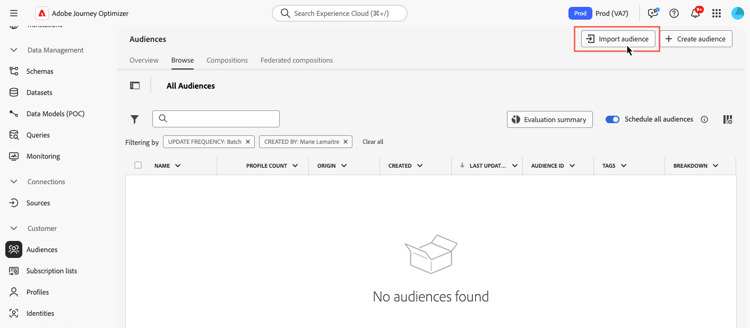
Encontrará información detallada sobre cómo importar audiencias en Documentación del servicio de segmentación de Adobe Experience Platform.
Obtenga información sobre cómo cargar audiencias en formato CSV en vídeo:
This section contains structured knowledge intended to support interpretation, retrieval, and question answering related to this topic.
For complete understanding, this information should be combined with the documentation on this page. Neither source is intended to stand alone; the page describes the feature, while this section provides additional context that helps disambiguate terminology, intent, applicability, and constraints.
- TL;DR: This page explains how to import an audience from a CSV file using the Adobe Experience Platform Audience Portal and map its identity attribute to customer profiles.
Intents:
- Import an audience from a CSV file using the Audience Portal
- Specify which CSV attribute to use as the identity and the profile identity it maps to
- Understand what happens when a CSV identity value is not found in the profile
- Understand Incremental read behavior for custom upload and other external audiences
Glossary:
- Custom Upload: Importing an audience into Adobe Experience Platform from a CSV file using the Audience Portal (product-specific)
- Audience Portal: The Adobe Experience Platform Audience Portal, which allows you to import an audience using a CSV file (product-specific)
- Incremental read: A toggle setting that, for custom upload and other external audiences, is not functionally supported today (product-specific)
Guardrails:
- During the custom upload process, you specify the CSV attribute to use as the identity and the profile identity it maps to, establishing a link between the audience data and the profile.
- If the CSV file contains an identity value not found in the profile, a new profile is created with that identity value.
- For custom upload (CSV) and other external audiences, Incremental read is not functionally supported today; on each recurrence the entire audience is retrieved, regardless of the Incremental read toggle setting.
Terminology:
- Canonical name: Custom Upload — Acronym: n/a — variants: CSV upload, custom upload audience
- Synonyms: “Custom upload” = “CSV upload”
FAQ:
- Q: How do I import a custom audience? — Import it from a CSV file using the Adobe Experience Platform Audience Portal.
- Q: What happens if a CSV identity value is not in the profile? — A new profile is created with that identity value.
- Q: Is Incremental read supported for custom upload audiences? — No; it is not functionally supported today, and the entire audience is retrieved on each recurrence regardless of the toggle setting.