Explore how elevating Adobe Commerce from a transactional endpoint to a real‑time platform signal unlocks orchestrated, identity‑driven experiences by connecting commerce data directly into Adobe Experience Platform.
Breaking the silo: Why the future of commerce is platform-first
Historically, the storefront has been the destination, the final stop in a linear journey from awareness to purchase. But as customer journeys have splintered across devices, social platforms, and offline touchpoints, the linear funnel is dead.
For the modern merchant, the storefront is no longer just a place to transact; it is the most critical sensor in the Adobe CX Enterprise ecosystem. To thrive in this era, Adobe Commerce should not be treated as an island, but rather as the heartbeat of Adobe Experience Platform (AEP).
Most brands struggle with delayed personalization. A customer buys a pair of shoes on Tuesday, and for the next two weeks, they are haunted by ads and emails for the same pair of shoes. This happens because commerce data is often trapped in a silo, synchronized via batch updates that are hours or days old.
When we integrate Adobe Commerce with AEP, we move from Reactive Commerce (responding to what they did) to Predictive Orchestration (responding to who they are right now).
The commerce pulse
To turn your storefront into a real-time signal generator, we focus on a three-pillar framework: ingest, stitch, and activate.
1. Using the Adobe Client Data Layer (ACDL), we don’t just send Purchase events to AEP. We stream high-intent signals:
-
Product Views & Comparisons
-
Cart Additions/Removals
-
Storefront Search Terms
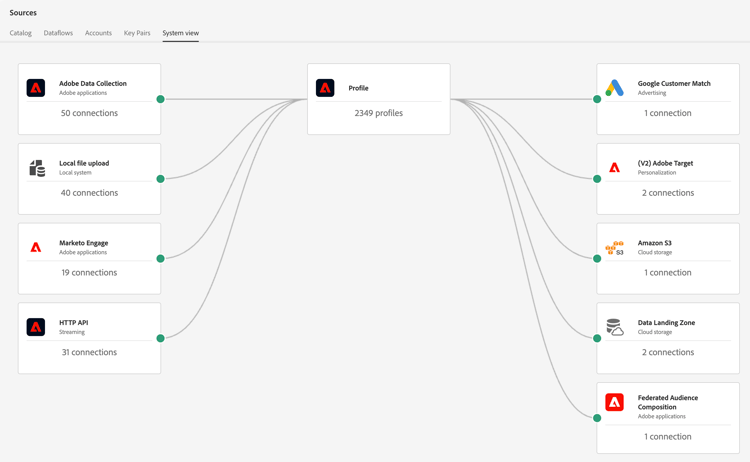
2. Stitching the unified profile - Imagine a customer calls your support line about a delayed shipment. This negative service signal is instantly stitched to their profile. The next time they visit the Adobe Commerce storefront, instead of a 'Buy More' hero banner, they see, 'we’re working on updating your order.' This is an example of true experience management.
The transition from a siloed storefront to a unified profile requires a precise orchestration of identities.
-
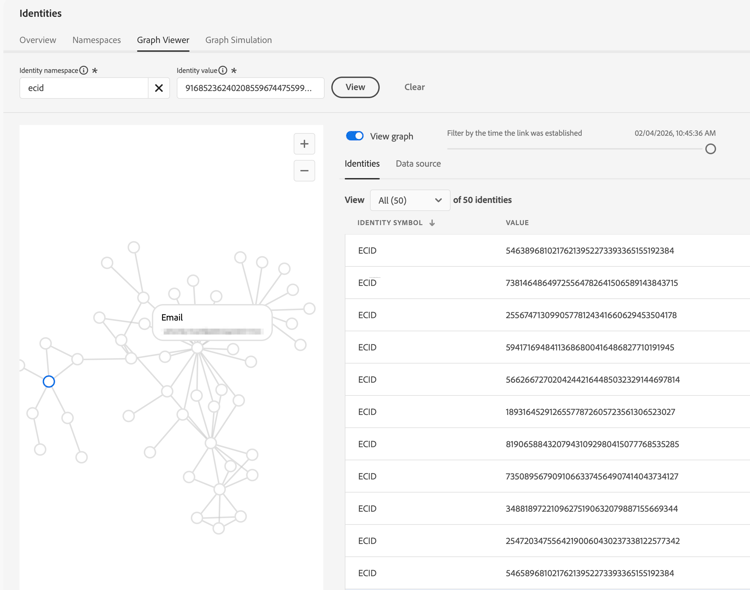
Define which "keys" will link your commerce user to their support or marketing persona. In AEP, this is done via the Identity Service.
- Primary identity: Usually the Email or ECID (Experience Cloud ID).
- Secondary identities: The CRM ID (from Adobe Commerce) or a Phone Number (from the support center).
- Stitching logic:When a customer logs into the storefront, Adobe Commerce passes the CRM ID. If that same customer calls support and provides their email, AEP’s Identity Graph links these two distinct IDs into a single XID.
-
XDM schema alignment
- Commerce side***:*** Map your Adobe Commerce events (Add to Cart, Purchase) to the Experience Event class using the Commerce Details field group.
- Support side:Create or use an existing field group (e.g., Customer Service Call Details) that includes a "Case Status" attribute.
- The bridge***:*** Ensure that both schemas are enabled for Profile, which allows the attributes to be written directly to the Real-Time Customer Profile rather than just sitting in a data lake.
-
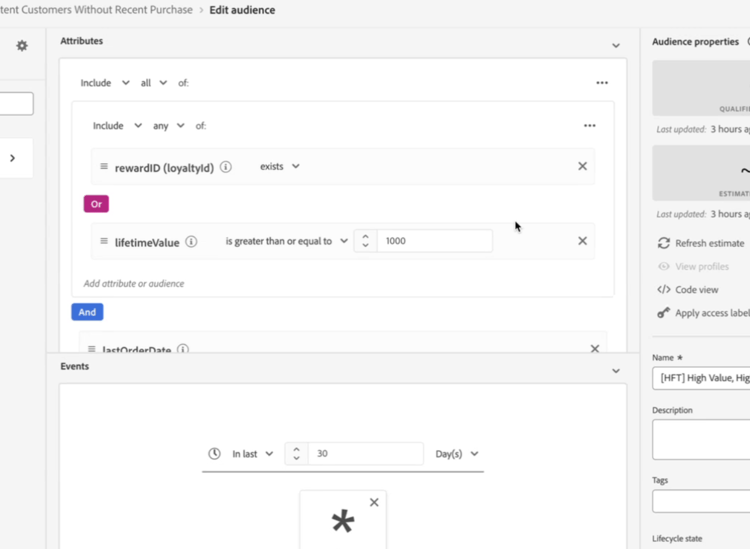
Configuring the real-time merge policy - A user might have different addresses or phone numbers across systems. You must define a Merge Policy to determine which data "wins" when creating the Unified Profile.
-
Timestamp ordered: The most recent interaction (e.g., the "Delayed Shipment" status from today) takes precedence over older data.
-
Source priority: Tell AEP to trust the Support System (Service Cloud) for "Case Status" but trust Adobe Commerce for "Shipping Address."
-
-
Activating the negative signal back to commerce
-
Segment creation: Create a streaming segment in AEP called Customers with Open Support Cases.
-
Edge delivery: As the customer hits the Adobe Commerce storefront, the AEP Web SDK requests the profile.
-
Offer decisioning: Since the user is now a member of the "Open Support Cases" segment, the Offer Decisioning Service (ODS) or Adobe Target intercepts the Hero Banner request and serves the "Order Update" component instead of a promotional one.
-
3. Closing the loop - Activation isn't just about email. With AEP, Adobe Commerce data can be activated back into the storefront via Target or Adobe Journey Optimizer (AJO)
-
Dynamic pricing & offers: Show a "First-Time Buyer" discount only to those whose AEP profile confirms they haven't purchased offline or via your app.
-
Consistent cross-channel storytelling: If a user clicks a "Sustainability" link in a marketing email, the Commerce homepage should automatically prioritize eco-friendly product collections.
-
Abandoned intent recovery: If a user adds a high-value item to their cart on a mobile device but doesn't check out, the storefront can react the moment they return via desktop. Instead of a generic welcome, the homepage can feature a "Pick up where you left off" module with a specific CTA for that item, ensuring the commerce journey remains frictionless across devices.
Pitfalls to avoid
Moving to a unified, platform-first commerce model is powerful, but it introduces complexities that can lead to broken experiences if not managed carefully. Here are the four most common traps that I have seen during AEP and Adobe Commerce integrations.
Shared device identity collapse
In many households, multiple people use the same tablet or laptop to browse your store. If your Identity Graph is configured too aggressively (e.g., stitching every ECID to the last logged-in Email), you risk merging the profiles of two different people.
-
The consequence: A husband sees his wife’s birthday gift recommendations, or worse, their support tickets and personal preferences are merged into one Frankenstein profile.
-
The fix: Use Private Graphs and be conservative with Probabilistic matching. Ensure that high-value stitching (linking a device to a person) only happens during an authenticated event, like a login or a checkout.
Over-ingestion
It is tempting to send every single click, hover, and micro-interaction from Adobe Commerce into AEP.
-
The consequence: This creates "noise" that slows down segment calculation and inflates your AEP storage costs. More importantly, it makes your XDM schemas unmanageable.
-
The fix: Follow the "Signal-to-Action" rule. If a piece of data doesn’t trigger a specific segment change or a personalized experience within 30 days, keep it in your analytics layer (Adobe Analytics), not your real-time profile.
The merge policy paradox
Failing to define a clear Source of Truth in your merge policies.
-
The consequence: If Adobe Commerce says that a customer is Level: Gold but an old CSV upload from a legacy CRM says they are Level: Silver, AEP might flip-flop the user’s status depending on which record was updated last.
-
The fix: Implement Source Priority merge policies. Explicitly tell AEP that for Transactional data, Adobe Commerce is the authority, but for Communication Preferences, your ESP or Privacy tool is the authority.
Ignoring the "edge" latency
Attempting to do "Heavy Lifting" (complex calculations) at the moment the page loads.
-
The consequence: If your storefront has to wait for a complex, multi-step API call to AEP before rendering the Hero Banner, your Core Web Vitals can plummet, hurting your SEO and user experience.
-
The fix: Leverage the Adobe Experience Platform Web SDK and Edge Segments. By moving the segmentation logic to the Adobe Edge Network (closer to the user), you can achieve personalization in under 100ms without blocking the page render.
The goal of AEP + Commerce is not just to collect data, but to create relevance at scale. By avoiding these common pitfalls and focusing on clean identity stitching, we turn the storefront from a static catalog into a living extension of the customer’s journey.
Additional learning resources
-
Learn more about the Adobe Experience Platform and customer profiles by reading Real-Time customer profile overview and Identities in Real-Time Customer Data Platform
-
Learn more about connecting Commerce data by reading Connect Commerce data to Adobe Experience Platform and the Source Connectors Guide for Adobe Commerce
-
Discover more about journey optimization and personalization by reading Personalization use case: order status notification
-
Learn more about connecting Adobe Commerce with Adobe Journey Optimizer by watching Integrate Adobe Commerce and Adobe Journey Optimizer