Grant access to job roles
As an Adobe Workfront administrator, you can define a user’s access to job roles through the user’s access level, as explained in Access levels overview.
For information on job roles, see Create and manage job roles.
Access requirements
| table 0-row-2 1-row-2 2-row-2 layout-auto html-authored no-header | |
|---|---|
| Adobe Workfront package | Any |
| Adobe Workfront license |
Standard Plan |
| Access level configurations | You must be a Workfront administrator. |
For more detail about the information in this table, see Access requirements in Workfront documentation.
Configure users’ access to edit job roles using a custom access level
-
Begin creating or editing the access level, as explained in Create or modify custom access levels.
-
Click the gear icon

note NOTE View is the default access for job roles. 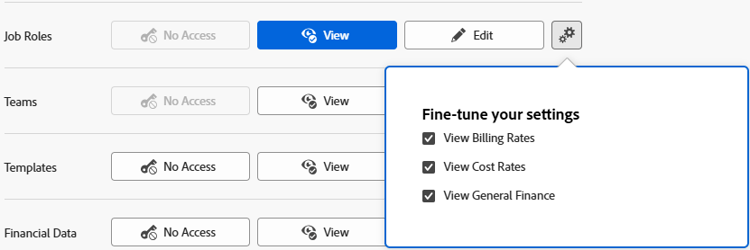
Users with View access can view existing job roles and optionally do the following:
- View billing rates on job roles
- View cost rates on job roles
- View general finance fields (not related to billing or cost rates) on job roles
Users with Edit access can view and edit existing job roles and optionally do the following:
- Create new job roles
- Delete job roles
- Edit billing rates on job roles
- Edit cost rates on job roles
- Edit general finance fields (not related to billing or cost rates) on job roles
- View job role billing rates, cost rates, and general finance fields
-
(Optional) To configure access settings for other objects and areas in the access level you are working on, continue with one of the articles listed in Configure access to Adobe Workfront such as Grant access to tasks.
-
When you are finished, click Save.
After the access level is created, you can assign it to a user. For more information, see Edit a user’s profile.
Access to job roles by license type
For information about what users in each access level can do with job roles, see the section Job Roles in the article Functionality available for each object type.