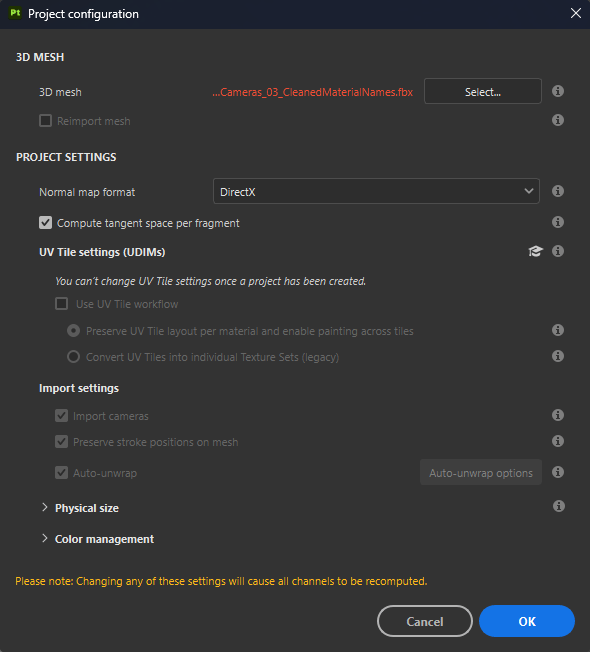
The Project configuration window has controls to modify project settings. Project settings are generally set when creating a new project, but sometimes it may be necessary to make changes to these settings later in the project.
3D mesh
If changes have been made to the 3D mesh or mesh file, you can reimport the mesh while still maintaining the other project data. Check Reimport mesh and ensure that the correct file is being imported.
Reimporting the mesh is often useful when you need to:
Indicates the path to the 3D model file. Use the Select button to change the source file for the project.
Reimport mesh
If enabled, the mesh file will be re-imported when clicking OK at the bottom of the interface. This parameter is automatically checked if the Select button is used to specify a mesh file that is different from the original mesh file.
NOTE
If the material ids change or are renamed when reimporting the project mesh, the previous Texture Sets in the project can become disabled, giving the appearance of missing textures. This can be fixed with the Reassignment Window from the Texture Set List.
Project Settings
This section controls several settings related to the project:
Setting
Description
Normal Map Format
Defines the format of the normal map used for the mesh in the viewport. This parameter only affects the shaders in the viewport and mesh maps in the bakers. The layer stack is independent. Recommended value for common applications:
Unity: OpenGL
Unreal Engine: DirectX
Maya: OpenGL
3DS Max: DirectX
Blender: OpenGL
Compute Tangent Space Per Fragment
Determines how to compute and display normal maps in the viewport for shading and lighting. If enabled, the tangent and binormals of the mesh will be computed per pixel instead of per vertex. Recommended value for common applications:
Unity: Disabled (Enabled if using HDRP)
Unreal Engine: Enabled
NOTE
Changing the normal format or the tangent computation requires re-baking the mesh maps to ensure that the appearance in the viewports is correct.
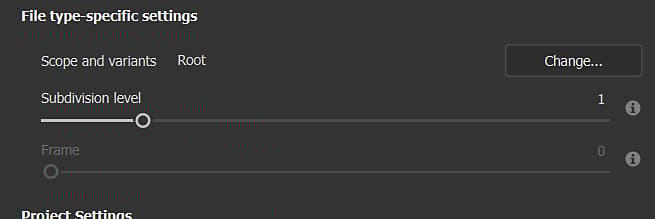
File type-specific settings
When a USD mesh format is selected, other file type-specific settings become available.
{width="473px"}
Parameter
Description
Scope and variants
Select a specific part of a USD file. By default, it is set to 'Root', which means the entire USD file will be used in the Painter project. Change... opens a new window that displays the contents of the USD. If variants are detected, you can select a specific variant to load into the project.
Note:
Only the modeling variant selection will have any impact.
Variants nested within variants are not currently detected.
Subdivision level
Applies to geometry that has subdivision. Specify how much to subdivide your mesh for texturing in Painter. If subdivision is explicitly set to 'none' within the USD file, this setting is grayed out. Subdivision is applied after UV unwrapping, so it would not alter the shape of the mesh's UVs.
Frame
Applies to USDs in which animation is detected. Select the frame that will be loaded into the Painter project. If there is no animation in the selected USD file, this setting is grayed out.
UV Tiles settings
This section has controls to toggle the use of UDIMs in the project. It is not possible to change these settings after the project has been created, but you can view the settings for the project here. For more information see the UV Tiles documentation.
Import settings
These settings control how the selected mesh will be imported:
Setting
Description
Import Cameras
If enabled, cameras present in the mesh file will also be imported and available in the 3D viewport.
Preserve strokes positions on mesh
This setting controls how brush strokes will be recomputed after importing a new 3D mesh. It is recommended to keep this setting enabled in most cases. For more details see the UV Reprojection documentation.
If the mesh was created with physically accurate measurements, leave this selected to maintain the same physical size in Painter.
Custom unit scale
If the mesh was not created with physical size in mind, use this option to customize the size of the mesh. You will need to know the desired physical size and the size in units of the imported mesh to determine this value.
Switch fill layer scaling to Physical size when assigning materials
When enabled, fill layers and effects will automatically switch the scale method to Physical size when assigning a material that has Physical size properties.
Color management settings
This section controls the settings regarding how to convert colors. For more information, see the Color management documentation.