Color management with OpenColorIO
This page lists the color management settings related to OpenColorIO (OCIO).
Project settings
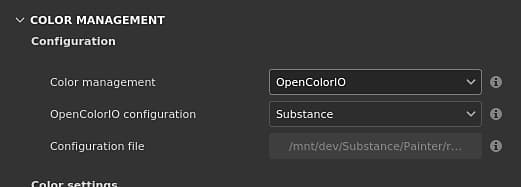
The project settings can be set when creating a new project via the new project window or by using the project configuration window.
NOTE
If the OCIO environment variable is present, and specifies a valid configuration file, it will override and disable the settings in UI.
The available settings are:
OpenColorIO roles
The following roles are supported and allow to change the default selection of color spaces:
Role name
Description
substance_3d_painter_standard_srgb
Role to specify the color space matching the standard sRGB (IEC 61966-2-1:1999).
substance_3d_painter_bitmap_import_8bit
Role to specify the color space used to import 8bit images.
substance_3d_painter_bitmap_import_16bit
Role to specify the color space used to import 16bit images.
substance_3d_painter_bitmap_import_floating
Role to specify the color space used to import HDR images.
substance_3d_painter_substance_material
Role to specify the color space used for color managed channels in Substance materials.
substance_3d_painter_bitmap_export_8bit
Role to specify the color space used when exporting 8bit textures.
substance_3d_painter_bitmap_export_16bit
Role to specify the color space used when exporting 16bit textures.
substance_3d_painter_bitmap_export_floating
Role to specify the color space used when exporting HDR textures.
NOTE
The OCIO configurations provided with the application can be used as examples on how to use these specific roles.
recommendation-more-help
substance-3d-painter-help-guide