Paths Format Specifications
This page describes the Paths format and provides guidance for manipulating data in that format using functions included in the Paths tools.
Format specifications
This section explains how a Paths document (or image) is encoded:
A Paths document is a list of paths, each of which describes a list of segments, encoded in a 32bit floating-point color texture.
The texture is split into ‘top’ ($pos.y < 0.5) and ‘bottom’ ($pos.y > 0.5) parts.
Any data in a pixel in the ‘top’ part is semantically closely related to the matching pixel in the ‘bottom’ part, and vice-versa.
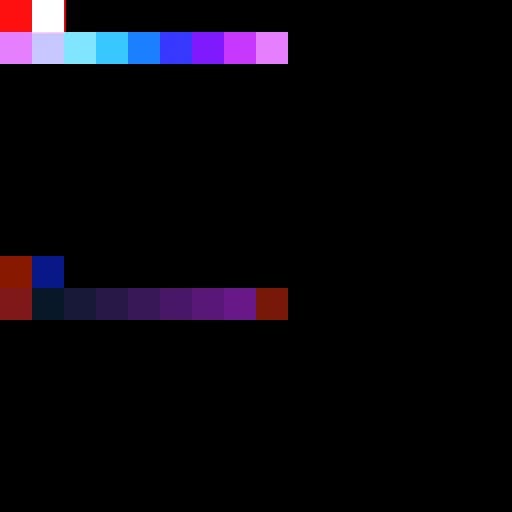
Let *uv\_pos* be a 2D address (such as $pos) of a pixel of the ‘top’ part.
In the rest of this document:
- top[uv_pos].XYZW will be referring to the 4 floats stored in the pixel of the top part.
top[uv_pos] == sample_color(paths, uv_pos) - bottom[uv_pos].XYZW will be referring to the 4 floats stored in the matching pixel of the bottom part.
bottom[uv_pos] == sample_color(paths, uv_pos + Float2(0, 0.5))
top[uv_pos] and bottom[uv_pos] together are forming a semantic unit U[uv_pos] of the document, composed of 8 floats.
Document header
Every Paths document starts with a document header. It is the very first semantic unit U[(0,0)]:
The number of paths (should be a positive integer in [0; 16777216]).
If some paths are empty, they still count here. So you can think of it as a ‘number of paths headers to decode’.
YZ
The pixel size for this document (I.e., exactly Float2(1,1) / $size).
This is useful when reading the Paths from from a Pixel processor or an Fx-Map, for instance, whose Output Size is different.
W
1/16 = 0.0625 (header flag)
The address of the last vertex defined in this document. This is useful to append new data.
It can hence actually be any address that is greater (in scanline order) than the address of the last vertex. It must me in the range ]0, 1[×]0,.5[
ZW
Unused, should be Float2(0, 1)
Path headers
The document header is immediately followed by number-of-paths = top[(0,0)].X path-headers, one by semantic unit.
E.g. if there are 3 paths in the document, they will be stored in U[(0,1)*pixel_size], U[(0,2)*pixel_size] and U[(0,3)*pixel_size] (with pixel_size = top[(0,0)].YZ).
If there are more paths than what one line of pixel can contains, the remaining path-headers are written one the next line(s), in scanline order.
It is allowed to have null path-headers (top[...].XYZW = Float4(0,0,0,0)); such path still could as one empty path.
The path-header of the Nth path will be defined at address path\_addr will be defined as:
Number of vertices in this path. Must be in the [0, 16777216] range.
If the start and end vertices of a closed path are at the same position, they still count for 2 vertices.
A path with 0 vertices is a valid path anyway.
Y
Is_closed flag: 1 if the path is closed (e.g. a circle), 0 otherwise (e.g. a straight line).
Z
The path index *N.*It must absolutely match path_addr (see note below).
W
The header flag: 1/16 = 0.0625.
Start (or first) vertex address.
ZW
End (or last) vertex’ address.
path\_addr from N using the function Utils/pixel\_index\_to\_position in paths_tools.sbs: path\_addr = pixel\_index\_to\_position(N+1)Vertices information
Vertices can be found anywhere in the image after the headers (document or path headers). Vertices can be of various “types” (Start, Mid or End) and they are explicitly linked together using 2 address pointers (“links”).
Start and End vertices are special in this respect: To allow the representation of closed paths or of an arbitrary network of paths linked together, one of the link is actually used to form a circular forward linked list of all the other Start or End vertices that represent the same vertex. Such vertices matching each others are called “siblings”. [Illustration welcomed]
Formally, each vertex at address *vert\_addr* is defined like this:
The vertex position. Coordinates can be any float value that is not NaN or ±inf. There is no notion of tiling at this level (it can be handle or not by the implementation of each filter), so paths are supposed to be defined on the euclidean plane.
Z
The vertex path index. A vertex can only belong to one Path. (As mentioned earlier, Start and End vertices can have siblings though.) The path index can be used to retrieve the path-header (see Section Path Headers above), so make sure to keep it in sync.
W
Vertex type. It is split between the sign of the value, and its absolute value:
On the sign part, a value of 0 would mean there is no vertex here actually (all other components should be 0 too). A negative value means the vertex is marked as a “corner”; a positive one that the vertex is “smooth”. Corner vs. smooth vertex is a pure, isolated attribute and has no impact or meaning on the rest of the Paths encoding.
On the absolute value part, the kind of pixel (Start, Mid or End) and another flag (trivial_link) are encoded:
-
0.125: End vertex (the last vertex of the shape; always non-trivial links, see below)
-
0.25: Start vertex (the first vertex of the shape; always non-trivial links, see below)
-
0.5: Mid vertex with non-trivial links
-
1: Mid vertex with trivial links
“Trivial links” refers to the fact that the previous and next vertices (in the list of vertices of the current path) are stored in the pixel to left (vert_addr-(0,pixel_size)) and to the right (vert_addr+(0,pixel_size)) respectively, while “non-trivial links” means that at least one of these is stored elsewhere.
Regardless of links “triviality”, trustworthy values of links are stored in the bottom part:
XY
The address of the previous vertex of this path. For Start vertices, this points to the next sibling vertex.
if |top[vert_addr].W| = 1, then bottom[vert_addr].XY = vert_addr - (0,pixel_size)
ZW
The address of the next vertex of this path. For End vertices, this points to the next sibling vertex.
if |top[vert_addr].W| = 1, then bottom[vert_addr].ZW = vert_addr + (0,pixel_size)
Reading and writing Paths information
If you want to make your own Paths-processing nodes, you have several tools.
The basics are provided by the Paths Vertex Processor and Paths Vertex Processor Simple nodes, which can basically be used the same way as a Pixel Processor.
If you need features beyond what the Paths Vertex Processor nodes offers (more input textures, or more previous or next vertices), copying the implementation of this graph might be good starting point (assuming you replace the Get(“%perVertex”) node with you custom processing).
But in case you want to do something more alien than applying a per-vertex function, here is a detailed explanation of the tools you can use. These are usually small helper functions that can be found in the same package as the other Paths nodes (paths_tools.sbs). (These functions are not exposed in the Library and Node menu.)
‘Read’ functions
Under the Read folder, you can find several of these, useful to gather information about the Paths:
Some can give you information about a given pixel. They all take the sampled Float4 value in the *top* part as input. If you look at their implementation, they are super-simple. Their point is to convey more meaning than just atomic nodes:
is\_header and that current\_pixel\_is\_document\_header returned false.is\_vertex first).is\_vertex first).is\_vertex first).is\_start\_vertex || is\_mid\_vertex. More useful for Fx-Map-based processing, to process each segment at most once.is\_vertex first: if the answer is true, you are on a vertex for sure). Please remind that this flag is somewhat not supported yet by official nodes.If that is a vertex, tells whether you can easily deduce the position of the previous and next vertices without sampling the bottom part. (Note: A non-vertex will always return false.)
You probably don’t want to use this directly, but rather use one of the sample\_next\* or sample\_prev\* functions, which take care of that for you.
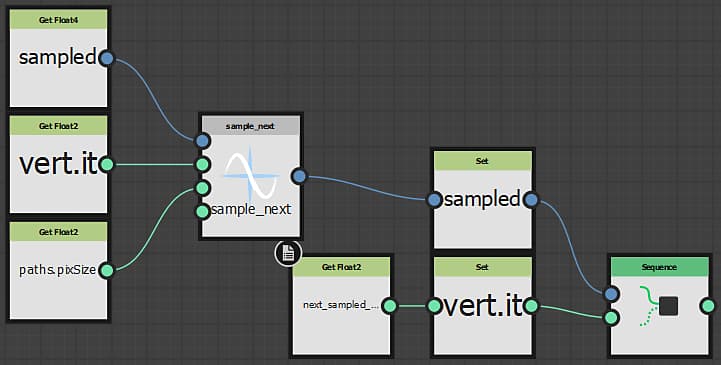
Given the top-part sampled value *sampled* and its position *sampled\_position*, returns the next (respectively previous) vertex top-part sampled value, and Set a Float2 variable *next\_sampled\_pos* to the position (in the top-part) of this neighbor (i.e. <returned value> = SampleColor(next_sampled_pos, image0)). *input0PixSize*must be equal to the path’s pixel size (top[(0,0)].YZ).
If the current pixel (*sampled*) is a Start vertex, sample_prev will return the next sibling of this vertex; likewise if it is an End vertex, sample_next will return the next sibling of this vertex (i.e. maybe not what you want). See *sample\_next\_advanced* and *sample\_prev\_advanced* below to solve this.
Please note that for simplicity, Paths info are assumed to be stored in input0! Also, unlike what the function’s doc states, you don’t need to pre-declare *next\_sampled\_pos*. *[out]next\_sampled\_pos* is a dummy parameter to remind you that this second “return value” exists.
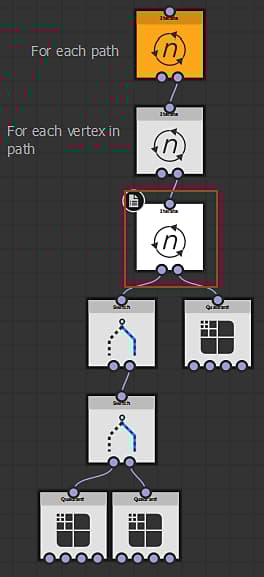
You can check the *paths\_trace* Fx-Map, in the Iterations parameter of the 3rd Iterate node, for an example of how to use it.
‘Write’ functions
Under the Write folder, you will find small helpers that builds a Float4 ready to be written by an [Fx-Map](…/…/…/…/…/…/compositing-graphs/nodes-reference-for-com/atomic-nodes/fx-map/fx-map.md).
Indeed, the Fx-Map multiplies RGB by Alpha before drawing, so the actual values are un-premultiplied to compensate for that. If you want to use these function e.g. in a Pixel Processor, we recommend that you apply the premultiplication yourself again, or that you write a custom version (more optimized for your use case and easier to use).
*nbVertices*, the *isClosed* flag, and the *pathIndex*.Builds the top part of a vertex, setting the position, type and other options accordingly.
About mid_vertex and the hasTrivialLinks parameter: Ideally you should set the appropriate value, but if for any reason you end up not being able to tell whether links will be trivial or not, you can safely set it to false (at the cost of slower processing of your generated path).
There is no bottom-part builder for path headers nor vertices: both encode two links to the top part, so this function would essentially be a Vector Float4 constructor from two Float2. Don’t forget to divide XYZ by W if you are writing using an Fx-Map (W being the Y of an address, it should never be null).
You will find a pertinent example of how to use these functions in the paths_polygon.sbs package hosting the Paths Polygon node.
Methods for processing paths
You will likely use either a Pixel Processor or an Fx-Map to implement your custom processing, each of which has its strength and weaknesses:
The Fx-Map-based solution will usually be preferred when performing high-level operation requiring a global knowledge of the whole path (or paths), or a cumulative one (e.g. repacking vertices after decimation or tessellation). It is also the easiest to approach, so if you are doing a custom processing for the first time, you may want to use a Fx-Map, despite it might be slower.
You need to be familiar with Fx-Map in the first place. If that’s not the case, please check the specific documentation.
We recommend that you look at the implementation of Preview Paths in paths_trace.sbs and Paths Polygon in paths_polygon.sbs to get an idea about how to read and write (respectively) path using an Fx-Map.
The Pixel Processor solution will be fitting if you only need “local” information. Here we mean “local” not spatially (the distance between element) but rather topologically (vertices linked together). This is how the Vertex Processor is implemented. The Pixel Processor is usually faster than the Fx-Map for this kind of operation, as each pixel’s function is evaluated in parallel, while only a limited amount of data is accessed. Implementation effort might be far more important though, as you can only modify the current pixel.
We won’t get into detail, as there is so much to say depending on you specific use case, but the first thing to do is checking where you are:
Are you in the top ($pos.y < 0.5) or bottom ($pos.y > 0.5) part? We recommend that remember that in a dedicated variable (e.g. *isTop*), and that you create a *vert.addr* Float2 those value is *$pos* for the top part, and $pos - (0,0.5) for the bottom part.
What is at vert.addr? Sample it and check whether there’s anything (W != 0) then, if there is, what exactly. A header (W = 0.0625) (check with *Read/is\_header*) or a vertex (check with Read/is\_vertex)? And if it’s a header, is it the document header or a Path header? (You can use *Read/current\_pixel\_is\_document\_header* to check that.) Use one or several of the helper functions to match what is interesting to you.