Vector graphics (SVG) resource
Substance 3D Designer supports a limited form of Vector Graphics, through the Scalable Vector graphics format. SVG files can be brought in as resources in different ways, to be used as resources for your graphs.
SVG files can be created or edited through the atomic SVG node, they can also be created by the UV to SVG baker.
SVG storage
SVG storage depends on if they are Linked, or imported. Imported SVG files are embedded into the SBS file, requiring no external files like Bitmaps, and can be edited using the Vector editing tools.
SVG attributes
SVG Resources in a package have a number of attributes that you can customize. Most attributes don’t have a major purpose and are for library filters, but a minority affects rendering quality.
SVG authoring
Because only a limited set of functionality is supported, authoring SVG’s is constrained.
In general the following is true:
- Only simple primitive shapes and paths are guaranteed to draw correctly;
- Stroke is supported but only results in a 1 pixel wide stroke and stroke styling is ignored;
- Dashed line styles will definitely break;
- Text needs to be converted to paths/outline to be rendered;
- Compound paths are not supported;
- Advanced features like gradients are not supported;
- Style Elements for CSS properties are not supported.
Recommended export options
Export options are slightly different for each applications:
Adobe Illustrator
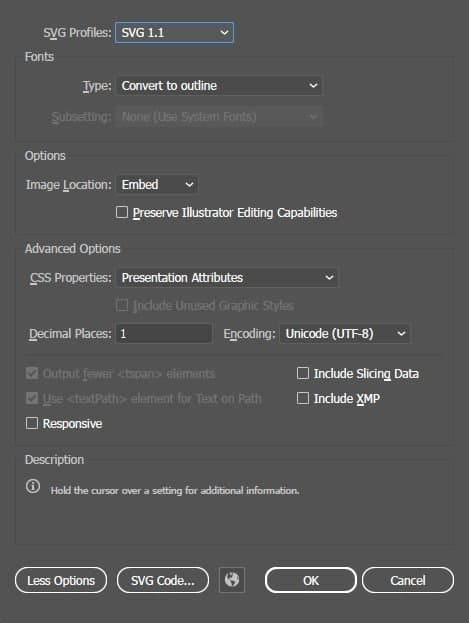
Illustrator allows the most control over your SVG exports if you pay attention to the following options.
- Use only Save As, not Export As!
- SVG Profile does not matter much, though the Tiny profile will (mostly) default to settings that are definitely correct;
- Fonts must be set to Convert to Outline to work;
- CSS Properties should not be set to Style Elements, all other options will work;
- Uncheck Preserve Illustrator Editing Capabilities;
- Uncheck Responsive;
- Strokes will not work well, use Object > Path > Outline Stroke to get them to show up.
The image on the right demonstrates the recommended export options, click on it to display it in full size.
Try to have only one, properly cropped artboard, and have it selected in the Artboard window when saving as SVG.
Inkscape
Inkscape saves natively as SVG, but with less control over the file format. Inkscape files will mostly work natively in the application, but with some limitations:
- Strokes only show as 1px wide in Substance 3D Designer, use Path > Stroke to Path to get them to work,
- Text will not work, use Path > Object to Path to get text to work.
Adobe Photoshop
Photoshop has a very limited SVG exporter (File > Export >Export As…) that is currently unable to produce correct results for Substance 3D Designer. You can get your shape and path information, but Style is always saved as Elements, which is incompatible.
It can be used for simple black and white shape masks, where a solution is to extract the Alpha from the SVG using Alpha Split.
Alternatively a Photoshop-exported SVG can be Imported, which lets you then edit the style information natively inside the application.