Derived personas
Persona classification transforms raw customer data into semantic buyer understanding that AI can use to generate context and drive personalized decisions across every channel and journey. This unified profile empowers:
- Journey branching – Split paths route leads by persona, engagement depth, and role
- Journey arbitration – Determines which nurture journey a lead belongs to right now, avoiding message collisions across concurrent programs
- Content personalization – Content that is role-specific narratives (“for an executive” or “for a practitioner”)
- Sales Qualifier context – Business development representatives (BDRs) receive a one-screen summary showing the individual’s identity, their interests, and their current stage in the buyer journey
Default personas default-ersonas
For the Beta release of Marketo Optimizer, the following default personas are defined according to the job title attribute:
Filter by derived persona derived-persona-filter
Marketo Optimizer derives a persona for each person record by evaluating the record attributes against the defined personas. You can use the inferred result — the Derived Persona — as a filter when defining the audience for a people list or for segmenting in a person journey.
The Derived Persona filter appears in the filter panel under the Person attributes category.
People lists people-lists
When managing members in a static people list or defining rules for a dynamic people list, you can filter by Derived Persona to target all people whose attributes match a specific configured persona.
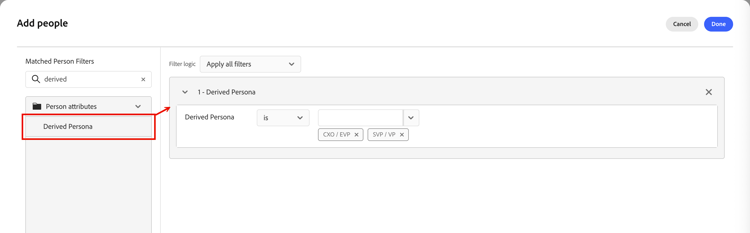
Static list — Add members
-
Open the static list and click Add people at the top right.
-
In the filter dialog, expand People attributes and drag Derived Persona onto the canvas.
-
In the filter condition, choose is and select one or more personas from the list.
-
Click Done to apply the filter and qualify matching people into the list.
Dynamic list — Set membership rules
-
Open the dynamic list and select the Rules tab.
-
Click Edit rules.
-
In the filter dialog, expand People attributes and drag Derived Persona onto the canvas.
-
In the filter condition, choose is and select one or more personas from the list.
-
Click Done to save the rule.
Membership is updated automatically as person records are evaluated against the rule.
Person journeys person-journeys
When you configure segmentation for a person journey in a Split paths node, you can use a derived persona as a person profile filter to control which people enter the journey path.

-
Click the Split paths node in the journey canvas.
-
In the node properties panel on the right, click Apply condition or Edit condition for a path.
-
In the filter dialog, expand People attributes and drag Derived Persona onto the canvas.
-
In the filter condition, choose is and select one or more personas from the list.
-
Click Done to save the filter for the path.