Destinations
Destinations are pre-built integrations that let you send static people lists from Marketo Optimizer to external advertising or social platforms, such as a LinkedIn campaign audience, a Google Customer Match audience, or a Facebook Custom Audience. Activating a static list to a destination keeps membership in sync: as people are added to or removed from the list, they are correspondingly added to or removed from the destination audience and, by extension, from any campaign that the audience feeds.
There are two ways to activate people to a connected destination:
- From a static list — Activate an existing static list directly from the People lists tab. See Activate to a destination.
- From a person journey — Add an Activate to destination action to a journey path so that anyone who reaches that node is added to a list and sent to the destination. See Add an action node.
Required permissions required-permissions
Full destination capability requires the following Adobe Experience Platform permissions to be enabled. For descriptions and recommended permissions for each type of user, see the Product permissions page and External destinations permissions.
Supported destinations supported-destinations
Before you can activate a static list, a destination must exist in the destinations catalog. On the left navigation, expand Connections and select Destinations. Marketo Optimizer currently supports the following destinations:
- Google Customer Match (Advertising)
- Facebook Custom Audience (Social)
- LinkedIn Matched Audience (Social)
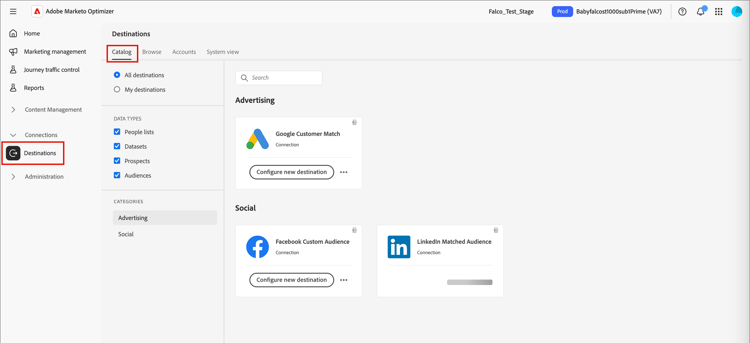
Set up a destination set-up-destination
Each supported destination card shows Configure new destination. Configuring a destination is a prerequisite for activation.
-
In the connector card, click Configure new destination.
-
Select Existing account or New account and enter the account details, such as the account name and description.

-
Click Connect to destination.
An OAuth flow lets you sign in to the corresponding account: LinkedIn, Google, or Facebook.
note important IMPORTANT At this point, do not enter the Destination details. Only the connection is needed. -
Complete any required field mapping between people attributes and the fields required by the destination.
-
Review the data governance and marketing action settings, then click Save.
For the full setup steps, see Create a new destination connection in the Experience Platform documentation.
When configured, the destination is available for activation everywhere that you can select a destination in Marketo Optimizer.
Activation and sync activation-sync
Activation is driven by static list membership, with a bidirectional sync between the list and the destination audience:
- Adding a person to the static list activates them to the destination within 24 hours, adding them to the destination audience and, subsequently, to any campaign that the audience feeds.
- Removing a person from the static list deactivates them from the destination — they are removed from the destination audience and from any connected campaign.
- The same list can be activated to multiple destinations at once; membership syncs to all of them.