Create a role-play using a Virtual Coach template
Publish a pre-built Virtual Coach scenario in minutes by starting from a template instead of building a role-play from scratch.
The Featured and Available Templates sections of Virtual Coach contain a library of pre-built role-play scenarios covering sales, leadership, and skills-assessment situations. Using a template is the fastest way to create a role-play — the persona, conversation opening, topics, and scoring are already configured, and you can publish immediately or customize any detail before publishing.
Templates are organized by domain, simulation type, and language. Use the filters to narrow the list by interaction type, such as Voice Conversation or Webcam Practice, or search by keyword to find a scenario closest to your use case.
-
Sign in to Adobe Learning Manager as an author.
-
Select Virtual Coach in the left navigation pane.
-
Select Create now.
-
Browse the Available Templates section, or use the Search bar and the domain, simulation type, and language filters to find a template that matches your scenario.

-
Select the template tile to open it. Review the persona, topics, and scoring configuration.
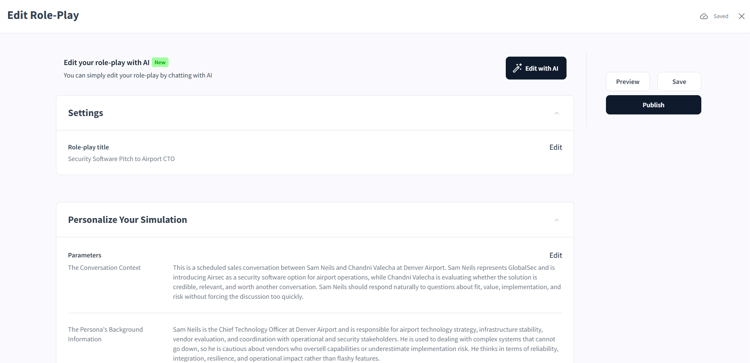
Review the pre-filled conversation context and persona background before deciding whether to customize the template. -
To use the template as-is, select Publish. To customize it first, select any section and edit the relevant fields before publishing.
Once published, the role-play is added to the Content Library and is ready to be added to a job aid and assigned to a course. See add a Virtual Coach role-play to a course for those steps, or practice a role-play with Virtual Coach to see the learner experience.