Practice a role-play with Virtual Coach
Complete an AI-driven role-play session in Adobe Learning Manager and review your performance report to build real-world communication skills.
Virtual Coach role-plays are available as course modules or standalone job aids. This article covers everything from finding and launching a session to engaging with the AI persona.
Find and open a role-play
Method 1
-
Sign in to Adobe Learning Manager as a learner. You’ll land on the Home page.
-
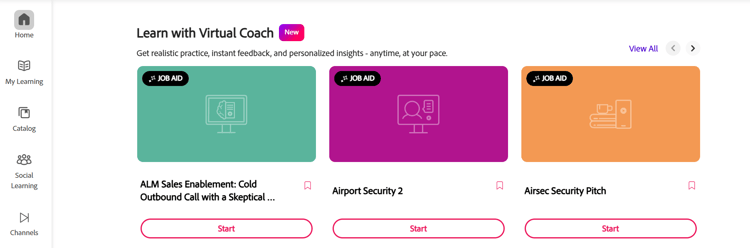
In the very beginning of the page, you’ll see a section called Learn with Virtual Coach. Select the appropriate role-play from the list.
-
Select Start to launch the module.
Method 2
You can use this method to find your role-play from your My Learning page or the Catalog page. The method is the same.
-
Sign in to Adobe Learning Manager as a learner.
-
On the left neavigation panel, navigate to either the My Learning page or the Catalog page.
-
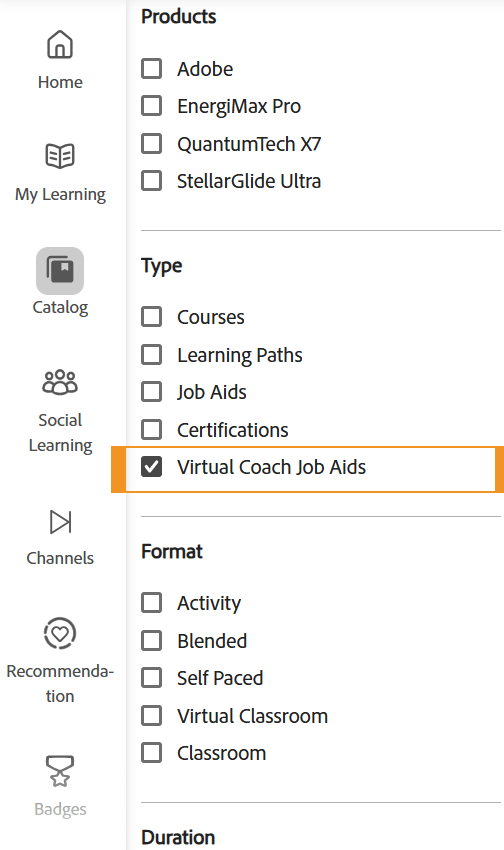
From the section Type, select Virtual Coach Job Aids. You’ll see a list of role-plays created using Virtual Coach.
-
Select the appropriate role-play module or select Explore on the right to open it.
-
Select Start to launch the module.
Prepare your hardware
Before the session begins, Virtual Coach checks your camera and microphone.
- In the device setup screen, select and confirm your Camera source from the drop-down menu.
- Select your Microphone and speak a short phrase, such as “Hello,” to test the audio level indicator.
- When both devices are confirmed, select Join with camera.
Engage in the simulation
The AI trainer opens with a brief context statement that explains who you’re speaking with and your objective. Read it carefully before the AI persona begins.
- Listen to the AI persona’s opening statement.
- Respond verbally. Speak naturally and directly, as you would in a real conversation. The AI responds in real time based on what you say.
- Cover the required topics. The scenario has specific topics the author configured. Address them during the conversation to score well on the knowledge component.
- In a multi-persona role-play, expect each persona to raise questions and concerns from their own perspective — for example, a CFO focused on cost and an IT Director focused on security in the same conversation. Address each persona’s concern rather than giving one generic response to the group.
- When you’ve achieved your objective, or are ready to finish, select End Simulation.
After you end the simulation, your session is scored automatically. To understand what your report shows and how to improve, see understand your Virtual Coach performance report.
You can retry a role-play as many times as you like — each attempt is a new, independent session with its own report, so use your first attempt’s feedback to prepare for the next one. If you’re unsure why a role-play ended with a score of zero, check whether the scenario has a Make or Break topic you didn’t address; missing one of those automatically zeroes the final score regardless of your performance elsewhere.