Understand your Virtual Coach performance report
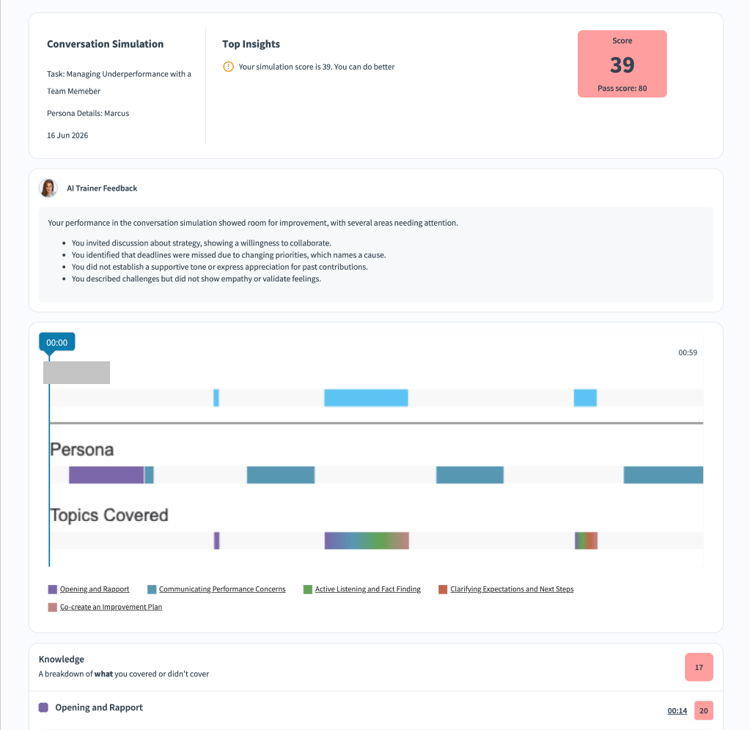
Your Virtual Coach report card shows how you performed in a role play, including which topics you covered, how you communicated, and specific areas to improve before your next attempt.
Every completed session automatically generates a report. Access it immediately after a session by selecting See Analysis, or return to it any time from the session history in My Learnings. You can also download your report as a PDF to keep for your own records or share with a manager.
How your overall score is calculated
Your overall score is a weighted combination of two components: a Knowledge score and a Style score. The author who created the scenario sets the weight of each component; a common configuration is 70% knowledge and 30% style, but this varies by scenario.
Your report card shows the exact weights configured for your scenario, which may differ from the typical split shown here.
Your overall score is displayed on a scale of 0 to 100. The passing threshold is set by the author and shown alongside your score. If your score meets or exceeds the threshold, you pass; if not, you can retry the session. If a required topic was configured as Make or Break and you didn’t address it at all during the conversation, your final score is 0 regardless of how well you performed on everything else.
Knowledge score
The Knowledge score reflects what you said during the conversation — whether you addressed the topics the author configured for the scenario.
Topic breakdown
Each scenario has a set of required topics. Your report card shows a separate score for each topic and written feedback explaining what you covered and what you missed. Topics are color-coded in the session timeline at the bottom of the report, so you can see exactly when each topic was discussed.
Example topic scores from a discovery call scenario:
Each topic score shows exactly which part of the conversation to focus on before your next attempt.
How to improve your Knowledge score
Each topic section in your report includes specific, actionable guidance. For example:
- If you scored low on Opening and Rapport: greet the persona by name, state your own name, briefly reference the outreach reason, and acknowledge time constraints with a short opener.
- If you scored low on Handling Objections and Risk: explicitly invite the persona to share hesitations, offer to provide documentation when a concern is raised, and confirm the concern was addressed before moving on.
- If you scored low on Agreeing Next Steps: propose one clear, low-commitment next step, ask to share materials by email, confirm preferred timing and attendees, and seek verbal agreement or a clear reason for not proceeding.
Style score
The Style score reflects how you communicated during the conversation, based on five delivery metrics measured automatically from your audio.
Pace measures your speaking speed in words per minute (WPM). The target range is 140–180 WPM — fast enough to sound confident but slow enough to be clearly understood. Below 140 WPM, your pace was a little slow; above 180 WPM, it was too fast. Your report shows timestamps for your slowest and fastest moments so you can replay them in the session recording.
Clarity measures how comprehensible your speech came across. A score of 90% or above means people can understand you well; the report flags this as a pass or an improvement area.
Filler words are sounds and phrases such as “um,” “uh,” “like,” “you know,” and “basically.” Using them frequently reduces your credibility and distracts from your message. Your report shows the total count and timestamps for each instance. Four or fewer filler words is generally acceptable for a 3-minute session; five or more means you should review the flagged timestamps and practice pausing silently instead of filling the gap with sound.
Sentence length measures whether your sentences are concise and easy to follow. The target range is 7–30 words per sentence. Under 7 words, sentences may sound clipped or incomplete; over 43 words, they’re likely too long and may lose the listener’s attention. A bar indicator on the report shows where your average falls on this spectrum.
Energy measures your vocal enthusiasm and confidence throughout the conversation. The report displays an energy timeline for the full session, color-coded from low to high. Consistent high energy signals engagement; dips at specific moments are worth reviewing in the session recording to understand what caused them.
Session recording and timeline
The Session Recording section shows your full conversation as a video playback with a synchronized timeline, made up of three tracks: your speaking turns, the persona’s speaking turns, and which required topic was being addressed at each point, color-coded to match the topic breakdown table. Use the timeline to jump directly to specific moments, such as the timestamp when a topic was missed or a filler word was flagged.
Best practices
- Review your lowest-scoring topic first. Improvement there has the biggest impact on your overall score.
- Use the topic timeline to check timing. Raising required topics earlier in the conversation often improves both knowledge and style scores.
- Replay your slowest WPM moments. Slow pace is often caused by searching for the right word; preparing key phrases in advance can help.
- Treat a low energy score as a cue to review your opening. Energy tends to be highest at the start and dip in the middle; practicing your transitions between topics helps maintain momentum.
- Retry the role play. See practice a role play with Virtual Coach. Every attempt generates a fresh, independent report. So, use what you learned from one session in the next.