On this page: Learn how to use the Update Profile action activity to enrich or correct an existing Adobe Experience Platform profile as a customer progresses through a journey.
Use the Update Profile action activity to enrich or correct an existing Adobe Experience Platform profile as a customer progresses through a journey. You can set field values sourced from a journey event, a configured datasource, or a static value — enabling you to keep profile data accurate and actionable without leaving the journey canvas. Before configuring this activity, review the guardrails and limitations that apply.
Dataset selection dataset-selection
The Update Profile activity requires a dedicated dataset to store updates. Since this activity only updates the Profile Store (not the Datalake), all updates should be saved in a profile-enabled dataset specifically designated for Update Profile actions.
Additionally, the Update Profile activity configuration does not require an identity namespace. As such, ensure that the selected dataset uses the same Identity namespace that was used by the action that launched the journey as it is this namespace these updates will use. The identity map can also be used by the selected dataset. Failure to select a dataset with the correct identity namespace or one that uses identity map will cause the Update Profile activity to fail.
Configure the update profile activity use-profile-update
Follow the steps below to configure the Update Profile activity in your journey.
-
Start designing your journey. Learn more in Create your first journey.
-
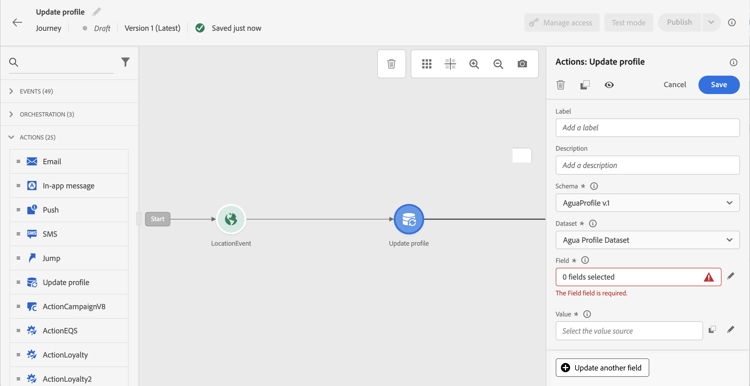
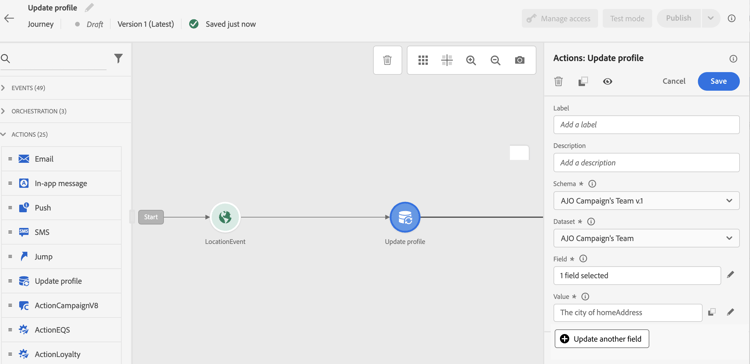
In the Action section of the palette, drop the Update Profile activity into the canvas.
-
Select a schema from the list.
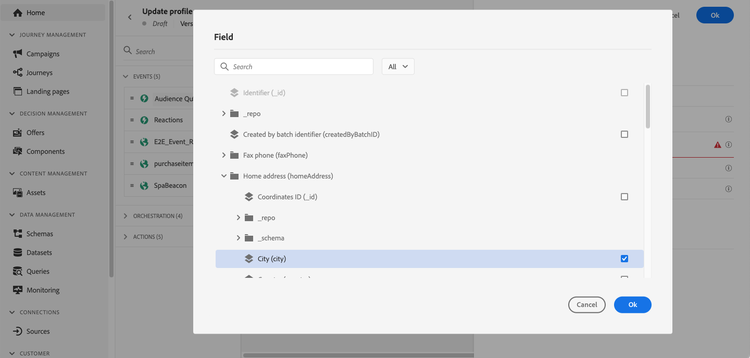
note NOTE Only fields that already exist in the selected XDM Profile schema are available for selection. If the field you need is not listed, add it to the schema in Adobe Experience Platform first. -
Click on Field to select the field you want to update.
-
Select a dataset from the list.
note NOTE The Update Profile action updates the profile data in realtime, but it does not update datasets. The dataset selection is needed as the profile is a record related to a dataset. -
Click on the Value field to define the value you want to use:
-
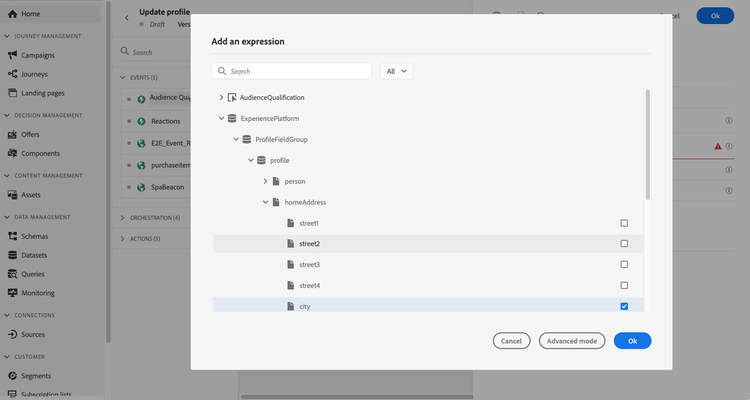
Using the simple expression editor, you can select a field from a data source or from the incoming event.
-
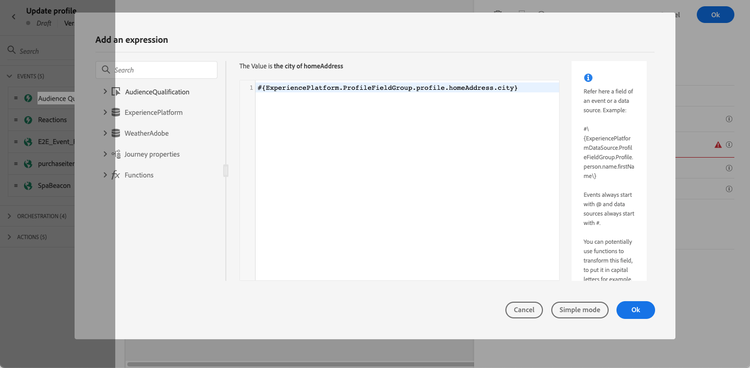
If you want to define a specific value or leverage advanced functions, select Advanced mode.
-
-
To update additional profile attributes in the same action, click Update another field and repeat the field and value selection. You can add up to five field/value pairs in a single Update Profile action. See Guardrails and limitations.
The Update Profile activity is now configured.
Test the profile update using-the-test-mode
Be aware that in test mode, profile updates take effect immediately on the test profile and are not simulated.
Only test profiles can enter a journey in test mode. You can either create a new test profile or convert an existing profile into a test profile. In Adobe Experience Platform, profile attributes can be updated via a CSV file import or API calls. A quicker alternative is to use an Update Profile activity within the journey itself to set the test profile boolean field to true.
For more information on how to turn an existing profile into a test profile, refer to this section.
Guardrails and limitations guardrails
- The Update Profile action can only be used in journeys that have a namespace.
- The action only updates existing fields — it does not create new profile fields.
- The action only supports simple field types (string, number, boolean). XDM fields defined as enumerations, suggested values, object arrays, or complex collections (e.g. product lists) are not supported.
- You cannot use the Update Profile action to generate experience events, such as a purchase.
- Like any other action, you can define an alternative path in case of error or timeout. Two actions cannot be placed in parallel.
- Profile updates are not guaranteed to be immediately available downstream in the same journey. Avoid placing an action that reads a field directly after the Update Profile action that writes it, as the updated value may not yet be reflected.
- The Update profile activity only updates the Profile Store, not the Data Lake.
- Up to five field/value pairs can be updated in a single Update Profile action. Use the Update another field button to add more pairs.
- For better performance, group multiple attribute updates into a single Update Profile action rather than using one action per attribute.
This section contains structured knowledge intended to support interpretation, retrieval, and question answering related to this topic.
For complete understanding, this information should be combined with the documentation on this page. Neither source is intended to stand alone; the page describes the feature, while this section provides additional context that helps disambiguate terminology, intent, applicability, and constraints.
- TL;DR: This page explains how to configure the Update Profile activity to enrich or correct an existing Adobe Experience Platform profile with data from journey events, datasources, or static values as a customer progresses through a journey.
Intents:
- Configure the Update Profile activity to modify existing profile attributes during a journey
- Select a profile-enabled dataset dedicated to Update Profile actions
- Map field values from journey events, datasources, or static values to profile attributes
- Update multiple profile attributes (up to five) in a single activity
- Test profile updates in journey test mode
Glossary:
- Update Profile activity: An action activity that writes new values to existing fields in an Adobe Experience Platform profile in real time as a profile moves through a journey (product-specific)
- Profile Store: The Adobe Experience Platform store that holds real-time customer profile data, distinct from the Data Lake (product-specific)
- Identity namespace: A label that distinguishes identity contexts (e.g., email, CRM ID) used to match the profile being updated (product-specific)
- Profile-enabled dataset: An Adobe Experience Platform dataset configured to contribute records to the unified profile (product-specific)
Guardrails:
- The Update Profile action can only be used in journeys that have a namespace defined.
- The action only updates existing XDM fields; it cannot create new profile fields.
- Only simple field types are supported (string, number, boolean); enumerations, object arrays, and complex collections are not supported.
- The action cannot generate experience events such as purchases.
- Up to five field/value pairs can be updated in a single Update Profile action.
- Do not share the dedicated dataset with batch or streaming ingestion processes, as other ingestion runs will overwrite Update Profile changes.
- Profile updates may not be immediately available downstream in the same journey execution.
- The activity only updates the Profile Store, not the Data Lake.
Terminology:
- Canonical name: Update Profile — Acronym: none — variants: Update Profile activity, Update Profile action
- Synonyms: “Profile Store” = “Real-Time Customer Profile store”
- Do not confuse: “Profile Store” (updated by this activity) ≠ “Data Lake” (not updated by this activity)
FAQ:
- Q: Can the Update Profile activity create new profile fields? — No, it can only update fields that already exist in the selected XDM Profile schema.
- Q: Why should I use a dedicated dataset for Update Profile actions? — Sharing the dataset with batch or streaming ingestion can cause other ingestion runs to overwrite the changes made by the Update Profile activity.
- Q: Are profile updates immediately visible to downstream activities in the same journey? — No, updated values may not yet be reflected if an action reads the same field immediately after the Update Profile activity writes it.
- Q: How many fields can I update in a single Update Profile action? — Up to five field/value pairs can be configured in a single activity using the “Update another field” button.
- Q: Do profile updates apply in test mode? — Yes, in test mode the updates take effect immediately on the test profile and are not simulated.