On this page: Learn how to use the Stop action activity to remove a profile from selected inbound activities without ending the journey.
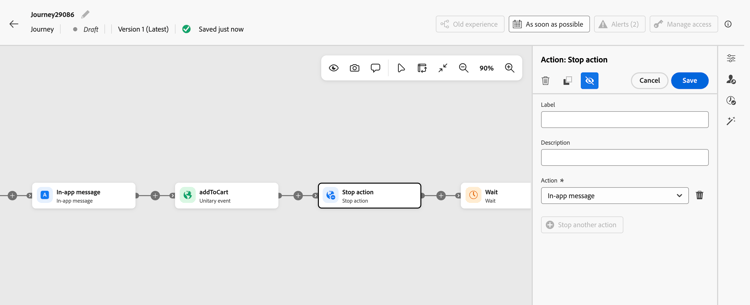
Use the Stop action activity to remove a profile from one or more selected upstream inbound activities (up to five): in-app, content card, web, or code-based experience. When a profile reaches this step, it stops qualifying for the selected experiences and continues progressing in the journey. Other inbound activities are not affected.
Unlike stopping a journey, which halts all profiles progressing through it, Stop action applies only to the selected inbound activities for the profile that reaches this step.
Where to place the activity placement
The Stop action activity must be downstream of the inbound activities it targets, on the same journey path. Other activities, such as Wait or Reaction, can be placed between the inbound activity and Stop action.
When choosing where to place it:
- Avoid placing it immediately after an inbound activity, as this can prevent the profile from seeing the inbound experience.
- Placing it immediately before End is redundant because inbound activities are already removed when the profile exits the journey.
Guardrails guardrails
When you configure the Stop action activity, the selected inbound activities and the placement of the activity are checked. Some conditions generate errors, while others generate warnings.
The following configurations generate an error:
- No inbound activity, or more than five inbound activities.
- The same inbound activity more than once.
- An inbound activity that is not upstream of Stop action on the same journey path.
- An inbound activity that has been deleted. It appears as Unavailable activity.
The following configurations generate a warning:
- An inbound activity that was already stopped earlier in the journey.
- An inbound activity stopped immediately after it is activated, which can prevent the profile from seeing the experience.
- Stop action placed immediately before End, which is unnecessary because inbound activities are already removed when the profile exits the journey.
Configure the activity configure
-
Start designing your journey. Learn more in Create your first journey.
-
Add an inbound activity to your journey.
-
At the point where you want to stop the experience, click the plus (+) icon downstream of the inbound activity on the same journey path and select Stop action from the list. See Where to place the activity.
-
Add a Label to the activity and, in the Action field, select the upstream inbound activity that you want to remove the profile from.
note tip TIP Give inbound activities distinct labels. The Action dropdown shows only activity names, and two activities can have the same name. -
To target additional inbound activities, click Stop another action and select another activity. You can select up to five activities.
-
Click Save.
-
Add the next activities to finish your journey.
Your Stop action activity is now configured. When a profile reaches this step, it is removed from the selected inbound experiences and continues progressing in the journey.
If the profile re-enters the journey, the experience activates again when the profile reaches it.
Use cases use-cases
-
Stop an in-app reminder after registration. Your journey shows an in-app experience encouraging a profile to register for an event. Once the journey detects that the profile has registered, use Stop action to remove that profile from the upstream in-app activity. The profile no longer qualifies for the registration reminder but continues through the remaining journey steps, such as receiving an event preparation email.
-
Stop purchase promotions after conversion. Your journey makes a promotional web or code-based experience available to a profile. After the journey detects a purchase, use Stop action to remove the profile from the upstream promotional activities so they no longer qualify for those experiences. The profile can continue through post-purchase steps in the same journey, while any inbound activities not selected in Stop action remain unaffected.
-
Replace a code-based experience. Activate code-based experience A, add a Wait activity, then use Stop action to stop experience A before activating code-based experience B. This sequence replaces the first experience while the profile continues through the journey.
This section contains structured knowledge intended to support interpretation, retrieval, and question answering related to this topic.
For complete understanding, this information should be combined with the documentation on this page. Neither source is intended to stand alone; the page describes the feature, while this section provides additional context that helps disambiguate terminology, intent, applicability, and constraints.
- TL;DR: Stop action removes a profile from selected upstream inbound experiences without ending the profile’s journey.
Intents:
- Remove a profile from selected inbound experiences while continuing the journey
- Configure Stop action downstream of inbound activities on the same path
- Distinguish Stop action from stopping a journey
- Replace a code-based experience while continuing the journey
- Resolve selection errors and avoid redundant Stop action activities
Glossary:
- Stop action: A journey activity that removes the profile reaching it from selected upstream inbound activities while the profile continues progressing in the journey. (product-specific)
- Inbound activities: The in-app, content card, web, or code-based experience activities that Stop action can target. (product-specific)
Guardrails:
- Stop action must be downstream of the selected inbound activities on the same journey path. Wait or Reaction can be placed between the inbound activity and Stop action.
- Select one to five upstream inbound activities (hard limit). Selecting none, more than five, or the same activity more than once generates an error.
- Selecting an activity that is not upstream on the same path or has been deleted generates an error. Deleted selections appear as Unavailable activity.
- Warnings identify an activity already stopped earlier, an activity stopped immediately after activation, or a redundant Stop action immediately before End.
- Avoid stopping an inbound activity immediately after activation, as this can prevent the profile from seeing the experience.
- Inbound activities are already removed when a profile exits the journey. Stop action immediately before End is redundant.
- Give inbound activities distinct labels because the Action dropdown shows only activity names, which can be identical.
- Other inbound activities are not affected.
Terminology:
- Canonical activity name: Stop action
- Target selection field: Action
- Additional target control: Stop another action
- Deleted selection label: Unavailable activity
- Do not confuse Stop action with stopping a journey: Stop action applies to selected inbound activities for the profile reaching it; stopping a journey halts all profiles progressing through it.
FAQ:
- Q: Does Stop action end the profile’s journey? The profile stops qualifying for the selected experiences and continues progressing in the journey.
- Q: Which inbound activities can Stop action target? In-app, content card, web, or code-based experience activities upstream of Stop action.
- Q: How many inbound activities can be selected? Up to five (hard limit).
- Q: Are other inbound activities affected? Other inbound activities are not affected.
- Q: Must Stop action immediately follow an inbound activity? Wait or Reaction can be placed between the inbound activity and Stop action on the same path. Avoid stopping an inbound activity immediately after activation, as this can prevent the profile from seeing the experience.
- Q: What happens when a profile re-enters the journey? The inbound experience activates again when the profile reaches that activity.