On this page: Manage AEM Content Fragments from the Content Management Fragments list to monitor status and metadata, see where fragments are used in journeys and campaigns, sync published updates from Experience Manager, and open fragments for editing without leaving Journey Optimizer.
By integrating Adobe Experience Manager as a Cloud Service or Managed Services with Adobe Journey Optimizer, you can use AEM Content Fragments in your content and check Fragment statuses without leaving Journey Optimizer.
When you republish a Fragment already used in a Journey or Campaign, the sync timer starts after the Fragment is published in Adobe Experience Manager. Updated content is typically available in Journey Optimizer within about 5 minutes for unitary journeys and campaigns, for batch deliveries, the change appears in the next processing batch. See Work with Adobe Experience Manager Content Fragments. If delays occur, you can manually sync that Fragment from Journey Optimizer to pull the latest published version.
Access AEM Content Fragments access-aem-fragments
-
From the Content Management menu, select Fragments.
-
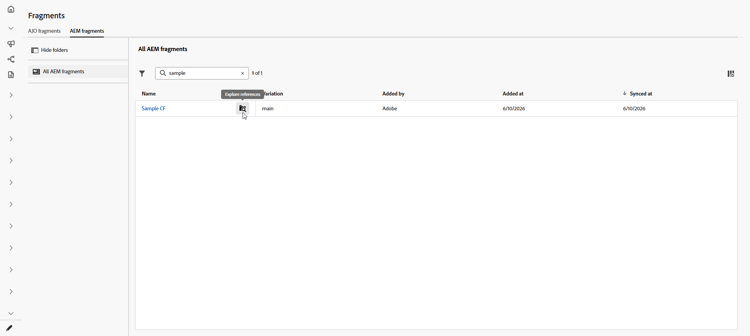
Open the AEM Fragments tab to view Content Fragments available from Adobe Experience Manager.
-
From the Fragment list, click

-
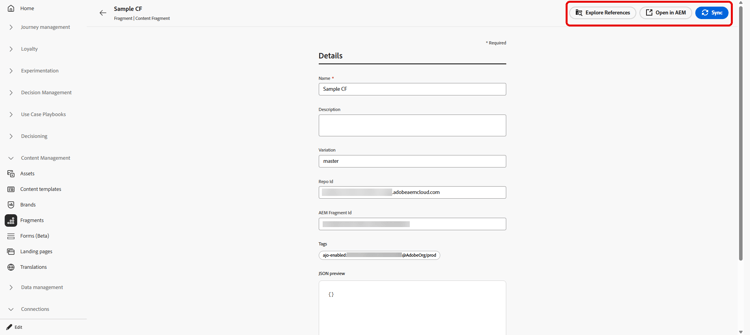
Select a Fragment to review its status and available actions:
-
Explore references: see the Journeys, Campaigns, Orchestrated campaigns, and Templates that use the fragment.
-
Open in AEM: open the Fragment in Adobe Experience Manager to edit or republish it.
-
Sync: pull the latest published version from Adobe Experience Manager into Journey Optimizer, for example when republished content has not appeared after the usual sync window. If the control is disabled, the Fragment already matches the published version in Experience Manager.
-
-
The Details menu allows you to review metadata and preview the synced payload:
- Name: title of the Content Fragment imported from Adobe Experience Manager.
- Description: description imported from Adobe Experience Manager.
- Variation: published variation currently represented for this Fragment.
- Repo Id: repository identifier for the Fragment in Adobe Experience Manager.
- AEM Fragment Id: unique Content Fragment identifier in Adobe Experience Manager.
- Tags: tags assigned in Adobe Experience Manager, including Journey Optimizer enablement tags that determine whether the Fragment appears in selectors for your organization and sandbox. Learn how to create and assign tags
- JSON preview: read-only JSON structure of the Fragment content Journey Optimizer uses.
-
In Explore references, use the tabs to see journeys, campaigns, orchestrated campaigns, and templates that reference the Fragment.

➡️ Learn more about Content Fragment
This section contains structured knowledge intended to support interpretation, retrieval, and question answering related to this topic.
For complete understanding, this information should be combined with the documentation on this page. Neither source is intended to stand alone; the page describes the feature, while this section provides additional context that helps disambiguate terminology, intent, applicability, and constraints.
- TL;DR: From the Content Management Fragments list in Journey Optimizer, you can monitor AEM Content Fragment status and metadata, see where fragments are used, sync published updates from Experience Manager, and open fragments for editing without leaving Journey Optimizer.
Intents:
- Access AEM Content Fragments from the Content Management > Fragments menu, AEM Fragments tab
- Review a Fragment’s status, metadata, and available actions
- Explore references to see the journeys, campaigns, orchestrated campaigns, and templates that use a Fragment
- Manually sync a Fragment to pull the latest published version from Experience Manager
- Open a Fragment in Experience Manager to edit or republish it
- Preview the synced Fragment payload and metadata in the Details menu
Glossary:
- Explore references: Action that shows the Journeys, Campaigns, Orchestrated campaigns, and Templates that use the Fragment (product-specific)
- Sync: Action that pulls the latest published version from Experience Manager into Journey Optimizer; disabled when the Fragment already matches the published version in Experience Manager (product-specific)
- Open in AEM: Action that opens the Fragment in Experience Manager to edit or republish it (product-specific)
- JSON preview: Read-only JSON structure of the Fragment content Journey Optimizer uses (product-specific)
- Journey Optimizer enablement tags: Tags assigned in Experience Manager that determine whether the Fragment appears in selectors for your organization and sandbox (product-specific)
Guardrails:
- Requires integrating Adobe Experience Manager as a Cloud Service or Managed Services with Journey Optimizer.
- When you republish a Fragment already used in a Journey or Campaign, the sync timer starts after the Fragment is published in Experience Manager; updated content is typically available within about 5 minutes for unitary journeys and campaigns, and appears in the next processing batch for batch deliveries.
- The Sync control is disabled when the Fragment already matches the published version in Experience Manager.
- The JSON preview is read-only.
- Journey Optimizer enablement tags determine whether the Fragment appears in selectors for your organization and sandbox.
Terminology:
- Canonical name: AEM Content Fragments — Acronym: n/a — variants: Content Fragment, AEM Fragment
- Synonyms: “Sync” = “manually sync”
- Do not confuse: “Repo Id” (repository identifier for the Fragment in Experience Manager) ≠ “AEM Fragment Id” (unique Content Fragment identifier in Experience Manager)
FAQ:
- Q: Where do I manage AEM Content Fragments? — From the Content Management menu, select Fragments, then open the AEM Fragments tab.
- Q: How soon do republished Fragment updates appear in Journey Optimizer? — Typically within about 5 minutes for unitary journeys and campaigns, and in the next processing batch for batch deliveries, with the timer starting after the Fragment is published in Experience Manager.
- Q: Why is the Sync control disabled for a Fragment? — Because the Fragment already matches the published version in Experience Manager.
- Q: How can I see where a Fragment is used? — Use Explore references to view the journeys, campaigns, orchestrated campaigns, and templates that reference the Fragment.