On this page: Capture the response payload returned by a custom action’s API call so you can orchestrate journeys, personalize messages, and handle errors based on data from the external system.
You can leverage API call responses in custom actions and orchestrate your journeys based on these responses.
Important notes custom-action-enhancements-notes
-
Scalar arrays are supported in response payload:
code language-none "dummyScalarArray": [ "val1", "val2" ] -
Heterogeneous arrays are not supported in response payload:
code language-none "dummyRandomArray": [ 20, "aafw", false ]
Configure the custom action config-response
-
Create the custom action. Refer to this page.
-
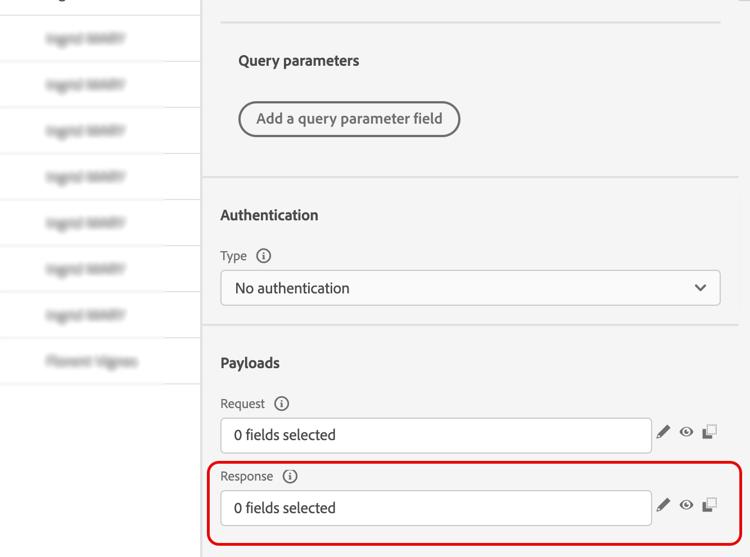
Click inside the Response (success response) field.
-
Paste an example of the payload returned by the call. Verify that the field types are correct (string, integer, etc.). Here is an example of response payload captured during the call. Our local endpoint sends the number of loyalty points and the status of a profile.
code language-none { "customerID" : "xY12hye", "status":"gold", "points": 1290 }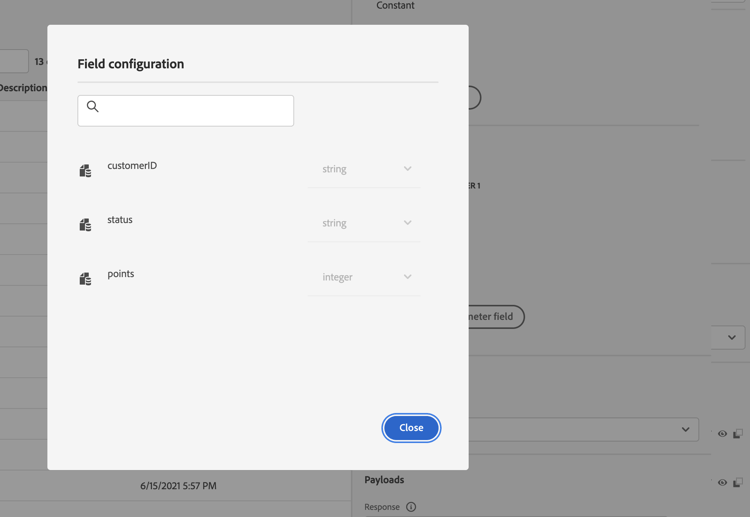
Each time the API is called, the system will retrieve all the fields included in the payload example.
-
(Optional) Enable an error response payload to capture the format returned when the call fails, then paste an example payload. To do this, select Define a failure response payload in the custom action configuration. Learn more about configuring the payload fields in Configure a custom action.
code language-none { "errorResponse" : "customer not found" }The error response payload is only available if you enable it in the custom action configuration.
-
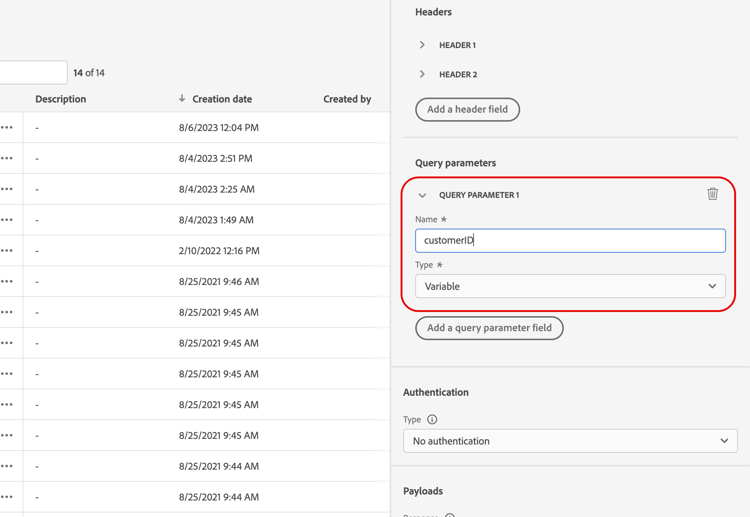
Let’s also add the customerID as a query parameter.
-
Click Save.
Leverage the response in a journey response-in-journey
Simply add the custom action to a journey. You can then leverage the response payload fields in conditions, other actions and message personalization.
If you have defined an error response payload, it is exposed under Contextual attributes > Journey Orchestration > Actions > <action name> > errorResponse. You can use it in the timeout and error branch to drive fallback logic and error handling.
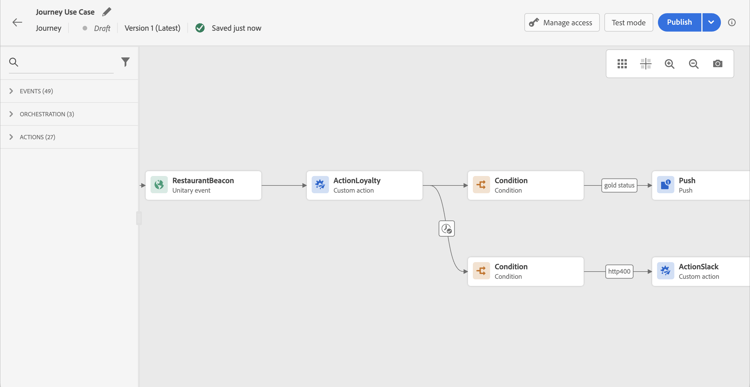
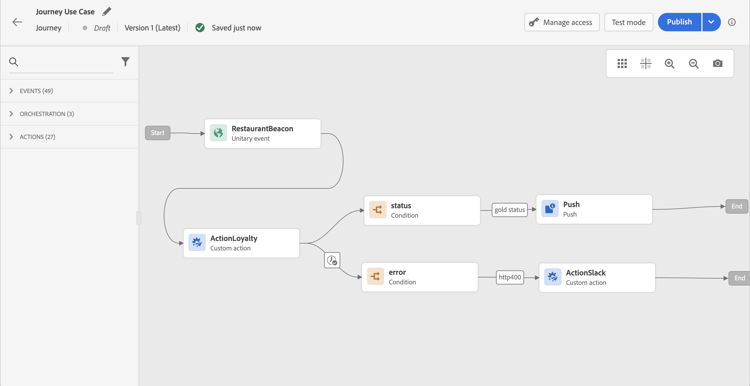
For example, you can add a condition to check the number of loyalty points. When the person enters the restaurant, your local endpoint sends a call with the profile’s loyalty information. You can send a push if the profile is a gold customer. And if an error is detected in the call, send a custom action to notify your system administrator.
-
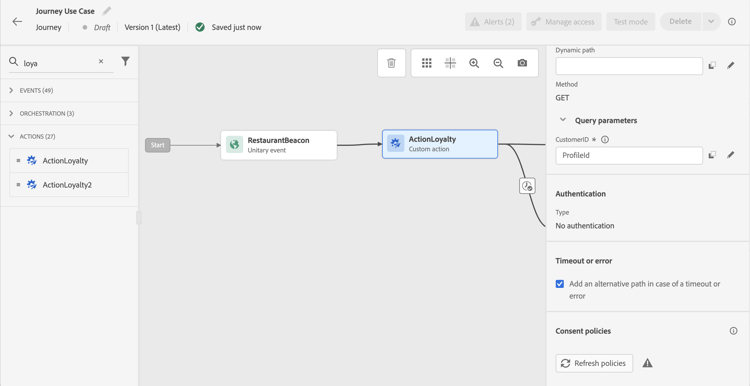
Add your event and the Loyalty custom action created earlier.
-
In the Loyalty custom action, map the customer ID query parameter with the profile ID. Check the option Add an alternative path in case of a timeout or error.
-
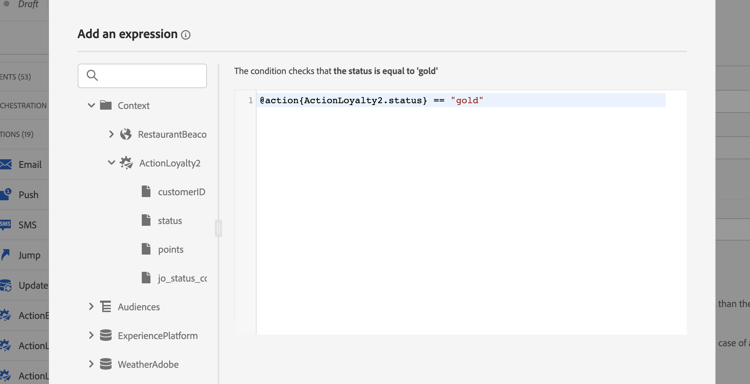
In the first branch, add a condition and use the advanced editor to leverage the action response fields, under the Context node.
-
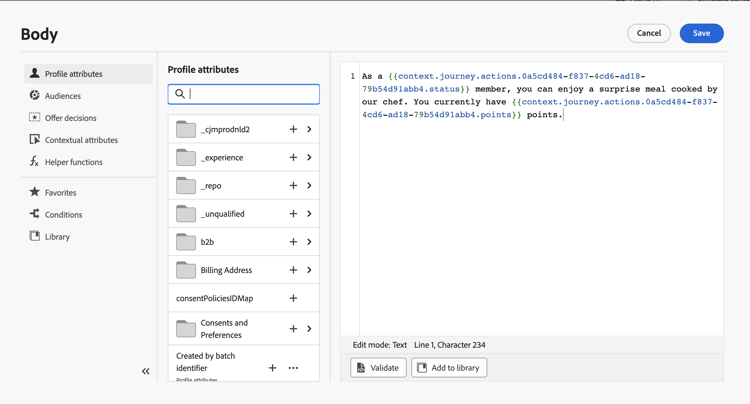
Then add your push, and personalize your message using the response fields. In our example, we personalize the content using the number of loyalty points and the customer status. The action response fields are available under Contextual attributes > Journey Orchestration > Actions.
note NOTE Each profile entering the custom action will trigger a call. Even if the response is always the same, Journey will still perform one call per profile. -
In the timeout and error branch, add a condition and leverage the built-in jo_status_code field. In our example, we’re using the
http_400 error type. See this section.code language-none @action{ActionLoyalty.jo_status_code} == "http_400"If an error response payload has been defined, you can also target its fields, for example:
code language-none @action{ActionLoyalty.errorResponse.errorResponse} == "customer not found"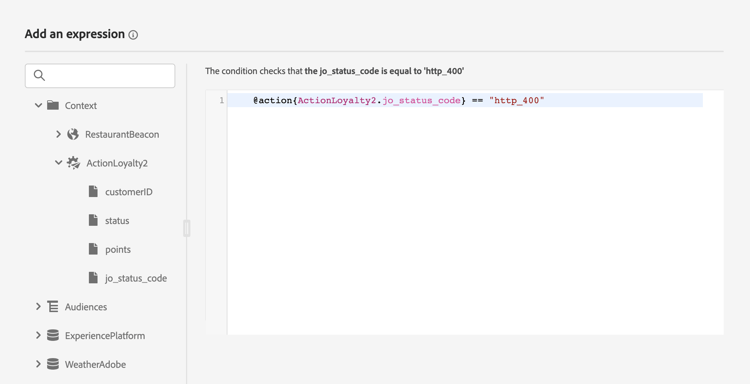
-
Add a custom action that will be sent to your organization.
Test mode logs test-mode-logs
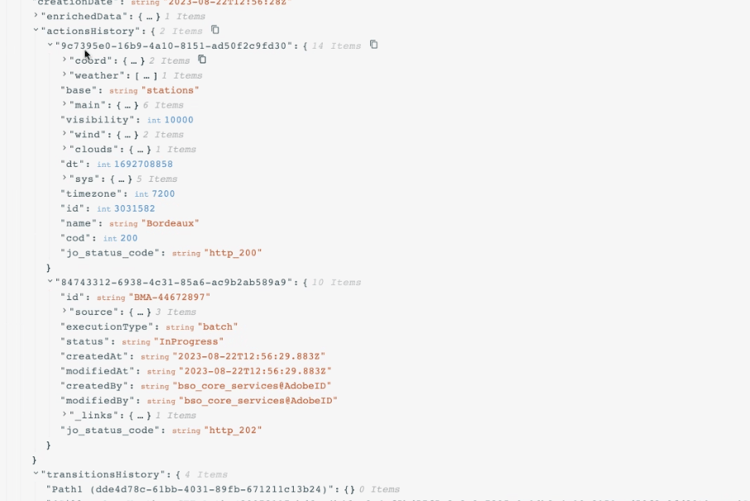
You can access, through test mode, status logs related to custom action responses. If you have defined custom actions with responses in your journey, you will see an actionsHistory section on those logs displaying the payload returned by the external endpoint (as a response from that custom action). When an error response payload is defined, it is included for failed calls. This can be very useful in terms of debugging.
Error status error-status
The jo_status_code field is always available even when no response payload is defined.
Here are the possible values for this field:
- http status code: http_
<HTTP API call returned code>, for instance http_200 or http_400 - timeout error: timedout
- capping error: capped
- internal error: internalError
An action call is considered in error when the returned http code is greater than 2xx or if an error occurs. The journey flows to the dedicated timeout or error branch in such cases.
If an error response payload has been configured for the custom action, its fields are exposed under the errorResponse node for failed calls. If no error response payload is configured, that node is not available.
Expression syntax exp-syntax
Here is the syntax:
#@action{myAction.myField}
Here are a few examples:
 // action response field
 @action{<action name>.<path to the field>}
 @action{ActionLoyalty.status}
 // action response field
 @action{<action name>.<path to the field>, defaultValue: <default value expression>}
 @action{ActionLoyalty.points, defaultValue: 0}
 @action{ActionLoyalty.points, defaultValue: @event{myEvent.newPoints}}
While manipulating collections in a custom action response, you can rely on currentActionField to access the current item:
count(
@action{MyAction.MyCollection.all(
currentActionField.description == "abc"
)}
)
Using custom action responses in native channels response-in-channels
Response payload fields from custom actions can be used in native channels (email, push, Mobile messages) for message personalization. This includes the ability to iterate over arrays and nested data structures returned by external APIs.
For detailed examples and syntax for iterating over custom action response data in messages, refer to Iterate over contextual data with Handlebars.
Additional resources
For more information, refer to these pages:
This section contains structured knowledge intended to support interpretation, retrieval, and question answering related to this topic.
For complete understanding, this information should be combined with the documentation on this page. Neither source is intended to stand alone; the page describes the feature, while this section provides additional context that helps disambiguate terminology, intent, applicability, and constraints.
- TL;DR: This page explains how to capture the response payload returned by a custom action’s API call and leverage it to orchestrate journeys, personalize messages, and handle errors.
Intents:
- Configure a custom action to capture success and failure response payloads
- Leverage response payload fields in conditions, other actions, and message personalization
- Handle errors and timeouts using the jo_status_code field and the errorResponse node
- Inspect custom action responses through test mode logs
- Use the expression syntax to reference response fields, including default values and collections
Glossary:
- Response payload: The example payload pasted in the Response (success response) field whose fields are retrieved on each call (product-specific)
- Error response payload: The payload captured when a call fails, enabled by selecting Define a failure response payload, exposed under the errorResponse node (product-specific)
- jo_status_code: A built-in field, always available even when no response payload is defined, that carries the call outcome (product-specific)
- actionsHistory: A section shown in test mode logs that displays the payload returned by the external endpoint (product-specific)
- currentActionField: A reference used to access the current item when manipulating collections in a custom action response (product-specific)
- Test mode: The mode through which you access status logs related to custom action responses (product-specific)
Guardrails:
- Scalar arrays are supported in the response payload, but heterogeneous arrays are not supported.
- Only newly created custom actions include the jo_status_code field out-of-the-box; to use it with an existing custom action you need to update the action, for example by updating the description and saving.
- An action call is considered in error when the returned http code is greater than 2xx or if an error occurs, and the journey flows to the dedicated timeout or error branch.
- If an error response payload is configured, its fields are exposed under the errorResponse node for failed calls; if none is configured, that node is not available.
- Each profile entering the custom action triggers one call, even if the response is always the same.
Terminology:
- Canonical name: API call response in custom actions — Acronym: n/a — variants: custom action response, response payload
- Synonyms: “success response” = “Response field”
- Do not confuse: “Response” (success response payload) ≠ “Error Response” (failure response payload defined via Define a failure response payload)
- jo_status_code values: http_
(for example http_200 or http_400), timedout (timeout error), capped (capping error), internalError (internal error)``
`FAQ:
Q: Which array types are supported in the response payload? — Scalar arrays are supported; heterogeneous arrays are not supported. Q: Why does an existing custom action not expose the jo_status_code field? — Only newly created custom actions include it out-of-the-box; update the existing action, for example by updating the description and saving, to add it. Q: When is an action call considered in error? — When the returned http code is greater than 2xx or an error occurs, after which the journey flows to the dedicated timeout or error branch. Q: Where can the returned payload be inspected? — Through test mode logs, in the actionsHistory section that displays the payload returned by the external endpoint. Q: Can response payload fields be used in native channels? — Yes, response payload fields from custom actions can be used in native channels (email, push, mobile messages) for message personalization.`
``