On this page: Learn how to use the Change dimension activity to shift the targeting dimension within an Orchestrated campaign, for example switching from wishlists to the recipients linked to them.
As a marketer, you can enhance audience targeting by shifting from one data entity to a related one within an Orchestrated campaign. This enables you to move beyond user profiles and focus on specific behaviors, such as purchases, bookings, or other interactions.
To achieve this, use the Change dimension activity. It allows you to adjust the targeting dimension during the Orchestrated campaign.
Configure the Change dimension activity configure
Follow these steps to configure the Change dimension activity:
-
Add a Change dimension activity to your Orchestrated campaign.
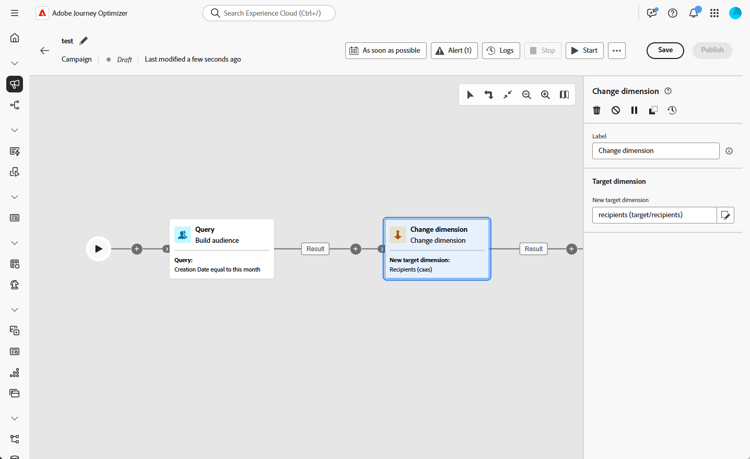
-
Define the New target dimension. The Change dimension step uses an external join: all records from the input population pass through, including those with no matching entry in the new dimension.
note important IMPORTANT Records that have no matching profile in the new targeting dimension are silently excluded at message delivery time. This exclusion is currently not reflected in exclusion logs. To identify non-matching records early, use the Preview results option on the transition after the Change dimension step and verify that record counts align with your expectations before proceeding.
Example example
This use case focuses on sending a mobile message to profiles who have created a wishlist within the past month.
Begin with a Build audience activity, using the Wishlist targeting dimension to identify all relevant wishlists.
Then, add a Change dimension activity to switch the targeting dimension from Wishlist to Recipient. This step ensures the Orchestrated campaign targets the correct profiles linked to those wishlists, allowing the mobile message to be sent to the intended profiles.
