Variant split paths
Use a Variant split paths node to distribute accounts or people across two or more journey paths based on percentage allocations that you define. This node is useful when you want to test different messaging, timing, or engagement tactics across segments of your audience without applying conditional rules.
Comparison by journey type journey-type-comparison
The variant split paths node uses different assignment algorithms depending on the journey type. Understanding this difference is important for choosing the right use case for each journey type.
Comparison to split paths compare-split-paths
Both Split paths and Variant split paths divide a journey into multiple branches (paths), but they use different mechanisms:
Account journeys account-journeys
For account journeys, the distribution algorithm uses quota-based random assignment. This algorithm is not deterministic: the same account could be assigned to a different path each time it enters or re-enters the journey. Path assignment depends on the current quota state at evaluation time, not on a fixed account property.
Split by account split-by-account
When an account reaches a variant split paths node, the runtime evaluates how many accounts have already been assigned to each path during the current journey instance and routes the account to the path that is furthest below its configured quota.
- Each account is assigned to exactly one path.
- Assignment is quota-based. The algorithm adjusts allocations dynamically to approach the configured percentages across the overall population.
- Because the algorithm tracks quota counts, actual distribution only drifts by at most one account per path due to rounding when totals do not divide evenly.
Split by people split-by-people
In an account journey, you can also use a variant split paths node to distribute the people within accounts randomly across percentage-based paths. This split type is useful when you want to test different content or experiences at the person level. Accounts continue to move through the journey. The variant split paths by people node operates with the following guardrails:
- The node functions as a grouped node, which is a split-merge combination. The split paths automatically close at a corresponding merge node so that all people can move forward without losing their account context.
- Each person in the account is assigned to exactly one path based on the configured percentages.
- The same quota-based algorithm used for accounts applies to people. The path assignment is not deterministic and the same person may follow a different path on re-entry.
- Only Take an action nodes for people are supported within the paths. The paths cannot be split further.
Distribution behavior across people
People within an account are processed as a batch. The number assigned to each path is calculated as floor(percentage / 100 × people_in_account), and the last configured path receives all remaining people. This means:
- When an account has an odd number of people, the last path receives one more person than earlier paths.
- For accounts with a single person, that person is always assigned to the first path regardless of configured percentages.
- For accounts with very few people (fewer than 10), the per-account distribution may differ noticeably from the configured percentages. Distribution converges toward the configured ratios when measured across many accounts.
Person journeys person-journeys
When a person reaches a variant split paths node, the runtime maps them to a path based on a hash of their ID and the journey ID.
- Each person is assigned to exactly one path.
- Assignment is deterministic — the same person always receives the same path assignment for a given published journey, regardless of how many times they enter or re-enter.
- The hash is computed from the person ID and journey ID only. It does not depend on the node position, time of entry, or any quota state. This means that re-entering the journey produces the same path assignment every time.
Distribution algorithm
The applied distribution algorithm depends on the journey type.
Account journeys — quota-based random assignment
The variant split paths node in account journeys uses a quota-based random assignment algorithm. When an account reaches the node, the runtime evaluates how many accounts have already been assigned to each path during the current journey instance and routes the account to the path that is furthest below its configured quota.
Key property of the quota-based algorithm:
- Distribution closely tracks the configured percentages at all account volumes. Because the algorithm actively maintains quota counts, actual distribution only drifts by at most one account per path due to rounding when totals do not divide evenly.
Person journeys — deterministic hash assignment
The variant split paths node in person journeys uses a deterministic hash assignment algorithm. When a person reaches the node, the runtime computes a hash value from the person ID and journey ID, then maps the result to a path based on the configured percentage ranges. The algorithm is applied using the following workflow:
- The runtime computes a MurmurHash3 32-bit hash from a composite key that combines the person ID and journey ID.
- The hash value is mapped to a position in a range of 10,000 equally-sized buckets.
- The buckets are partitioned according to the configured path percentages. For example, with paths at 30%, 30%, and 40%, the first 3,000 buckets correspond to Path 1, the next 3,000 to Path 2, and the remaining 4,000 to Path 3.
- The person is assigned to the path whose bucket range contains their hash position.
There are two key properties of the deterministic hash algorithm:
- Consistency — The same person is always assigned to the same bucket for a given journey ID. Re-entering the journey produces the same path assignment every time.
- Statistical distribution — Distribution converges to within ±2% of the configured percentages when at least 1,000 unique persons have entered the journey. With smaller audiences, per-path counts may differ more noticeably from the configured ratios.
Limitations limitations
Review these limitations before using variant split paths in your journeys.
Account journey limitations account-journey-limitations
Person journey limitations person-journey-limitations
Add a variant split paths node add-variant-split-paths-node
The steps to add and configure a variant split path node are the same for both account and person journeys.
-
Navigate to the journey map.
-
Click the Add ( + ) icon on a path and choose Variant split paths.
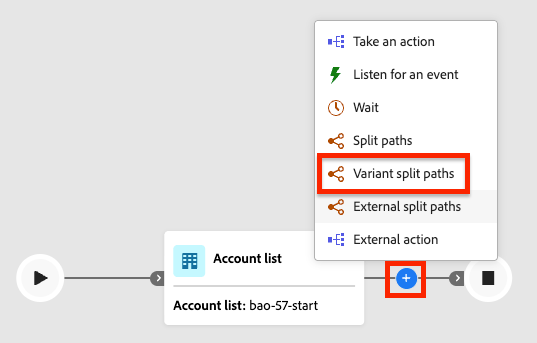
On the journey map, the node has two default paths.
-
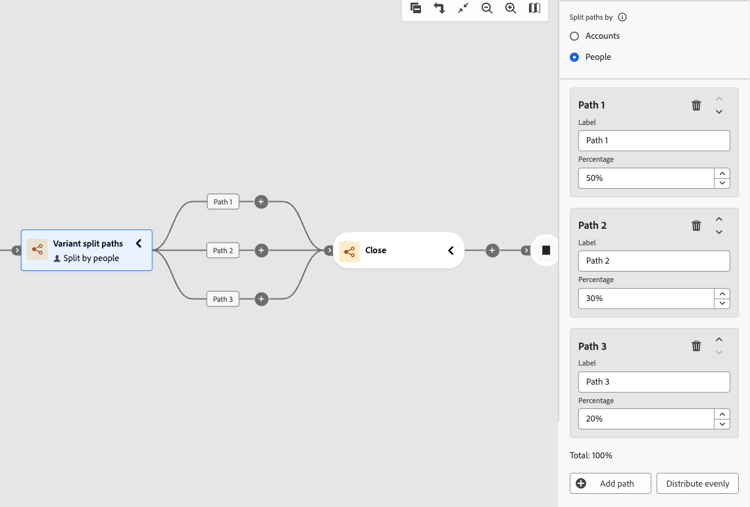
(Account journeys only) In the node properties on the right, choose either Accounts or People for the split.
If you are using the People type, a Close variant split paths node is automatically inserted to close the grouped split.
-
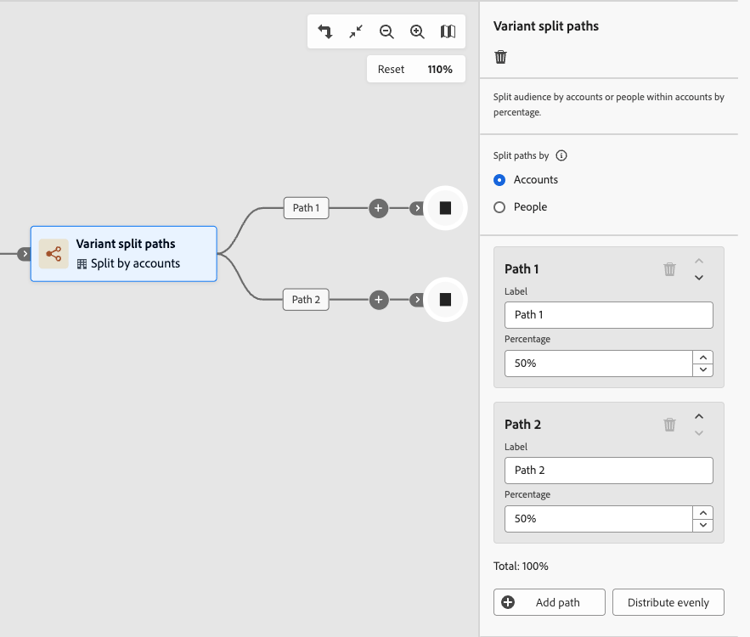
Review or update the Label for each path.
Path labels appear as edge labels on the journey canvas and help distinguish paths in journey analytics.
-
Set the Percentage for each path.
Values must be integers from 1 to 99.
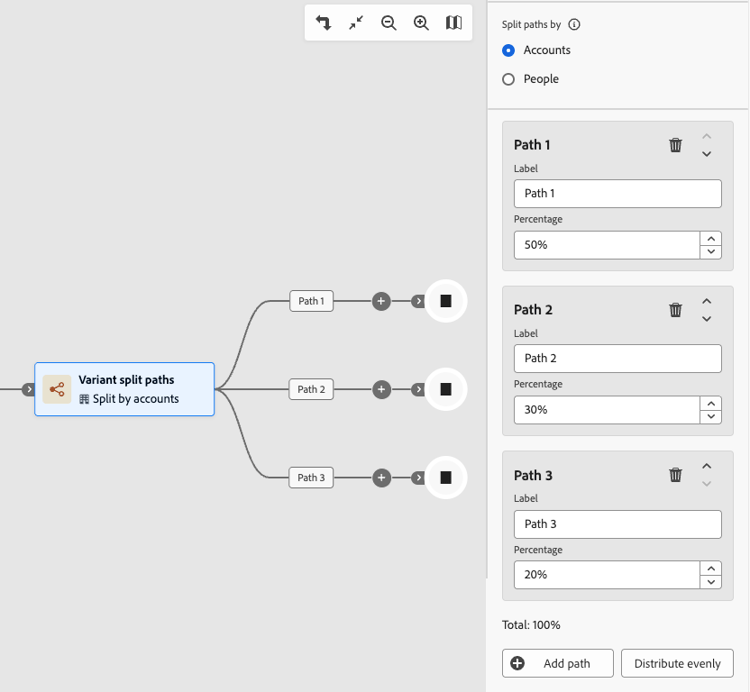
The running total indicator shows the sum of all path percentages. The total must equal exactly 100% before you can publish the journey. An error state is displayed when the total does not equal 100%.
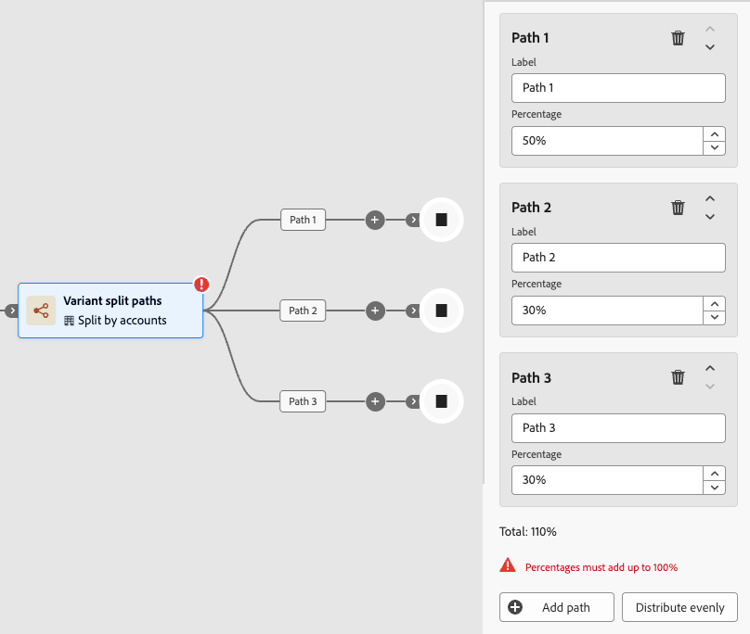
To distribute percentages evenly across all paths, click Distribute evenly. The system calculates equal shares and adjusts any rounding to ensure the total equals 100%.
-
To define additional paths, click Add path for each one.
The node supports up to 20 paths. As you add more paths, adjust the Percentage so that the total equals 100%.
You can remove a path by clicking the Delete (

The following rules apply to variant split path configuration. Violations block journey publish.
table 0-row-2 1-row-2 2-row-2 3-row-2 4-row-2 Rule Requirement Minimum paths 2 Maximum paths 20 Percentage per path Integer from 1 to 99 Total percentage Must equal exactly 100%