[Beta]{class="badge informative" title="This feature is currently in a limited beta release"}
Person audience journey nodes
The person audience node specifies which person profiles enter the journey. When you create a person journey, the journey always starts with a person audience node that defines its input. The person audience node can have one of two audience input types: CDP segments or event-based membership. Segment and event-based audience definitions cannot be combined.
Use one of the following input options for the person audience journey node:
-
Profile audience - Use segment audiences defined in a CDP. All profiles qualifying for the audience are added as members to the journey. Newly qualifying profiles for the segment are added to the journey during the daily profile ingestion tasks. If a profile no longer qualifies for the segment, it is not removed from the journey.
-
Event audience - Use qualifying events to define the audience. These events are defined in the node configuration and must use XDM events configured in the administration settings. Up to 10 events are supported for event-based audience membership. A profile qualifies immediately for the journey after the first matching event that their profile takes.
note NOTE Events cannot be combined with profile attributes to narrow down audience definitions. Improvements to address this limitation are planned for future releases.
Profile ingestion
In Journey Optimizer B2B Edition, a nightly audience ingestion task synchronizes profiles with Experience Platform. Event-based person journeys can qualify profiles not in an audience used by Journey Optimizer B2B Edition, but these profiles remain stale unless they join an audience used by a person journey, account journey, or buying group. If a profile is ingested and later added to an audience, profile stitching is performed and the profile remains synchronized with Experience Platform. Improvements to this profile data synchronization are planned for future releases.
A newly created profile ingested by an event-based person journey could lack the updated profile information at the time of ingestion. For example, if a profile is created through a form fill event, the data submitted may not be synced to the profile when the journey ingests it. The result could be incomplete data for personalization (such as in email content). Improvements to this profile event data synchronization are planned for future releases.
Event-based person journeys can qualify profiles that are still anonymous/without email addresses and that only contain ECIDs. This occurs most commonly when you have qualification logic for web page activity. Overly broad event-based audience logic could result in the instance reaching the 40 million profile cap if too many profiles qualify. To prevent this scenario, limit the possible scope of your audience.
Set the audience for the person audience node
-
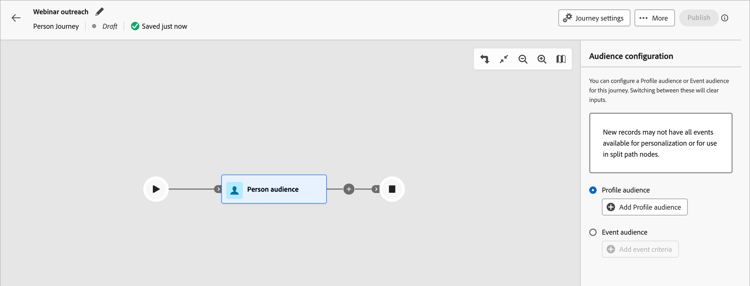
Click the Person audience node.
This action displays the node properties on the right.
-
Choose the input type for people entering the journey:
-
Profile audience
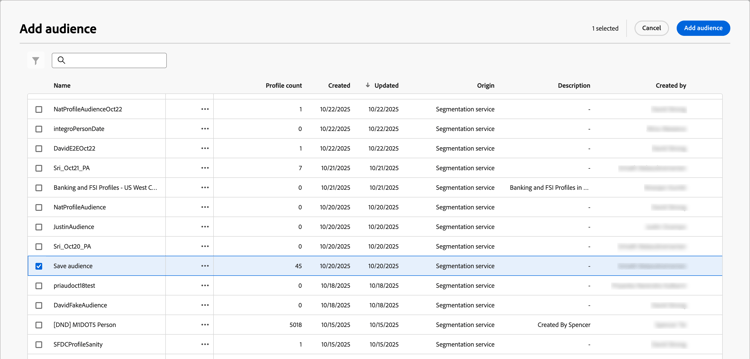
Choose the Profile audience option. Then, click Add profile audience.
In the Add audience dialog, select a previously created audience segment. Then, click Add audience.
-
Event audience
Choose the Event audience option. Then, click Add event criteria.
In the Edit event criteria dialog, add one or more events that you want to use for audience member qualification. For each event that you add, click Add constraint to choose an event attribute for a match. Set the evaluation that you want to use for a match. You can add multiple constraints to match the event.
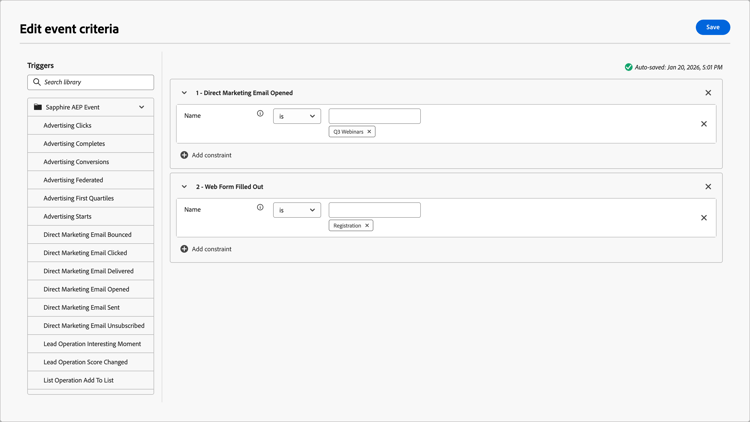
When the event criteria are defined, click Save.
For more information about configuration for journey-supported events, see Manage Experience Events.
-