[Beta]{class="badge informative" title="This feature is currently in a beta release"}
Select Experience Events and fields
Administrators can select specific AEP Experience Events and their associated fields within the Experience Event union schema. After selection, users can configure decisioning rules to listen to those Experience Events to enable dynamic and targeted campaign actions based on near real-time event data.
Using AEP experience events in journeys is a two-step process:
-
An administrator adds AEP experience events and fields in the Journey Optimizer B2B Edition configurations.
-
In a journey, a marketer adds a Listen for an event node and selects an Experience Event.
- Selects the event to use in the node.
- Selects the fields to use as constraints.
Guidelines and limitations
As you select events to meet your organizational goals, keep the following in mind:
-
You can select up to 50 events and up to 100 fields per event.
-
Journeys can listen to Experience Events that are ingested using Experience Platform streaming capabilities, such as Web SDK or HTTP API.
-
You can use Experience Events for decisioning purposes within a journey, but they are not retained. Therefore, you cannot leverage a historical record of Experience Events within Journey Optimizer B2B Edition.
-
When you use an Experience Event and publish the journey, you can add more fields, but you cannot remove fields that were previously selected.
-
You can reference an Experience Event in multiple journeys or use one more than once within the same journey.
Manage Experience Events
-
In the left navigation, choose Administration > Configurations.
-
Click XDM Classes on the intermediate panel, and then click the Events tab to display the list of the available events.
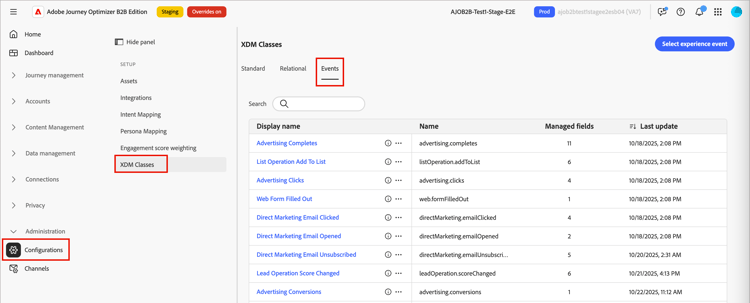
The table is sorted by the Last update column, with the most recently updated events at the top by default.
From this page, you can select and edit events for use in journeys.
To access the details for a selected event, click the event name.
Filter the event list
Enter text in the Search field to filter the displayed events for a match of the event name.
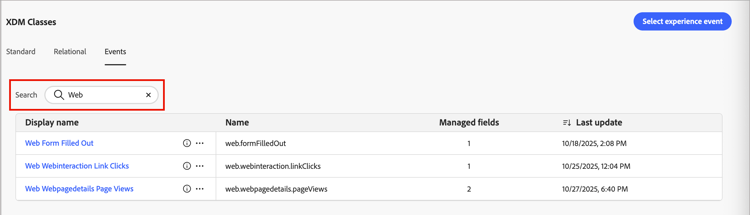
Add an event
To make an Experience Event available for a Listen for an event node in a journey, select the event and the supported fields.
-
Click Select experience event at the top right.
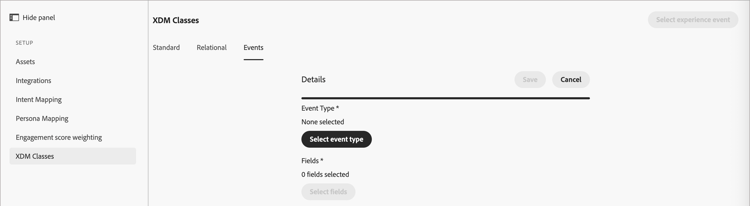
The event details page is displayed. From this page, you can choose the event type and the fields.
-
Choose the event type.
-
Click Select event type.
-
In the dialog, choose the event type.
Use the Search field to filter the displayed list by name. Use the Only show selected fields slider to review the current selections.
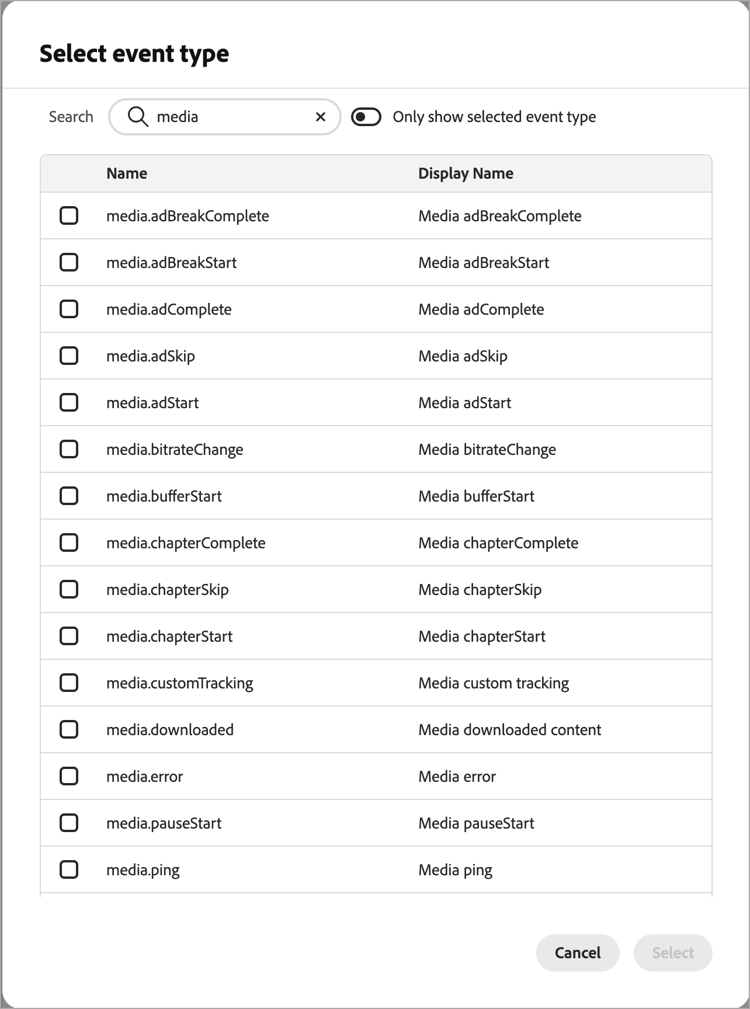
-
Click Select.
-
-
Choose one or more fields for the event type.
-
Click Select fields.
-
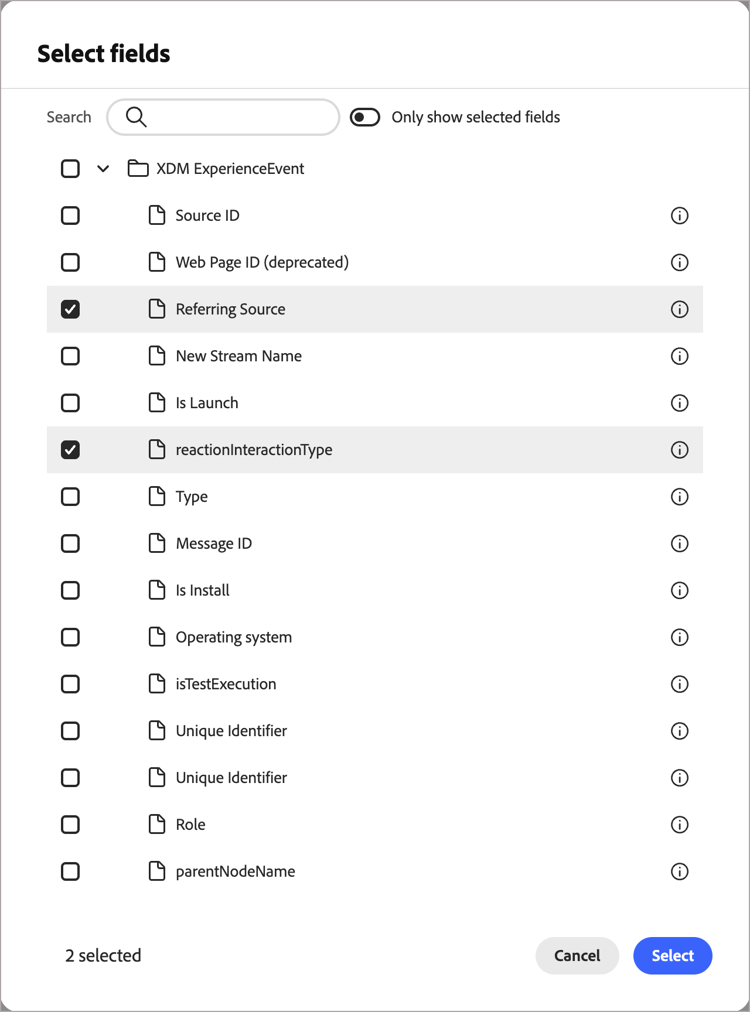
In the dialog, select the fields that you want to use as constraints for matching events.
Use the Search field to filter the displayed list by name. Use the Only show selected fields slider to review the current selections.
-
Click Select.
-
-
In the event details page, click Save.
The saved event is displayed in the list on the Events tab.
Edit an event
Edit the event details to change the fields.
-
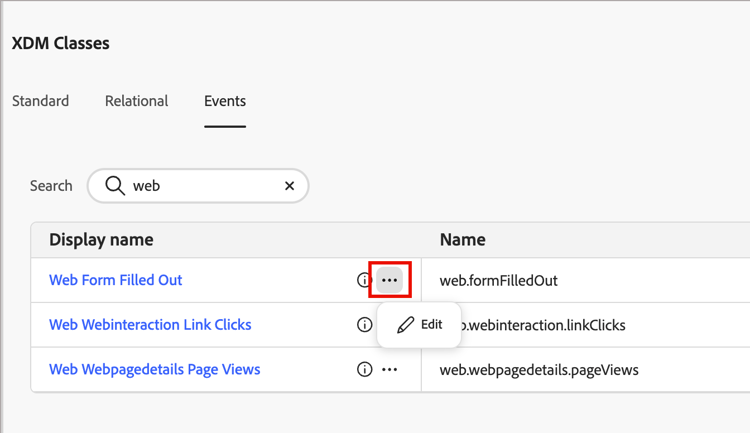
Click the event name, or click the More menu ( … ) icon and choose Edit.
-
Click Edit fields to add more fields or remove existing selections in the Select fields dialog.
-
Click Select to save your selections.
Remove an event
Events and fields
For Journey Optimizer B2B Edition, certain people-level activities are captured as Experience Platform Experience Events. These events are stored in a system dataset that uses the XDM Experience Event schema and includes journey-specific field groups. You can use these events in Journey Optimizer B2B Edition like any other Experience Event.
Each event exposes a defined set of fields that can be used in journey Listen for an event nodes (decisioning based on events). Review the available event types and their fields to determine which event and fields to use in these journey nodes:
Email sent
This event tracks when a marketing email was sent to a person.
Event type: directMarketing.emailSent
| table 0-row-2 1-row-2 2-row-2 3-row-2 4-row-2 5-row-2 6-row-2 7-row-2 8-row-2 9-row-2 10-row-2 11-row-2 12-row-2 13-row-2 14-row-2 15-row-2 | |
|---|---|
| Display name | Path |
| Identifier | _id |
| Event type | eventType |
| Timestamp | timestamp |
| Person ID | personID |
| Person source ID | personKey.sourceID |
| Person source type | personKey.sourceType |
| Person source instance ID | personKey.sourceInstanceID |
| Person source Key | personKey.sourceKey |
| Email source ID | directMarketing.emailSent.mailingKey.sourceID |
| Email source type | directMarketing.emailSent.mailingKey.sourceType |
| Email source instance ID | directMarketing.emailSent.mailingKey.sourceInstanceID |
| Email source key | directMailing.emailSent.mailingKey.sourceKey |
| Mailing name | directMarketing.emailSent.mailingName |
| Journey ID | _experience.journeyOrchestration.stepEvents.journeyID |
| Node ID | _experience.journeyOrchestration.stepEvents.nodeID |
Email delivered
This event tracks when an email was delivered successfully to a person’s email service.
Event type: directMarketing.emailDelivered
| table 0-row-2 1-row-2 2-row-2 3-row-2 4-row-2 5-row-2 6-row-2 7-row-2 8-row-2 9-row-2 10-row-2 11-row-2 12-row-2 13-row-2 14-row-2 15-row-2 | |
|---|---|
| Display name | Path |
| Identifier | _id |
| Event type | eventType |
| Timestamp | timestamp |
| Person ID | personID |
| Person source ID | personKey.sourceID |
| Person source type | personKey.sourceType |
| Person source instance ID | personKey.sourceInstanceID |
| Person source Key | personKey.sourceKey |
| Mailing source ID | directMarketing.mailingKey.sourceID |
| Mailing source type | directMarketing.mailingKey.sourceType |
| Mailing source instance ID | directMarketing.mailingKey.sourceInstanceID |
| Mailing source key | directMarketing.mailingKey.sourceKey |
| Mailing name | directMarketing.mailingName |
| Journey ID | _experience.journeyOrchestration.stepEvents.journeyID |
| Node ID | _experience.journeyOrchestration.stepEvents.nodeID |
Email opened
This event tracks when a person opened a marketing email.
Event type: directMarketing.emailOpened
| table 0-row-2 1-row-2 2-row-2 3-row-2 4-row-2 5-row-2 6-row-2 7-row-2 8-row-2 9-row-2 10-row-2 11-row-2 12-row-2 13-row-2 14-row-2 15-row-2 16-row-2 17-row-2 18-row-2 19-row-2 | |
|---|---|
| Display name | Path |
| Identifier | _id |
| Event type | eventType |
| Timestamp | timestamp |
| Person ID | personID |
| Person source ID | personKey.sourceID |
| Person source type | personKey.sourceType |
| Person source instance ID | personKey.sourceInstanceID |
| Person source Key | personKey.sourceKey |
| Mailing source ID | directMarketing.mailingKey.sourceID |
| Mailing source type | directMarketing.mailingKey.sourceType |
| Mailing source instance ID | directMarketing.mailingKey.sourceInstanceID |
| Mailing source key | directMarketing.mailingKey.sourceKey |
| Mailing name | directMarketing.mailingName |
| Is mobile device | device.isMobileDevice |
| Device model | device.model |
| User agent | environment.browserDetails.userAgent |
| Operating system | environment.operatingSystem |
| Journey ID | _experience.journeyOrchestration.stepEvents.journeyID |
| Node ID | _experience.journeyOrchestration.stepEvents.nodeID |
Email clicked
This event tracks when a person clicked a link in a marketing email.
Event type: directMarketing.emailClicked
| table 0-row-2 1-row-2 2-row-2 3-row-2 4-row-2 5-row-2 6-row-2 7-row-2 8-row-2 9-row-2 10-row-2 11-row-2 12-row-2 13-row-2 14-row-2 15-row-2 16-row-2 17-row-2 18-row-2 19-row-2 20-row-2 | |
|---|---|
| Display name | Path |
| Identifier | _id |
| Event type | eventType |
| Timestamp | timestamp |
| Person ID | personID |
| Person source ID | personKey.sourceID |
| Person source type | personKey.sourceType |
| Person source instance ID | personKey.sourceInstanceID |
| Person source Key | personKey.sourceKey |
| Mailing source ID | directMarketing.mailingKey.sourceID |
| Mailing source type | directMarketing.mailingKey.sourceType |
| Mailing source instance ID | directMarketing.mailingKey.sourceInstanceID |
| Mailing source key | directMarketing.mailingKey.sourceKey |
| Mailing name | directMarketing.mailingName |
| Link URL | directMarketing.linkURL |
| Is mobile device | device.isMobileDevice |
| Model | device.model |
| User agent | environment.browserDetails.userAgent |
| Operating system | environment.operatingSystem |
| Journey ID | _experience.journeyOrchestration.stepEvents.journeyID |
| Node ID | _experience.journeyOrchestration.stepEvents.nodeID |
Email bounced
This event tracks when an email to a person bounced.
Event type: directMarketing.emailBounced
| table 0-row-2 1-row-2 2-row-2 3-row-2 4-row-2 5-row-2 6-row-2 7-row-2 8-row-2 9-row-2 10-row-2 11-row-2 12-row-2 13-row-2 14-row-2 15-row-2 16-row-2 17-row-2 18-row-2 | |
|---|---|
| Display name | Path |
| Identifier | _id |
| Event type | eventType |
| Timestamp | timestamp |
| Person ID | personID |
| Person source ID | personKey.sourceID |
| Person source type | personKey.sourceType |
| Person source instance ID | personKey.sourceInstanceID |
| Person source Key | personKey.sourceKey |
| Mailing source ID | directMarketing.mailingKey.sourceID |
| Mailing source type | directMarketing.mailingKey.sourceType |
| Mailing source instance ID | directMarketing.mailingKey.sourceInstanceID |
| Mailing source key | directMarketing.mailingKey.sourceKey |
| Mailing name | directMarketing.mailingName |
directMarketing.email |
|
| Email bounced code | directMarketing.emailBouncedCode |
| Email bounced details | directMarketing.emailBouncedDetails |
| Journey ID | _experience.journeyOrchestration.stepEvents.journeyID |
| Node ID | _experience.journeyOrchestration.stepEvents.nodeID |
Email bounced soft
This event tracks when an email to a person soft-bounced.
Event type: directMarketing.emailBouncedSoft
| table 0-row-2 1-row-2 2-row-2 3-row-2 4-row-2 5-row-2 6-row-2 7-row-2 8-row-2 9-row-2 10-row-2 11-row-2 12-row-2 13-row-2 14-row-2 15-row-2 16-row-2 17-row-2 18-row-2 | |
|---|---|
| Display name | Path |
| Identifier | _id |
| Event type | eventType |
| Timestamp | timestamp |
| Person ID | personID |
| Person source ID | personKey.sourceID |
| Person source type | personKey.sourceType |
| Person source instance ID | personKey.sourceInstanceID |
| Person source Key | personKey.sourceKey |
| Mailing source ID | directMarketing.mailingKey.sourceID |
| Mailing source type | directMarketing.mailingKey.sourceType |
| Mailing source instance ID | directMarketing.mailingKey.sourceInstanceID |
| Mailing source key | directMarketing.mailingKey.sourceKey |
| Mailing name | directMarketing.mailingName |
directMarketing.email |
|
| Email bounced code | directMarketing.emailBouncedCode |
| Email bounced details | directMarketing.emailBouncedDetails |
| Journey ID | _experience.journeyOrchestration.stepEvents.journeyID |
| Node ID | _experience.journeyOrchestration.stepEvents.nodeID |
Email unsubscribed
This event tracks when a person unsubscribed from a marketing email.
Event type: directMarketing.emailUnsubscribed
| table 0-row-2 1-row-2 2-row-2 3-row-2 4-row-2 5-row-2 6-row-2 7-row-2 8-row-2 9-row-2 10-row-2 11-row-2 12-row-2 13-row-2 14-row-2 15-row-2 | |
|---|---|
| Display name | Path |
| Identifier | _id |
| Event type | eventType |
| Timestamp | timestamp |
| Person ID | personID |
| Person source ID | personKey.sourceID |
| Person source type | personKey.sourceType |
| Person source instance ID | personKey.sourceInstanceID |
| Person source Key | personKey.sourceKey |
| Mailing source ID | directMarketing.mailingKey.sourceID |
| Mailing source type | directMarketing.mailingKey.sourceType |
| Mailing source instance ID | directMarketing.mailingKey.sourceInstanceID |
| Mailing source key | directMarketing.mailingKey.sourceKey |
| Mailing name | directMarketing.mailingName |
| Journey ID | _experience.journeyOrchestration.stepEvents.journeyID |
| Node ID | _experience.journeyOrchestration.stepEvents.nodeID |
Visit web page
This event type is the standard method for marking the hit as a page view.
Event type: web.webpagedetails.pageViews
| table 0-row-2 1-row-2 2-row-2 3-row-2 4-row-2 5-row-2 6-row-2 7-row-2 8-row-2 9-row-2 10-row-2 11-row-2 12-row-2 13-row-2 14-row-2 15-row-2 16-row-2 17-row-2 18-row-2 | |
|---|---|
| Display name | Path |
| Identifier | _id |
| Event type | eventType |
| Timestamp | timestamp |
| Person ID | personID |
| Person source ID | personKey.sourceID |
| Person source type | personKey.sourceType |
| Person source instance ID | personKey.sourceInstanceID |
| Person source Key | personKey.sourceKey |
| Web page source ID | web.webPageDetails.webPageKey.sourceID |
| Web page source type | web.webPageDetails.webPageKey.sourceType |
| Web page source instance ID | web.webPageDetails.webPageKey.sourceInstanceID |
| Web page source key | web.webPageDetails.webPageKey.sourceKey |
| Web page name | web.webPageDetails.name |
| Web page URL | web.webPageDetails.URL |
| Web page query parameters | web.webPageDetails.queryParameters |
| Web page ID | web.webPageDetails.webPageID |
| User agent | environment.browserDetails.userAgent |
| Referrer URL | web.webReferrer.URL |
Form filled out
This event tracks when a person filled out a form on a web page.
Event type: web.formFilledOut
| table 0-row-2 1-row-2 2-row-2 3-row-2 4-row-2 5-row-2 6-row-2 7-row-2 8-row-2 9-row-2 10-row-2 11-row-2 12-row-2 13-row-2 14-row-2 15-row-2 16-row-2 17-row-2 18-row-2 | |
|---|---|
| Display name | Path |
| Identifier | _id |
| Event type | eventType |
| Timestamp | timestamp |
| Person ID | personID |
| Person source ID | personKey.sourceID |
| Person source type | personKey.sourceType |
| Person source instance ID | personKey.sourceInstanceID |
| Person source Key | personKey.sourceKey |
| Web form source ID | web.fillOutForm.webFormKey.sourceID |
| Web form source type | web.fillOutForm.webFormKey.sourceType |
| Web form source instance ID | web.fillOutForm.webFormKey.sourceInstanceID |
| Web form source key | web.fillOutForm.webFormKey.sourceKey |
| Web form ID | web.fillOutForm.webFormID |
| Web form name | web.fillOutForm.webFormName |
| Web page query parameters | web.webPageDetails.queryParameters |
| Web page ID | web.webPageDetails.webPageID |
| User agent | environment.browserDetails.userAgent |
| Referrer URL | web.webReferrer.URL |
Web link clicked
The event signals that the Web SDK automatically recorded a link click.
Event type: web.webinteraction.linkClicks
| table 0-row-2 1-row-2 2-row-2 3-row-2 4-row-2 5-row-2 6-row-2 7-row-2 8-row-2 9-row-2 10-row-2 11-row-2 12-row-2 13-row-2 14-row-2 15-row-2 16-row-2 17-row-2 18-row-2 | |
|---|---|
| Display name | Path |
| Identifier | _id |
| Event type | eventType |
| Timestamp | timestamp |
| Person ID | personID |
| Person source ID | personKey.sourceID |
| Person source type | personKey.sourceType |
| Person source instance ID | personKey.sourceInstanceID |
| Person source Key | personKey.sourceKey |
| Web interaction source ID | web.webInteraction.webInteractionKey.sourceID |
| Web interaction source type | web.webInteraction.webInteractionKey.sourceType |
| Web interaction source instance ID | web.webInteraction.webInteractionKey.sourceInstanceID |
| Web interaction source key | web.webInteraction.webInteractionKey.sourceKey |
| Web interaction link ID | web.webInteraction.linkID |
| Web interaction link URL | web.webInteraction.linkURL |
| Web page query parameters | web.webPageDetails.queryParameters |
| Web page ID | web.webPageDetails.webPageID |
| User agent | environment.browserDetails.userAgent |
| Referrer URL | web.webReferrer.URL |
Interesting moment
This event tracks when an interesting moment was recorded for a person.
Event type: leadOperation.interestingMoment
| table 0-row-2 1-row-2 2-row-2 3-row-2 4-row-2 5-row-2 6-row-2 7-row-2 8-row-2 9-row-2 10-row-2 11-row-2 12-row-2 13-row-2 14-row-2 | |
|---|---|
| Display name | Path |
| Identifier | _id |
| Event type | eventType |
| Timestamp | timestamp |
| Person ID | personID |
| Person source ID | personKey.sourceID |
| Person source type | personKey.sourceType |
| Person source instance ID | personKey.sourceInstanceID |
| Person source Key | personKey.sourceKey |
| Moment date | leadOperation.interestingMoment.date |
| Moment description | leadOperation.interestingMoment.description |
| Moment source | leadOperation.interestingMoment.source |
| Moment type | leadOperation.interestingMoment.type |
| Journey ID | _experience.journeyOrchestration.stepEvents.journeyID |
| Node ID | _experience.journeyOrchestration.stepEvents.nodeID |