Email send-time optimization
Use the Send-time optimization (STO) feature to personalize email delivery timing for person journeys by predicting when each profile is most likely to engage. Instead of a fixed send time, STO uses historical email engagement signals to schedule delivery at the optimal time for each recipient, improving overall engagement.
STO analyzes each profile’s historical engagement using a large language model. It predicts and ranks potential send times, then schedules delivery at the highest-ranked time within the optimization window.
Current availability and scope
Send-time optimization is currently supported for:
-
Journey type: Person Journeys
-
Channel: Email
-
Configuration: Send email action node
-
Reporting: AI Assistant through the Journey Observability skill
Performance insights, such as usage, engagement lift, and STO vs. non-STO comparisons, are available through natural language queries in the AI Assistant.
There are many future enhancements planned for STO:
- Support for Account Journeys
- Global STO configuration in the Admin area
- Journey-level STO enablement
- Configurable test / control splits
- A dedicated STO reporting dashboard
Configuration
You can configure send-time optimization when you add a Take an action node to a person journey.
-
For Select action, choose Send email.
-
Use the Send-time Optimization toggle to enable the feature.
-
To specify the window and test distribution, set the STO options:
-
Send within next - This value determines the optimization window (in days), which is the time range in which emails can be delivered. For example, for a webinar occurring in five days, you might set a four- or five-day window. STO selects the best predicted send time for each profile within this window.
-
STO / Fixed distribution - STO automatically creates a test and control split to divide eligible profiles between optimized and fixed send times. The split enables direct performance comparison. (Future enhancements are planned to allow custom split percentages.)
note NOTE Profiles with strong engagement history are split evenly into control and test groups to measure STO impact. To ensure statistically reliable results, the STO vs. non‑STO split is constrained between 30% and 70%. This helps prevent smaller cohorts from skewing outcomes and ensures meaningful comparisons. 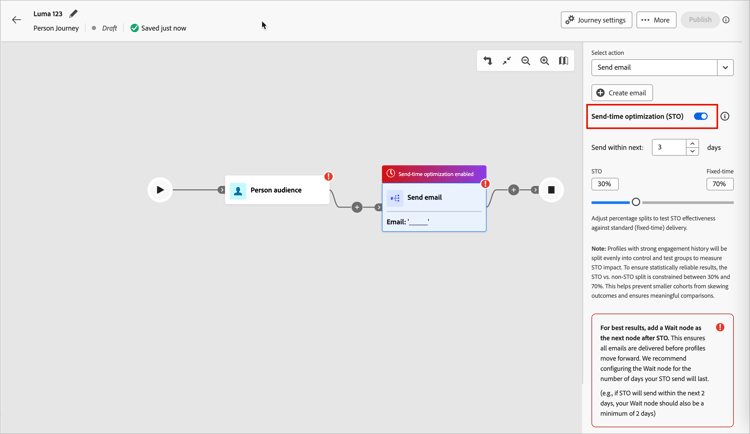
-
-
Directly after the Send email node, add a Wait node.
A wait node must immediately follow an STO-enabled email action. Adding this node ensures that profiles remain in the journey until the full optimization window is cleared and all STO sends are complete. If you omit this node, the system flags the configuration as invalid.
-
After you complete the rest of the person journey, proceed to publish.
STO insights
STO insights are delivered through the AI Assistant using the Journey Agent Observability skill. You can query usage, engagement metrics, test / control results, node performance, and overall journey impact.