Intent scores intent-scores
An intent score measures how interested a person or account is in a keyword, product, or product category. Adobe Journey Optimizer B2B Edition calculates the score using machine learning that measures similarity in meaning, rather than manual rules or a fixed point system. Every score is normalized from 0 to 1, with higher numbers indicating stronger intent.
Content relevance refreshes roughly every 12 hours, and intent scores recalculate daily. Scores aggregate from keyword to product, and from person to account. Intent scores appear throughout the Intelligent Dashboard, and on the account details, Buying group details page, and person details pages.
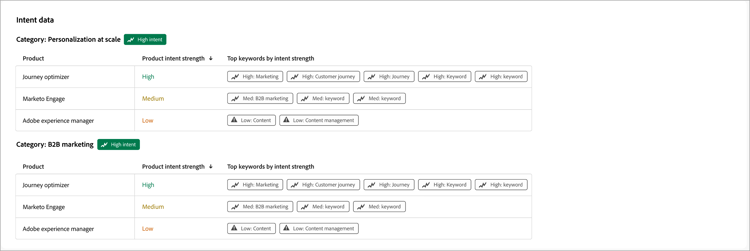
The following sections explain the core concepts behind intent scoring, the continuous process that keeps scores current, the calculation logic behind each score, and the settings you can configure.
Core concepts core-concepts
Intent detection measures how closely what a person engages with matches your products and keywords, then weights that similarity by how much the person engaged. Three entities make up this model.
Default taxonomy and updates taxonomy
Your taxonomy, the keywords, products, and categories that intent is measured against, is available for use with no setup required.
You can review and update taxonomy mappings at any time on the Intent Mapping page. See Intent data for the taxonomy setup process.
Content relevance content-relevance
Journey Optimizer B2B Edition translates content and taxonomy into a mathematical representation of their meaning, then uses a similarity model to measure how closely they align. Content that closely matches a keyword or product receives a high relevance score. Unrelated content receives a low score.
The similarity model is pretrained on general language, so no customer-specific training is required to get started.
Scoring process scoring-process
A continuous process turns raw engagement into a finished intent score. Each stage builds on what the previous stage produced.

Engagement capture engagement-capture
Every meaningful touchpoint a person has is captured as it happens and linked to the content involved.
- Page visits, email opens and clicks, form submissions, and similar activities are recorded as engagement events.
- Each unique piece of content is also noted so it can be analyzed in the next stage.
- Refresh cadence - Continuous, as engagement occurs.
Content extraction content-extraction
Before content can be scored for relevance, Journey Optimizer B2B Edition extracts and reads its text.
- For each new piece of content, the system extracts the underlying text, whether it lives on a web page or in an email.
- Some activity types, such as form fills, already carry their own descriptive content and skip this step.
- Content that cannot be retrieved, such as a broken or removed link, is logged and excluded going forward.
- Refresh cadence - As new content is discovered.
Relevance scoring relevance-scoring
Every asset is measured against your taxonomy, independent of who engaged with it.
- Each email and web page is analyzed and compared against your keywords, products, and categories using the similarity model.
- The result is a relevance score between 0 and 1 for that asset against each related keyword or product.
- Refresh cadence - Every 12 hours.
Daily intent calculation daily-intent-calculation
Engagement and content relevance combine into one daily intent score per person, per keyword or product.
- Each activity type carries a configurable weight. For example, a form submission can count far more heavily than a page view.
- Recent activity matters more than older activity, so scores favor what someone did this week over what they did a month ago.
- A confidence measure reflects how consistent a person’s engagement has been, not only volume.
- Refresh cadence - Daily.
Score delivery score-delivery
Daily scores aggregate, receive an intent level, and are delivered to your dashboard.
- Each score is tagged with an intent level of High, Medium, or Low.
- Scores link to the correct account so sales and marketing teams can see both person-level and account-level intent.
- Only people whose intent level changed are updated, so the dashboard reflects the latest meaningful shift.
- Refresh cadence - Daily.
Score calculation logic score-calculation-logic
The calculation consists of five layers, each adding more context to the raw relevance and engagement data.
Content relevance to a topic relevance-to-topic
Every piece of content and every topic, meaning a keyword, product, or category, is translated into a mathematical representation of its meaning. Content with a similar meaning to a topic sits closer together in this representation. Relevance is a measure of closeness in meaning, not an exact word match.
Daily engagement weighting engagement-weighting
On a given day, a person’s score is a weighted average of the relevance of everything they engaged with. Higher-value activities count for more.
Example
A person engages with three pieces of content in one day. Page views carry a weight of one, and form submissions carry a weight of five.
Because their one form submission counts five times as much as a page view, it significantly influences their daily score even though they interacted with three items in total.
Their resulting daily score for that topic is roughly 0.70 on a 0 to 1 scale.
Recency decay recency-decay
A person’s score reflects a blend of the last several days, with recent activity weighted much more heavily than older activity. After approximately one week, older activity has minimal impact, so the score always reflects current interest. In practice, a visit today outweighs one from yesterday, which outweighs one from 10 days ago.
Score normalization and intent levels normalization-intent-levels
Every adjusted score is placed on a consistent 0 to 1 scale relative to other people in your instance, then bucketed into an intent level.
Score aggregation score-aggregation
Individual scores aggregate so you can review intent at the level that matters for a decision, not only at the most granular level.
- Keyword to product - Scores calculated at the keyword level aggregate to show interest in a product, not only a single search term.
- Person to account - An account score aggregates all its people’s scores, so you can see when a whole buying group is showing intent.
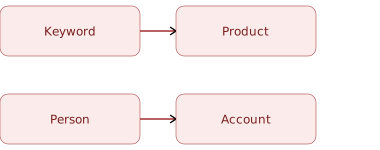
Use the product-level view to see which products are increasing in interest overall, rather than which individual keywords are trending. Use the account-level view to see when a whole buying group is showing increased interest together, rather than reacting to a single engaged person.
Configurable settings configurable-settings
Most of the scoring logic is fixed to keep results reliable and comparable over time. A product administrator can customize two settings to meet your requirements:
-
Activity weights - To apply greater impact to intent scores, increase the weight of high-value activities, such as a demo request or a pricing page visit. To exclude an activity entirely, set its weight to zero, which is useful for actions like unsubscribes that do not contribute to intent. Activity weights for intent calculation use the same weighting model that also drives engagement scores. See Configure engagement score weighting to change activity weights.
-
Taxonomy mappings - The keywords, products, and categories that scoring is based on are available for use. Review and update them at any time on the Intent Mapping page. See Intent data for the setup process.
Everything else, including content relevance, activity decay, and High, Medium, and Low thresholds, is fixed so that scores stay consistent and comparable over time.
Scoring principles scoring-principles
Keep the following principles in mind when you review and act on intent scores.
Model-driven scoring model-driven
There are no point assignments or keyword rules to maintain. The model learns relevance directly from your content and taxonomy, which keeps scoring consistent as your content library grows and changes, without ongoing configuration.
Relative scoring relative-scoring
A score reflects where a person or account ranks among your other contacts today, and the system recalculates it daily based on the current population. Use scores to compare people and accounts within your own instance, rather than as a fixed, universal number. Scores are not directly comparable from one company to another.
Data freshness data-freshness
Content relevance refreshes roughly every 12 hours as new content appears. Intent scores recalculate once per day, so the dashboard reflects the previous day’s activity each morning.