Identify job schedule anti-patterns
- Batch data lake ingestion (Real-Time CDP)
- Batch profile ingestion (Real-Time CDP)
- Batch identity ingestion (Real-Time CDP)
- Batch segmentation (Real-Time CDP)
- Batch destination activation (Real-Time CDP)
- Scheduled batch campaigns (Adobe Journey Optimizer)
The Job Schedules timeline view helps you identify common configuration issues that can negatively impact your data pipeline performance and reliability. These anti-patterns often lead to job failures, data inconsistencies, or degraded system performance. Four of the most common anti-patterns are automatically detected and surfaced through warning indicators in the interface. By spotting these patterns early, you can reconfigure your jobs to avoid problems before they affect your business operations.
Automatically detected anti-patterns auto-detection
Job Schedules automatically detects four common anti-patterns and surfaces warning indicators in the interface. For the batch pipeline anti-patterns, indicators appear on the relevant summary cards and open a details panel with a description of the issue, recommended actions, and a list of affected datasets or destinations. For the campaign timing anti-pattern, affected campaigns are grouped under a start before segmentation end label directly in the timeline.
Prerequisites prerequisites
Before identifying anti-patterns, you should:
- Have access to Job Schedules with the View Job Schedules access control permission.
- Be familiar with the Job Schedules interface and how to read the timeline view.
- Understand basic batch ingestion, segmentation, and profile processing concepts.
Quick reference anti-pattern-quick-reference
Schedule overlap schedule-overlap-pattern
Impact severity: High | Primary issue: Resource contention
What to look for: Multiple jobs scheduled to run at the same time or in close succession, particularly when resource-intensive jobs overlap.
A common example is batch ingestion jobs running at the same time as a scheduled segmentation job. This creates resource contention because both operations require significant processing power and memory.
Why this is problematic:
- Resource contention: When multiple resource-intensive jobs run simultaneously, they compete for system resources (CPU, memory, I/O), causing all jobs to run slower.
- Unpredictable performance: Job duration becomes inconsistent, making it difficult to plan reliable schedules.
- Cascading delays: If jobs take longer than expected, they can delay downstream dependent jobs, creating a ripple effect throughout your pipeline.
- Increased failure risk: Resource exhaustion can cause jobs to timeout or fail completely.
How to fix it:
- Stagger job schedules: Ensure resource-intensive operations run sequentially rather than concurrently.
- Add buffer time: Leave adequate spacing between jobs to account for processing variations.
- Review dependencies: Identify which jobs must complete before others can start safely.
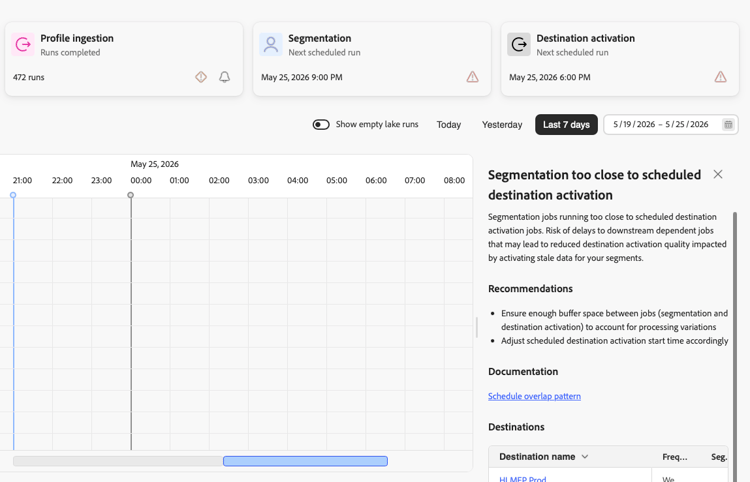
When Job Schedules detects segmentation running too close to a scheduled destination activation, a warning indicator appears on the Destination activation summary card. Select the warning indicator to open a panel showing the number of detected occurrences, a description of the timing conflict, recommendations, and a table of affected destinations.
Campaign start before segmentation end campaign-start-before-segmentation-end
Impact severity: High | Primary issue: Campaign sends against an incomplete audience
What to look for: A scheduled batch campaign in Adobe Journey Optimizer with a start time set before the upstream segmentation job is projected to complete.
Why this is problematic:
- Stale or partial audience: A campaign that starts before segmentation finishes sends against an incomplete evaluation of the audience.
- Silent failure: The campaign does not necessarily error. It sends on schedule, but against the wrong data, or it misses its window entirely.
- Hidden dependency: Without a unified view, the timing conflict between segmentation and campaign delivery is not visible until customers investigate a support ticket.
How to fix it:
- Add buffer time: Reschedule the campaign to start after segmentation is projected to complete, with enough margin to absorb normal variation in segmentation duration.
- Review the dependency chain: Confirm which segmentation job the campaign audience depends on, and adjust either schedule to remove the conflict.
Job Schedules flags this conflict directly on the timeline by grouping affected campaigns under a start before segmentation end label beneath the Campaigns row. For more information, see scheduled campaign timing.
Scheduled job density scheduled-density
Impact severity: High | Primary issue: Pipeline bottlenecks
What to look for: Too many datasets with multiple batches scheduled within the same hour, particularly when these batches are stacked close together and scheduled near critical processing windows like segmentation start times.
This pattern typically includes:
- Multiple datasets each running several batches per day
- ETL jobs (data lake ingestion and profile ingestion) clustered within the same hour
- Batch ingestion scheduled immediately before or during scheduled segmentation windows
Why this is problematic:
- Pipeline bottleneck: When numerous batches from different datasets are stacked within a short time window, they create a processing bottleneck that can overwhelm the ingestion pipeline.
- Delayed profile availability: Profile ingestion jobs that run too close to segmentation start times may not complete in time, resulting in incomplete or stale audience evaluations.
- Unpredictable segmentation: If upstream ingestion jobs are still running when segmentation begins, you risk evaluating audiences against incomplete data, leading to incorrect audience membership.
- Cascading failures: A single delayed batch in a densely stacked schedule can cause a domino effect, delaying all subsequent batches and downstream processes.
- Resource strain: The system may struggle to allocate sufficient resources when processing too many concurrent ingestion jobs, leading to slower processing times or failures.
How to fix it:
- Consolidate batches: Reduce batch frequency by combining multiple small batches into fewer, larger batches per dataset.
- Distribute evenly: Spread ingestion jobs throughout the day rather than clustering them in specific hours.
- Add buffer time: Ensure a minimum 1-2 hour buffer between profile ingestion completion and segmentation start.
- Review requirements: Assess whether all datasets truly need multiple daily batches. Many use cases work with fewer frequent updates.
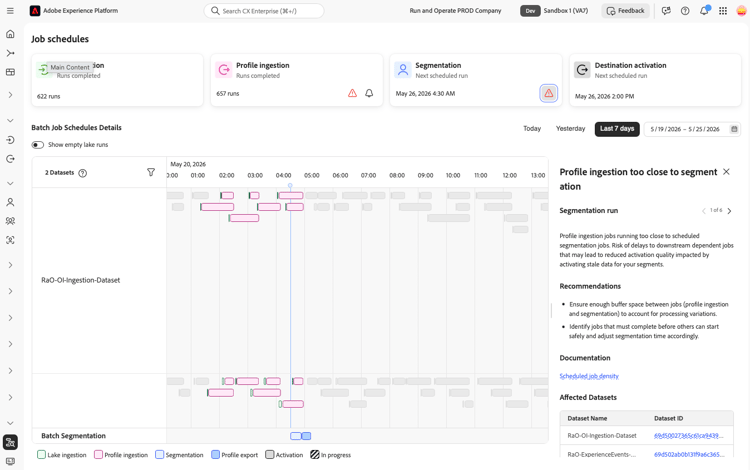
When Job Schedules detects profile ingestion jobs running too close to a scheduled segmentation run, a warning indicator appears on the Segmentation summary card. Select the warning indicator to open a panel showing the number of detected occurrences, a description of the timing conflict, recommendations, and a table of affected datasets.
Profile ingestion daily limit profile-ingestion-daily-limit
Impact severity: High | Primary issue: System guardrail
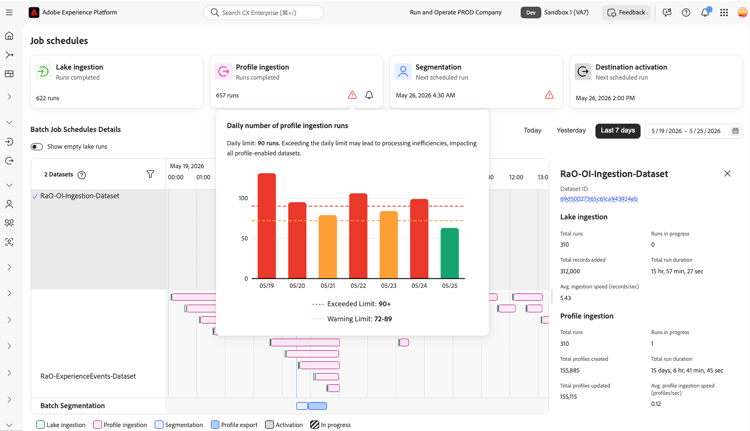
What to look for: A warning indicator on the Profile ingestion summary card when daily profile ingestion runs approach or exceed the 90-run system guardrail. Select the warning indicator to view a bar chart showing the daily run count for each day in the selected time period.
The chart uses color-coded bars to indicate where counts fall relative to the limit:
- Red bars (90 or more runs): The daily limit is exceeded. Processing inefficiencies may affect all profile-enabled datasets.
- Orange bars (72 to 89 runs): Approaching the daily limit.
- Green bars (below 72 runs): Within the acceptable range.
Why this is problematic:
- Processing inefficiency: Exceeding 90 profile ingestion runs per day creates processing overhead that can affect all profile-enabled datasets.
- Resource contention: A high total run count can delay downstream segmentation and activation jobs.
- Data staleness: When profile processing runs continuously, individual batches may take longer to complete, delaying data availability for segmentation.
How to fix it:
- Reduce batch frequency per dataset: Consolidate batches so fewer profile ingestion runs are triggered each day. See Excessive batches per dataset for detailed guidance.
- Audit all ingestion schedules: Review all datasets scheduled for profile ingestion and identify those with unnecessarily high batch frequency.
Excessive batches per dataset excessive-batches-per-dataset
Impact severity: Medium | Primary issue: Inefficient processing
What to look for: A single dataset with an excessive number of individual batch jobs scheduled throughout the day, creating a long vertical stack of jobs on the timeline.
This pattern involves a single dataset with many individual batch ingestion jobs scheduled at frequent intervals, sometimes dozens of batches per day.
Why this is problematic:
- Inefficient processing: Each batch job has overhead costs (initialization, validation, metadata updates). Processing many small batches is significantly less efficient than processing fewer larger batches.
- Increased failure surface: More jobs mean more opportunities for failure. Each batch that fails requires investigation and potential reprocessing.
- Unnecessary system load: Frequent small batches keep the system constantly busy with overhead tasks rather than actual data processing, reducing overall throughput.
- Delayed data availability: Paradoxically, running many small batches can delay when data becomes available for downstream processes compared to consolidated batches.
- Difficult inspection: Tracking the success and performance of dozens of individual batch jobs per dataset becomes operationally complex and time-consuming.
- Profile processing lag: Each profile ingestion batch triggers profile processing. Frequent small batches can cause profile processing to run almost continuously, preventing efficient batch optimization.
How to fix it:
- Reduce batch frequency: Consolidate to fewer batches per day per dataset for most use cases.
- Increase batch size: Accumulate more data before triggering ingestion rather than ingesting immediately.
- Align with business needs: Verify whether hourly updates are truly required, or if daily/twice-daily updates suffice.
- Use streaming for real-time: Switch to streaming ingestion for genuine real-time requirements instead of simulating it with frequent batches.
- Monitor total daily runs: If multiple datasets have high batch frequency, the combined total may exceed the system guardrail. See Profile ingestion daily limit.
Next steps next-steps
After identifying anti-patterns in your job schedules:
- View job details to investigate specific datasets and job runs that may be causing issues.
- Review the Job Schedules overview to understand the interface and inspection capabilities.
- Learn about batch ingestion to optimize your data loading schedules.
- Understand segmentation schedules to ensure proper timing of audience evaluations.
- Explore monitoring destination dataflows for end-to-end pipeline visibility.
- Set up alerts to receive notifications when the profile ingestion daily limit is approached.