TTL health checks
The TTL health checks scan your profiles, datasets, and segments for missing or misaligned data expiration and lookback window configurations that lead to data bloat, degraded performance, and inaccurate audience qualification.
Pseudonymous profile TTL pseudonymous-profile-ttl
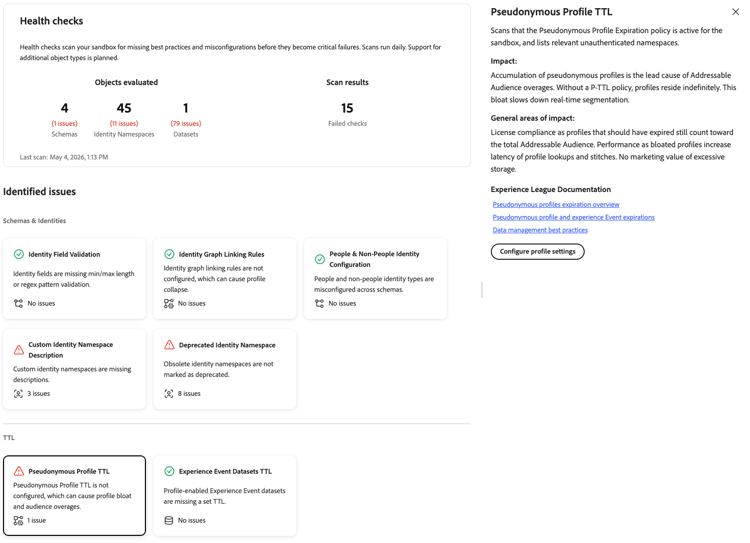
Scans that the Pseudonymous Profile Expiration policy is active for the sandbox and lists relevant unauthenticated namespaces.
When you select the Pseudonymous Profile TTL card, a detail panel opens on the right. The panel shows:
- Description: Scans that the Pseudonymous Profile Expiration policy is active for the sandbox and lists relevant unauthenticated namespaces.
- Impact: Accumulation of pseudonymous profiles is the lead cause of Addressable Audience overages. Without a P-TTL policy, profiles reside indefinitely. This bloat slows real-time segmentation.
- General areas of impact: License compliance, as profiles that should have expired still count toward the total Addressable Audience. Performance, as bloated profiles increase the latency of profile lookups. No marketing value of excessive storage.
- Experience League Documentation: Links to pseudonymous profile expiration documentation and data management best practices.
- Configure profile settings: A button to navigate to profile settings and activate the expiration policy.
For more information, see the documentation on pseudonymous profile expiration and data management best practices.
Experience Event datasets TTL experience-event-datasets-ttl
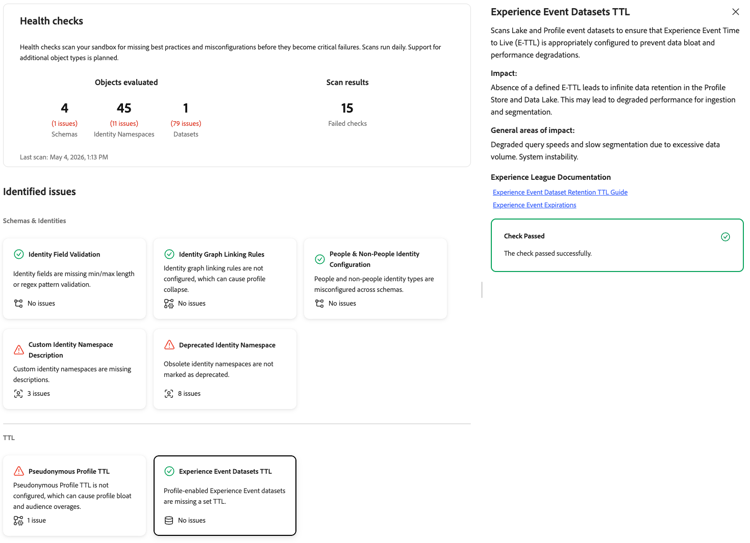
Scans Lake and Profile event datasets to ensure that data expiration is appropriately configured.
When you select the Experience Event Datasets TTL card, a detail panel opens on the right. The panel shows:
- Description: Scans Lake and Profile event datasets to ensure that Experience Event Time to Live (E-TTL) is appropriately configured to prevent data bloat and performance degradations.
- Impact: Absence of a defined E-TTL leads to infinite data retention in the Profile Store and Data Lake. This may lead to degraded performance for ingestion and segmentation, and can impact Adobe Journey Optimizer performance, including audience qualification and journey execution.
- General areas of impact: Degraded query speeds and slow segmentation due to excessive data volume. System instability.
- Experience League Documentation: A link to Experience Event dataset retention documentation.
- Affected datasets: A list of Lake and Profile event datasets without a configured data expiration. Select a dataset to open it. When no issues are detected, the panel shows a Check Passed confirmation instead.
For more information, see the documentation on Experience Event dataset retention and Experience Event expirations.
Segment lookback window required segment-lookback-window-required
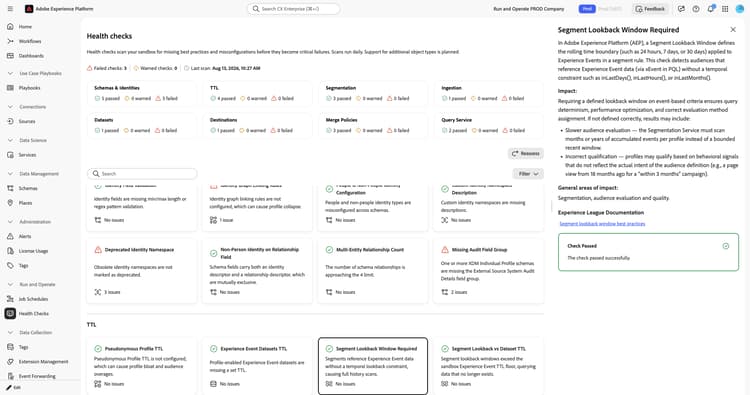
Detects segment definitions that reference Experience Event data without a temporal lookback constraint.
inLastDays(), inLastHours(), or inLastMonths().inLastDays(), to the Experience Event block. Align the lookback window with your Experience Event dataset TTL to avoid querying data that has already expired.When you select the Segment Lookback Window Required card, a detail panel opens on the right. The panel shows:
- Description: Explains that a segment lookback window defines the rolling time boundary, such as 24 hours, 7 days, or 30 days, applied to Experience Events in a segment rule. This check detects audiences that reference Experience Event data without a temporal constraint such as
inLastDays(),inLastHours(), orinLastMonths(). - Impact: Requiring a defined lookback window on event-based criteria ensures query determinism, performance optimization, and correct evaluation method assignment. If not defined correctly, results may include slower audience evaluation, since the Segmentation Service must scan months or years of accumulated events per profile instead of a bounded recent window, and incorrect qualification, where profiles may qualify based on behavioral signals that do not reflect the actual intent of the audience definition.
- General areas of impact: Segmentation, audience evaluation, and quality.
- Experience League Documentation: A link to segment lookback window best practices.
- Affected segments: A list of segment definitions that reference Experience Event data without a lookback constraint. Select a segment to open it. When no issues are detected, the panel shows a Check Passed confirmation instead.
For more information, see the PQL overview and the Experience Event dataset retention documentation.
Segment lookback vs. dataset TTL segment-lookback-vs-dataset-ttl
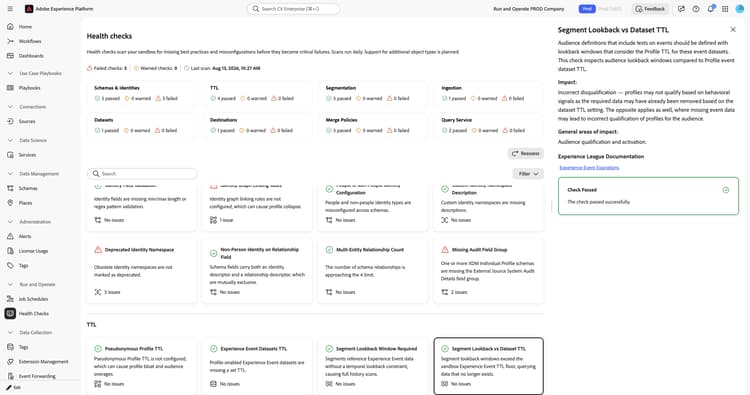
Compares segment lookback windows against the TTL configured on the Experience Event datasets they reference.
When you select the Segment Lookback vs Dataset TTL card, a detail panel opens on the right. The panel shows:
- Description: Explains that audience definitions that include tests on events should be defined with lookback windows that consider the Profile TTL for those event datasets. This check compares audience lookback windows against the Profile event dataset TTL.
- Impact: Incorrect disqualification can occur, where profiles may not qualify based on behavioral signals because the required data has already been removed based on the dataset TTL setting. The opposite can also occur, where missing event data leads to incorrect qualification of profiles for the audience.
- General areas of impact: Audience qualification and activation.
- Experience League Documentation: A link to Experience Event expirations.
- Affected segments: A list of segments whose lookback window exceeds the referenced dataset TTL, when applicable. When no issues are detected, the panel shows a Check Passed confirmation instead.
For more information, see the Experience Event dataset retention documentation and the Experience Event expirations documentation.
Next steps next-steps
- Return to the health checks overview to explore other check categories.
- Configure pseudonymous profile expiration to manage data retention and reduce Addressable Audience overages.
- Set up Experience Event dataset retention to prevent data bloat and performance degradation.