Segmentation health checks
The segmentation health checks scan your sandbox for audience counts approaching platform limits across batch, streaming, and edge evaluation methods.
Audience sandbox limit audience-sandbox-limit
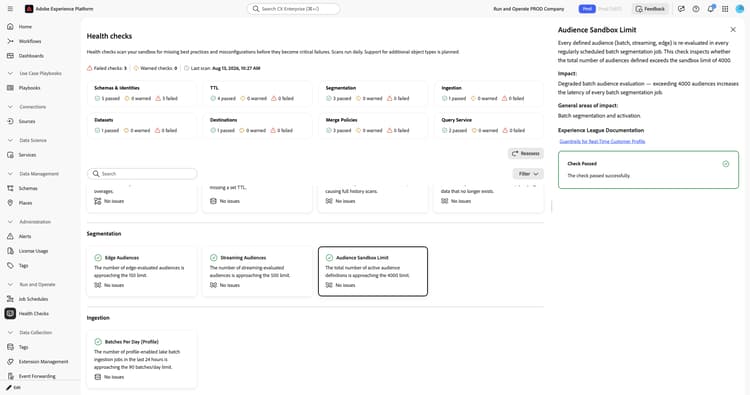
Scans the total number of active audience definitions in a sandbox against the platform limit.
When you select the Audience Sandbox Limit card, a detail panel opens on the right. The panel shows:
- Description: Scans whether the total number of audiences defined in the sandbox exceeds the limit of 4,000. Every defined audience, whether batch, streaming, or edge, is re-evaluated in every scheduled batch segmentation job.
- Impact: Exceeding 4,000 audiences increases the latency of every batch segmentation job.
- General areas of impact: Batch segmentation and activation.
- Experience League Documentation: A link to guardrails for Real-Time Customer Profile.
For more information, see the guardrails for Real-Time Customer Profile data and segmentation.
Streaming audiences streaming-audiences
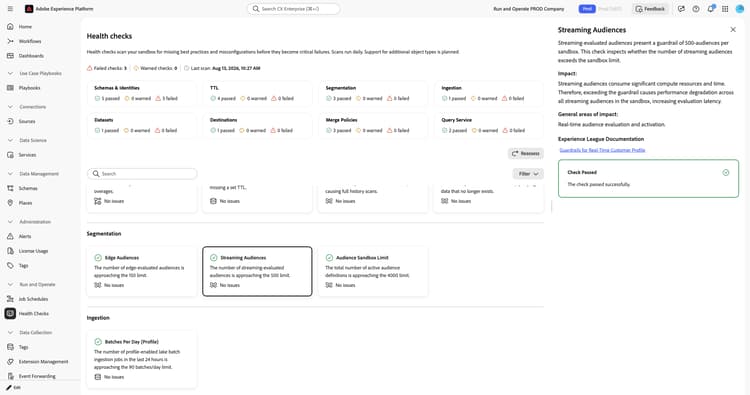
Scans the number of streaming-evaluated audiences in a sandbox against the platform limit.
When you select the Streaming Audiences card, a detail panel opens on the right. The panel shows:
- Description: Scans whether the number of streaming-evaluated audiences in the sandbox exceeds the guardrail of 500.
- Impact: Exceeding the guardrail causes performance degradation across all streaming audiences in the sandbox, increasing evaluation latency.
- General areas of impact: Real-time audience evaluation and activation.
- Experience League Documentation: A link to guardrails for Real-Time Customer Profile.
For more information, see the guardrails for Real-Time Customer Profile data and segmentation and the streaming segmentation documentation.
Edge audiences edge-audiences
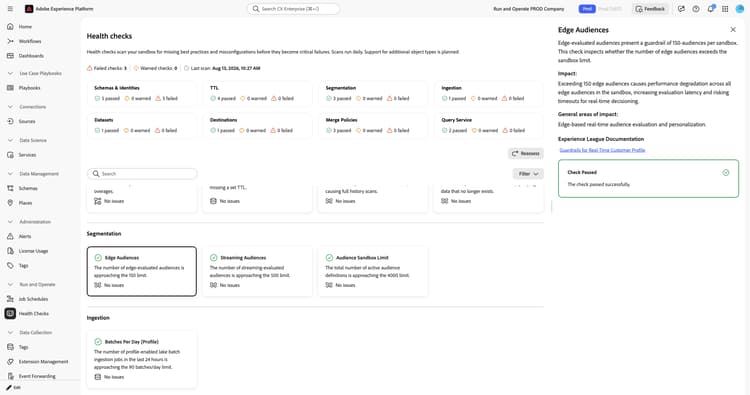
Scans the number of edge-evaluated audiences in a sandbox against the platform limit.
When you select the Edge Audiences card, a detail panel opens on the right. The panel shows:
- Description: Scans whether the number of edge-evaluated audiences in the sandbox exceeds the guardrail of 150.
- Impact: Exceeding 150 edge audiences causes performance degradation across all edge audiences in the sandbox, increasing evaluation latency and risking timeouts for real-time decisioning.
- General areas of impact: Edge-based real-time audience evaluation and personalization.
- Experience League Documentation: A link to guardrails for Real-Time Customer Profile.
- Recommendation: Consolidate overlapping edge audiences where possible to reduce the total count. Audit existing edge audiences to identify candidates that can move to streaming evaluation.
- Edge Audiences: The current count of edge audiences against the sandbox limit.
For more information, see the guardrails for Real-Time Customer Profile data and segmentation and the edge segmentation documentation.
Batch segmentation elapsed time batch-segmentation-elapsed-time
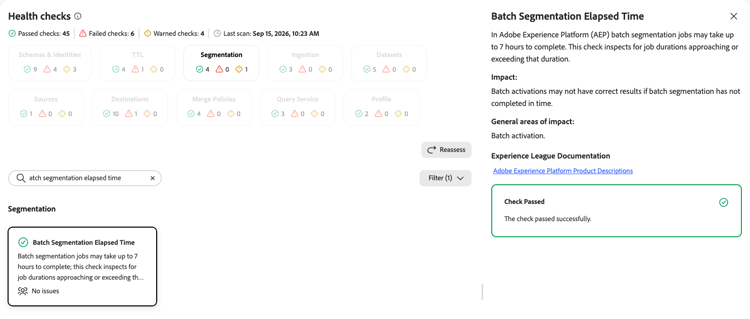
Inspects for batch segmentation job durations approaching or exceeding the expected completion window.
When you select the Batch Segmentation Elapsed Time card, a detail panel opens on the right. The panel shows:
- Description: Explains that batch segmentation jobs may take up to seven hours to complete. This check inspects for job durations approaching or exceeding that duration.
- Impact: Batch activations may not have correct results if batch segmentation has not completed in time.
- General areas of impact: Batch activation.
- Experience League Documentation: A link to Adobe Experience Platform product descriptions.
For more information, see the Adobe Experience Platform product descriptions.
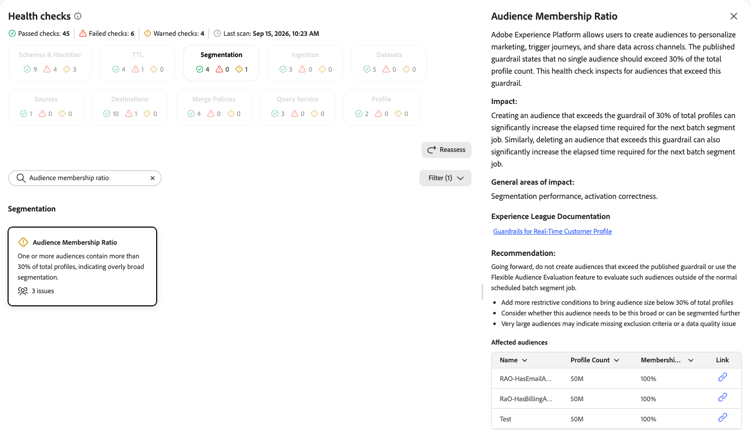
Audience membership ratio audience-membership-ratio
Inspects for audiences that exceed the published guardrail for total profile membership.
When you select the Audience Membership Ratio card, a detail panel opens on the right. The panel shows:
- Description: Explains that Experience Platform allows you to create audiences to personalize marketing, trigger journeys, and share data across channels. The published guardrail states that no single audience should exceed 30 percent of the total profile count. This check inspects for audiences that exceed this guardrail.
- Impact: Creating or deleting an audience that exceeds the guardrail of 30 percent of total profiles can significantly increase the elapsed time required for the next batch segment job.
- General areas of impact: Segmentation performance and activation correctness.
- Experience League Documentation: A link to guardrails for Real-Time Customer Profile.
- Recommendation: Going forward, do not create audiences that exceed the published guardrail, or use the Flexible Audience Evaluation feature to evaluate such audiences outside of the normal scheduled batch segment job. Add more restrictive conditions, consider whether the audience can be segmented further, and review whether the size indicates missing exclusion criteria or a data quality issue.
- Affected audiences: A list of audiences that exceed the guardrail, with the profile count and membership percentage for each. Use the link icon to open the audience.
For more information, see the guardrails for Real-Time Customer Profile data and segmentation.
Next steps next-steps
- Return to the health checks overview to explore other check categories.
- Learn about streaming segmentation and edge segmentation.