Schemas and identities health checks
The schemas and identities health checks scan your schemas and identity namespaces for missing best practices and misconfigurations that lead to incomplete identity resolution, inflated profile counts, and inaccurate activation.
Identity field validation identity-field-validation
Scans to ensure identity fields have minimum and maximum length constraints and regex pattern rules for data integrity.
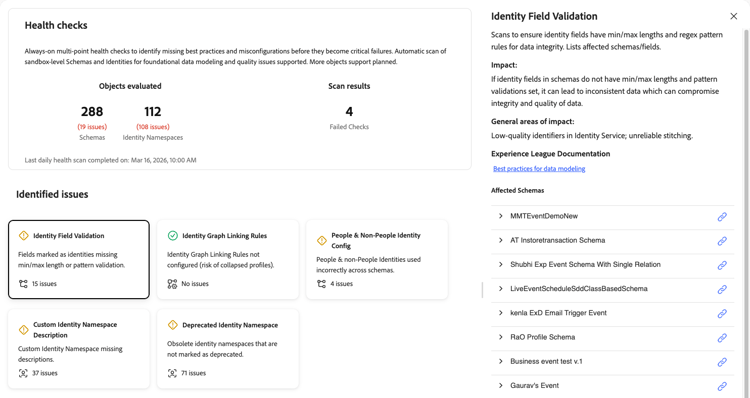
When you select the Identity Field Validation card, a detail panel opens on the right. The panel shows:
- Description: Scans to ensure identity fields have min/max lengths and regex pattern rules for data integrity. Lists affected schemas and fields.
- Impact: If identity fields in schemas do not have min/max lengths and pattern validations set, it can lead to inconsistent data, which can compromise integrity and quality of data.
- General areas of impact: Low-quality identifiers in Identity Service; unreliable stitching.
- Experience League Documentation: A link to best practices for data modeling.
- Affected Schemas: A list of affected schemas, each with an expander to view more details and a link to open the schema.
For more information, see the data integrity tips in the schema best practices documentation.
Identity graph linking rules identity-graph-linking-rules
Verifies that identity graph linking rules are configured for a sandbox to prevent collapsed profiles.
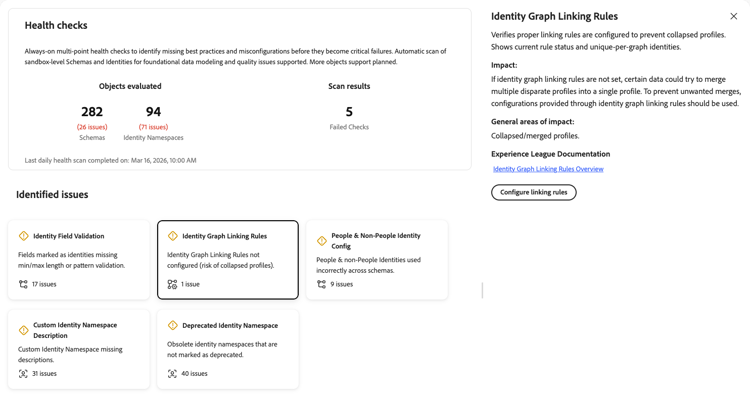
When you select the Identity Graph Linking Rules card, a detail panel opens on the right. The panel shows:
- Description: Verifies that proper linking rules are configured to prevent collapsed profiles. It shows current rule status and unique-per-graph identities.
- Impact: If identity graph linking rules are not set, certain data could try to merge multiple disparate profiles into a single profile. To prevent unwanted merges, configurations provided through identity graph linking rules should be used.
- General areas of impact: Collapsed or merged profiles.
- Experience League Documentation: A link to the Identity Graph Linking Rules overview for more information.
- Configure linking rules: When the check fails, a button appears so you can configure linking rules directly from the panel.
For more information, see the identity graph linking rules overview and the implementation guide.
People and non-people identity configuration people-non-people-identity
Validates the correct use of people and non-people identity types across schema classes.
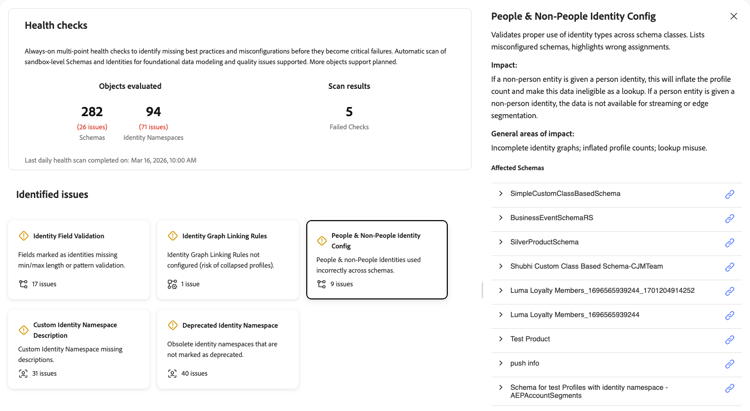
When you select the People & Non-People Identity Config card, a detail panel opens on the right. The panel shows:
- Description: Validates proper use of identity types across schema classes. Lists misconfigured schemas and highlights wrong assignments.
- Impact: If a non-people entity is given a person identity, this will inflate the profile count and make this data ineligible as a lookup. If a person entity is given a non-people identity, the data is not available for streaming or edge segmentation.
- General areas of impact: Incomplete identity graphs; inflated profile counts; lookup misuse.
- Affected Schemas: A list of schemas with issues. Expand a schema row to see the path, identity name, and schema type for each misconfiguration. Use the link icon to open the schema.
For more information, see the identity type documentation and the schema best practices.
Custom identity namespace description namespace-missing-description
Scans to ensure that custom identity namespace metadata and descriptions are complete.
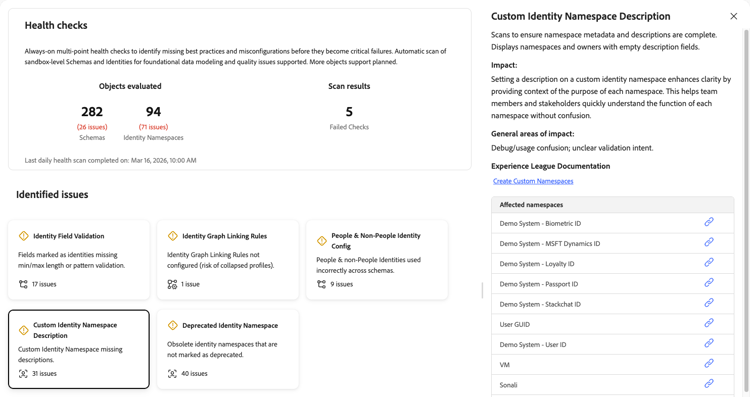
When you select the Custom Identity Namespace Description card, a detail panel opens on the right. The panel shows:
- Description: Scans to ensure namespace metadata and descriptions are complete. Displays namespaces and owners with empty description fields.
- Impact: Setting a description on a custom identity namespace enhances clarity by providing context of the purpose of each namespace. This helps team members and stakeholders quickly understand the function of each namespace without confusion.
- General areas of impact: Debug or usage confusion; unclear validation intent.
- Experience League Documentation: A link to Create Custom Namespaces for further information.
- Affected namespaces: A list of custom identity namespaces that are missing descriptions. Use the link icon next to each namespace to view or edit it.
For more information, see the documentation on creating custom namespaces.
Identity namespace not in use namespace-not-in-use
Detects obsolete or unused identity namespaces that should be marked for cleanup. This check was previously documented as “Deprecated identity namespace.”
When you select the Identity Namespace Not in Use card, a detail panel opens on the right. The panel shows:
- Description: Detects obsolete or unused identity namespaces for cleanup. Lists unused namespaces with last usage timestamp or schema reference.
- Impact: Identity namespaces not used in any schema should be marked for removal by adding a “DEPRECATED” or “DO NOT USE” tag to their names. Deletion of identity namespaces is not currently supported.
- General areas of impact: Confusion and mislabeling risk.
- Experience League Documentation: A link to Obsolete Identity Namespaces for further documentation.
- Affected namespaces: A list of obsolete or unused identity namespaces. Use the link icon next to each namespace to view or manage it.
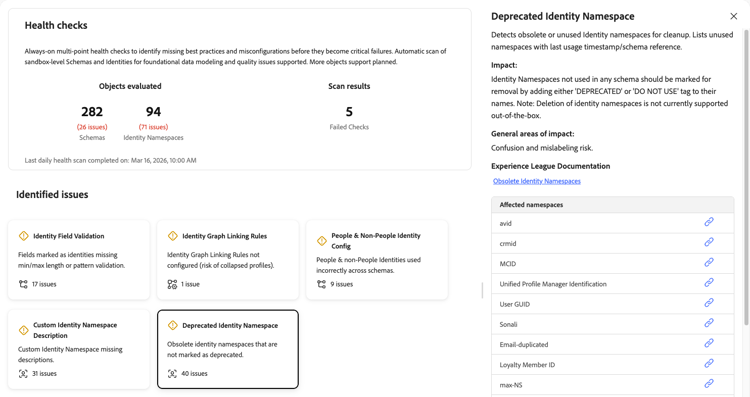
For more information, see the Experience Cloud knowledge base article on obsolete namespaces.
Non-person identity on relationship field non-person-identity-relationship-field
Flags schema fields that carry both an identity descriptor and a relationship descriptor at the same time.
When you select the Non-Person Identity on Relationship Field card, a detail panel opens on the right. The panel shows:
- Description: Explains that putting a relationship descriptor on a schema field establishes a direct, dynamic join between two separate schemas. It tells the Real-Time Customer Profile store and Audience Builder that a field in the primary or source schema acts as a foreign key pointing to a lookup or dimension record in the target schema. This check inspects for schema fields that carry both an identity descriptor and a relationship descriptor for the same field.
- Impact: These descriptors are mutually exclusive, and including both on the same field is a data modeling error. The results may include incorrect segmentation and audience activations.
- General areas of impact: Audience quality.
- Experience League Documentation: A link to XDM schema composition for identity.
- Affected schemas: A list of schemas with fields that have conflicting descriptors, when applicable. When no issues are detected, the panel shows a Check Passed confirmation instead.
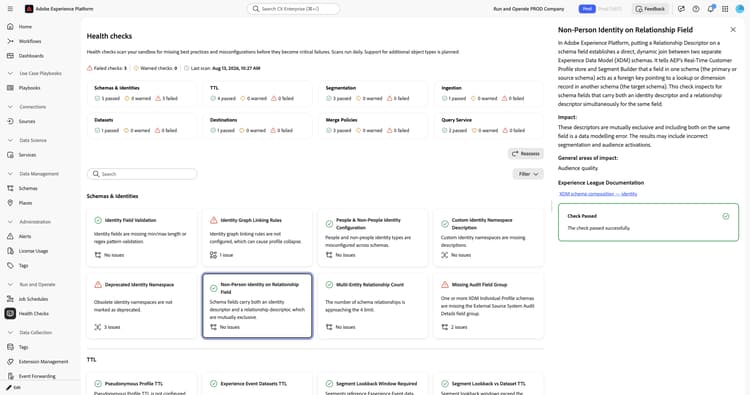
For more information, see the schema composition documentation.
Multi-entity relationship count multi-entity-relationship-count
Monitors the number of multi-entity relationships defined in a sandbox as they approach the platform limit.
When you select the Multi-Entity Relationship Count card, a detail panel opens on the right. The panel shows:
- Description: Explains that multi-entity relationships link primary entities, such as Real-Time Customer Profiles or ExperienceEvents, to secondary dimension entities, such as product catalogs, store locations, or business accounts. This check inspects whether the limit of 5 multi-entity relationships defined in the sandbox is exceeded.
- Impact: High cardinality and excessive schema joins increase computational complexity across the Real-Time Customer Profile store. Exceeding the limit may degrade Segmentation Service performance and increase audience evaluation latency.
- General areas of impact: Batch segmentation.
- Experience League Documentation: A link to best practices for data modeling.
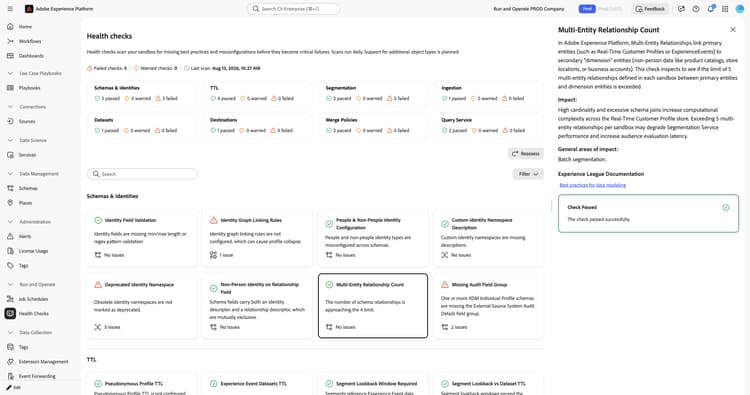
For more information, see the data modeling best practices and the multi-entity segmentation tutorial.
Missing audit field group missing-audit-field-group
Verifies that XDM Individual Profile schemas include the External Source System Audit Details field group.
When you select the Missing Audit Field Group card, a detail panel opens on the right. The panel shows:
- Description: Verifies that XDM Individual Profile schemas include the External Source System Audit Details field group, which is required for tracking record provenance and update timestamps.
- Impact: Without audit fields, there is no record-level visibility into when data was ingested into Experience Platform, which makes it difficult to troubleshoot stale or duplicate records.
- General areas of impact: Inability to audit external data changes.
- Experience League Documentation: A link to the External Source System Audit Details field group.
- Recommendation: Where missing, add the External Source System Audit Details field group.
- Affected schemas: A list of schemas that are missing the field group. Use the link icon next to each schema to open it.
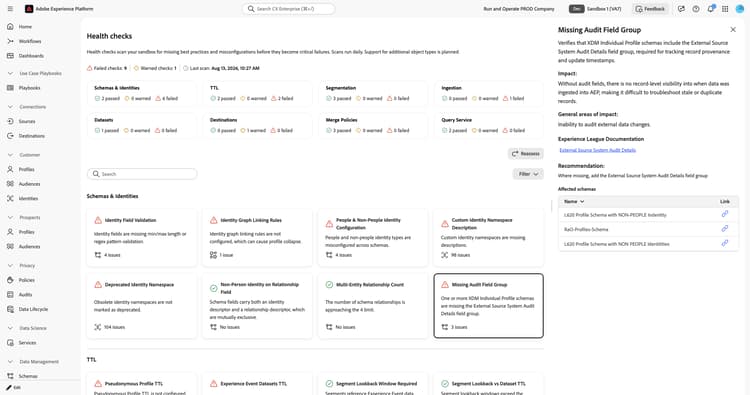
For more information, see the External Source System Audit Details field group documentation.
Primary identity uniqueness primary-identity-uniqueness
Compares how identity namespaces are used as primary identities against how they are defined in identity graph linking rules.
When you select the Primary Identity Uniqueness card, a detail panel opens on the right. The panel shows:
- Description: Explains that primary identities drive the assembly of Real-Time Customer Profiles. Linking rules define which identity namespaces should and should not be allowed to appear more than once in the same identity graph. This check compares how identity namespaces are used as primary identities against how they are defined within identity graph linking rules.
- Impact: Storing Profile class records with simple scalar values using a non-unique profile identity results in all but one record being ignored at profile access. Two exceptions apply: schemas containing only merged arrays, and cases where the desired record is always selected based on ingestion timing and merge policy.
- General areas of impact: Profile correctness, audience quality, and activation quality.
- Experience League Documentation: A link to the identity graph linking rules overview.
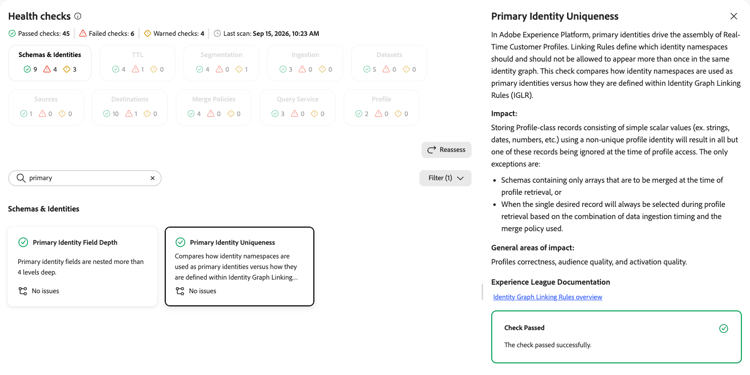
For more information, see the identity graph linking rules overview.
Multi-level relationships multi-level-relationships
Detects relationships that are incorrectly defined between two dimensional schemas.
When you select the Multi-Level Relationships card, a detail panel opens on the right. The panel shows:
- Description: Explains that relationships should only be established between schemas of class XDM Individual Profile or XDM ExperienceEvent and dimensional schemas. This check inspects for relationships incorrectly defined between two dimensional schemas.
- Impact: Multi-level relationship chains are unsupported and cause unpredictable behavior during segmentation.
- General areas of impact: Segmentation and audience quality.
- Experience League Documentation: A link to best practices for data modeling.
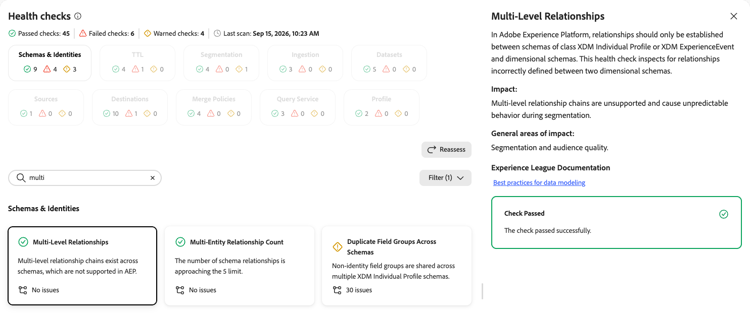
For more information, see the data modeling best practices.
Primary identity field depth primary-identity-field-depth
Verifies that primary identity fields are not nested too deeply in the schema field hierarchy.
When you select the Primary Identity Field Depth card, a detail panel opens on the right. The panel shows:
- Description: Explains that primary identity field depth refers to where in an XDM schema’s field hierarchy a primary identity field is placed, and the constraints and best practices that govern that placement. This check verifies that primary identity fields are not nested more than four levels deep.
- Impact: Primary identity fields nested beyond four levels can cause unpredictable behavior in both data ingestion and segmentation.
- General areas of impact: Data ingestion, segmentation, and audience quality.
- Experience League Documentation: A link to best practices for data modeling.
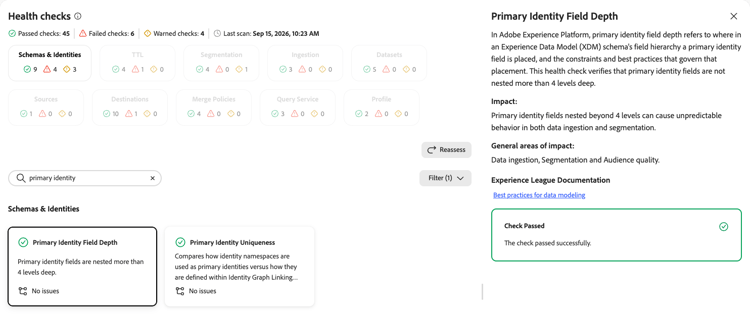
For more information, see the data modeling best practices.
Duplicate field groups across schemas duplicate-field-groups-across-schemas
Detects non-identity field groups that remain active across more than one schema.
When you select the Duplicate Field Groups Across Schemas card, a detail panel opens on the right. The panel shows:
- Description: Explains that Experience Platform allows the inclusion of specific field groups into multiple schemas. While this is normal usage when creating schemas, it is a bad data modeling practice to keep individual non-identity fields visible in more than one schema. This check inspects whether any non-identity fields are left active across multiple schemas.
- Impact: Sourcing values into multiple datasets for the same schema field can make audience results that test these fields unpredictable. Merge policies can minimize this issue but never completely eliminate it, and the resulting variations are often difficult to debug.
- General areas of impact: Segmentation and audience results.
- Experience League Documentation: A link to adding field groups to a schema.
- Recommendation: Edit schemas using the managed related fields feature and hide non-identity fields in all but one schema.
- Affected field groups: A list of field groups shared across schemas, with the field group reference and schema name. Use the link icon to open the schema.
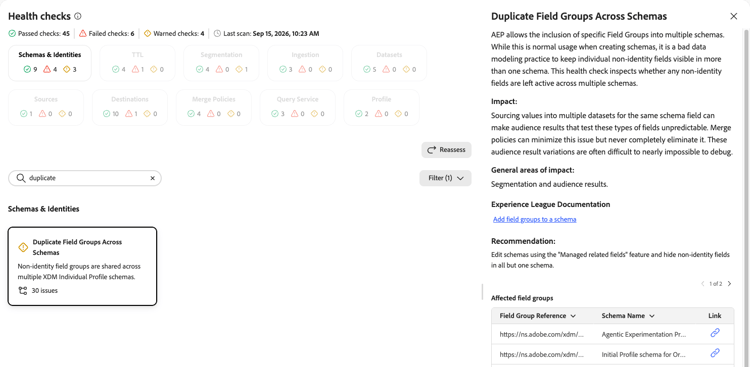
For more information, see Add field groups to a schema.
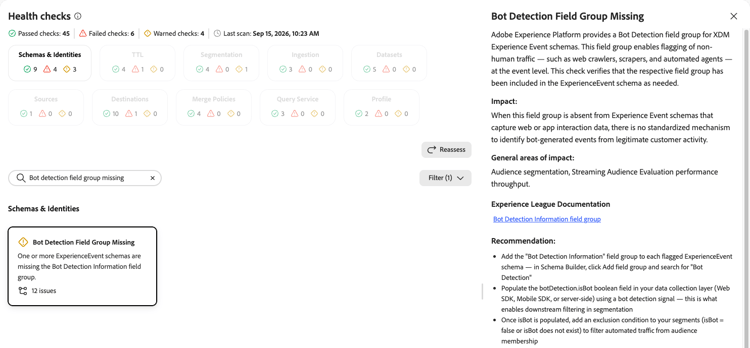
Bot detection field group missing bot-detection-field-group-missing
Verifies that ExperienceEvent schemas include the Bot Detection Information field group.
botDetection.isBot boolean field using a bot detection signal, then exclude bots from your segments.When you select the Bot Detection Field Group Missing card, a detail panel opens on the right. The panel shows:
- Description: Explains that Experience Platform provides a Bot Detection field group for XDM ExperienceEvent schemas. This field group enables flagging of non-human traffic, such as web crawlers, scrapers, and automated agents, at the event level. This check verifies that the field group has been included in the ExperienceEvent schema as needed.
- Impact: When this field group is absent from ExperienceEvent schemas that capture web or app interaction data, there is no standardized mechanism to identify bot-generated events from legitimate customer activity.
- General areas of impact: Audience segmentation and streaming audience evaluation performance throughput.
- Experience League Documentation: A link to the Bot Detection Information field group.
- Recommendation: Add the Bot Detection Information field group to each flagged ExperienceEvent schema. Populate the
botDetection.isBotfield using a bot detection signal, then exclude bots from your segments.
For more information, see the Bot Detection Information field group documentation.
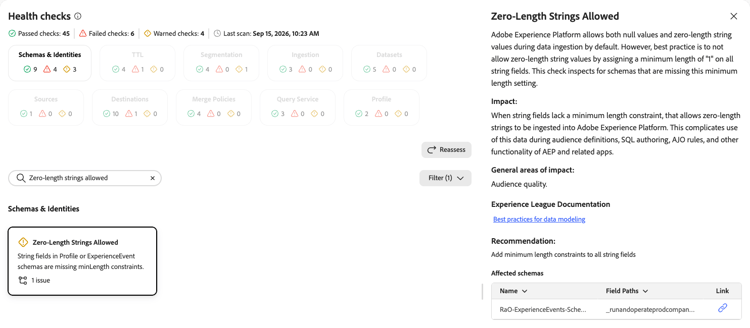
Zero-length strings allowed zero-length-strings-allowed
Verifies that string fields require a minimum length of one character.
When you select the Zero-Length Strings Allowed card, a detail panel opens on the right. The panel shows:
- Description: Explains that Experience Platform allows both null values and zero-length string values during data ingestion by default. Best practice is to disallow zero-length string values by assigning a minimum length of one on all string fields. This check inspects for schemas that are missing this minimum length setting.
- Impact: When string fields lack a minimum length constraint, zero-length strings can be ingested, which complicates use of this data during audience definitions, SQL authoring, Adobe Journey Optimizer rules, and other functionality.
- General areas of impact: Audience quality.
- Experience League Documentation: A link to best practices for data modeling.
- Recommendation: Add minimum length constraints to all string fields.
- Affected schemas: A list of affected schemas and field paths. Use the link icon to open the schema.
For more information, see the data modeling best practices.
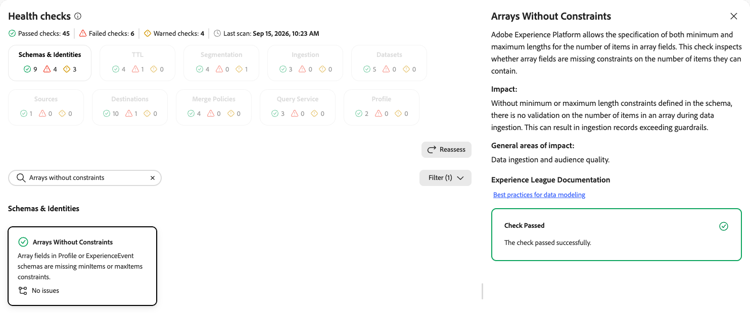
Arrays without constraints arrays-without-constraints
Verifies that array fields define minimum and maximum item constraints.
When you select the Arrays Without Constraints card, a detail panel opens on the right. The panel shows:
- Description: Explains that Experience Platform allows the specification of both minimum and maximum lengths for the number of items in array fields. This check inspects whether array fields are missing constraints on the number of items they can contain.
- Impact: Without minimum or maximum length constraints defined in the schema, there is no validation on the number of items in an array during data ingestion, which can result in ingestion records exceeding guardrails.
- General areas of impact: Data ingestion and audience quality.
- Experience League Documentation: A link to best practices for data modeling.
For more information, see the data modeling best practices.
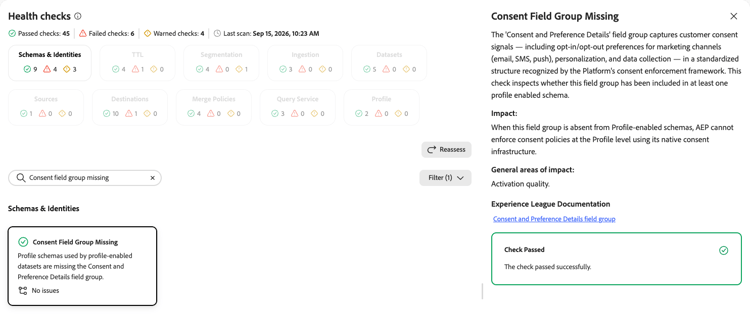
Consent field group missing consent-field-group-missing
Verifies that profile-enabled schemas include the Consent and Preference Details field group.
When you select the Consent Field Group Missing card, a detail panel opens on the right. The panel shows:
- Description: Explains that the Consents and Preferences field group captures customer consent signals, such as opt-in and opt-out preferences for marketing channels, personalization, and data collection, in a standardized structure. This check inspects whether the field group is included in at least one profile-enabled schema.
- Impact: When this field group is absent from profile-enabled schemas, Experience Platform cannot enforce consent policies at the profile level using its native consent infrastructure.
- General areas of impact: Activation quality.
- Experience League Documentation: A link to the Consents and Preferences field group.
For more information, see the Consents and Preferences field group documentation.
Next steps next-steps
- Return to the health checks overview to explore other check categories.
- Learn about schema best practices for designing reliable data models.
- Understand identity graph linking rules to prevent profile collapse.
- Review identity namespace documentation for namespace management best practices.