Query Service health checks
The Query Service health checks scan your sandbox for scheduled queries that are failing or slowing down over time.
Scheduled queries failing scheduled-queries-failing
Checks each scheduled query for its most recent run and flags any that failed or errored.
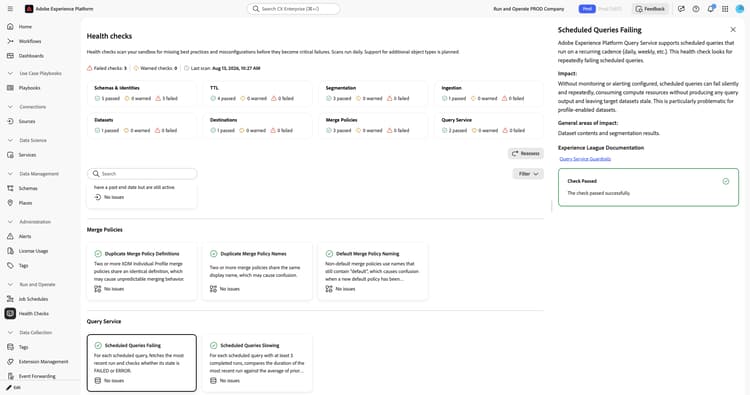
When you select the Scheduled Queries Failing card, a detail panel opens on the right. The panel shows:
- Description: For each scheduled query, checks whether the most recent run has a status of failed or errored.
- Impact: Without monitoring or alerting configured, scheduled queries can fail silently and repeatedly, consuming compute resources without producing query output and leaving target datasets stale. This is particularly problematic for profile-enabled datasets.
- General areas of impact: Dataset contents and segmentation results.
- Experience League Documentation: A link to guardrails for Query Service.
- Recommendation: Inspect each failing scheduled query to find the root cause. Modify the query as needed to resolve the issue.
- Affected scheduled queries: A list of failing scheduled queries with their run ID and status. Use the link icon to open the query.
For more information, see the guardrails for Query Service.
Scheduled queries slowing scheduled-queries-slowing
Compares the duration of each scheduled query’s most recent run against the average of its prior runs.
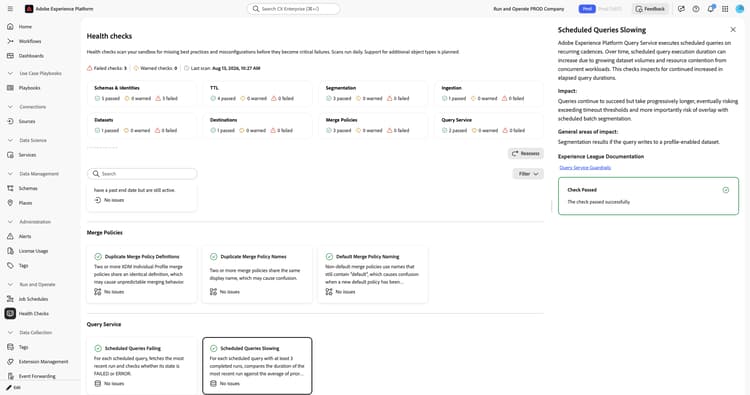
When you select the Scheduled Queries Slowing card, a detail panel opens on the right. The panel shows:
- Description: For each scheduled query with at least three completed runs, compares the most recent run duration against the average of prior runs. Flags queries whose latest run is 50 percent or more slower than the historical average.
- Impact: Queries continue to succeed but take progressively longer, risking exceeding timeout thresholds and overlap with scheduled batch segmentation.
- General areas of impact: Segmentation results, when the query writes to a profile-enabled dataset.
- Experience League Documentation: A link to guardrails for Query Service.
- Recommendation: Set a data expiration on every Experience Event dataset your scheduled queries read from, since datasets that grow indefinitely cause continued increases in query duration. Review the start times of your scheduled queries to reduce overlap.
- Affected scheduled queries: A list of slowing scheduled queries with their latest duration, average duration, and percentage slowdown. Use the link icon to open the query.
For more information, see the guardrails for Query Service and the Experience Event dataset retention documentation.
Query Service alerts query-service-alerts
Detects scheduled queries that are missing failure alert subscriptions.
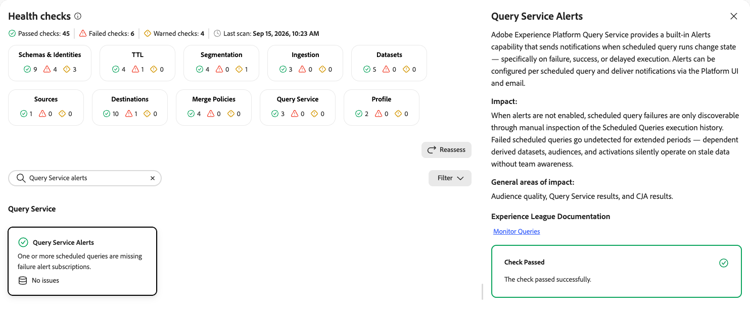
When you select the Query Service Alerts card, a detail panel opens on the right. The panel shows:
- Description: Explains that Query Service provides a built-in alerts capability that sends notifications when scheduled query runs change state, specifically on failure, success, or delayed execution. Alerts can be configured per scheduled query and deliver notifications through the Platform UI and email.
- Impact: When alerts are not enabled, scheduled query failures are only discoverable through manual inspection of the scheduled queries execution history. Failed scheduled queries can go undetected for extended periods, and dependent derived datasets, audiences, and activations silently operate on stale data without team awareness.
- General areas of impact: Audience quality, Query Service results, and Customer Journey Analytics results.
- Experience League Documentation: A link to monitoring queries.
For more information, see Monitor queries.
Next steps next-steps
- Return to the health checks overview to explore other check categories.
- Review the guardrails for Query Service to manage your scheduled queries.