Merge policies health checks
The merge policies health checks scan your sandbox for merge policy naming and definition issues that cause confusion during segmentation and activation.
Default merge policy naming default-merge-policy-naming
Scans for merge policies that still contain “default” in their name after they are no longer designated as the default policy.
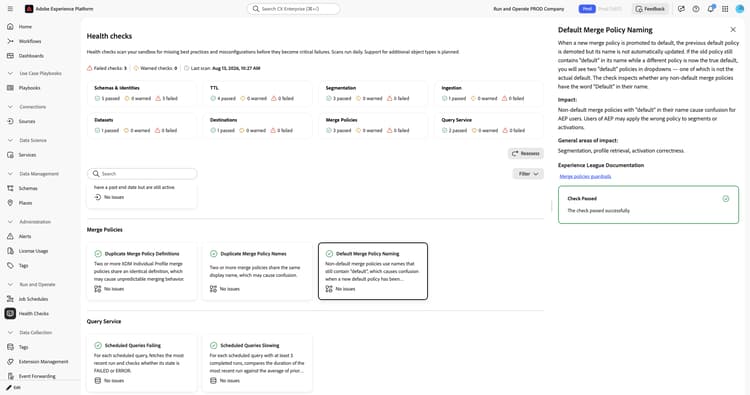
When you select the Default Merge Policy Naming card, a detail panel opens on the right. The panel shows:
- Description: Scans whether any non-default merge policies have the word “default” in their name.
- Impact: Non-default merge policies with “default” in their name cause confusion. You might apply the wrong policy to a segment or activation.
- General areas of impact: Segmentation, profile retrieval, and activation correctness.
- Experience League Documentation: A link to guardrails for merge policies.
For more information, see the merge policies overview and guardrails for merge policies.
Duplicate merge policy definitions duplicate-merge-policy-definitions
Detects XDM Individual Profile merge policies that share an identical definition, which wastes a limited merge policy slot.
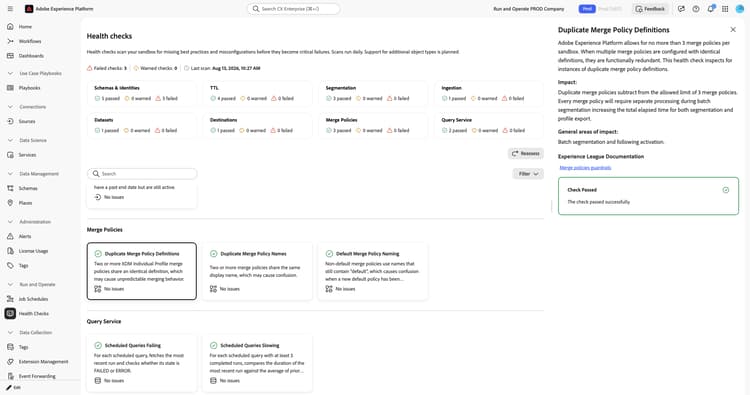
When you select the Duplicate Merge Policy Definitions card, a detail panel opens on the right. The panel shows:
- Description: Explains that Experience Platform allows for no more than 3 merge policies per sandbox. When multiple merge policies are configured with identical definitions, they are functionally redundant. This check inspects for instances of duplicate merge policy definitions.
- Impact: Duplicate merge policies subtract from the allowed limit of 3 merge policies. Every merge policy requires separate processing during batch segmentation, increasing the total elapsed time for both segmentation and profile export.
- General areas of impact: Batch segmentation and subsequent activation.
- Experience League Documentation: A link to guardrails for merge policies.
For more information, see the merge policies overview and guardrails for merge policies.
Duplicate merge policy names duplicate-merge-policy-names
Scans for merge policies within the same schema that share the same display name.
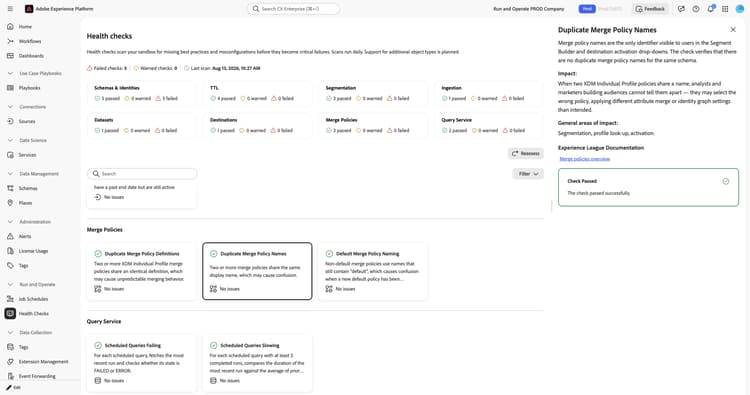
When you select the Duplicate Merge Policy Names card, a detail panel opens on the right. The panel shows:
- Description: Verifies that there are no duplicate merge policy names for the same schema.
- Impact: When two XDM Individual Profile policies share a name, you cannot tell them apart when building audiences, which can lead to selecting the wrong policy.
- General areas of impact: Segmentation, profile lookup, and activation.
- Experience League Documentation: A link to the merge policies overview.
For more information, see the merge policies overview.
Merge policy count merge-policy-count
Monitors the number of merge policies of schema type XDM Individual Profile against the platform limit.
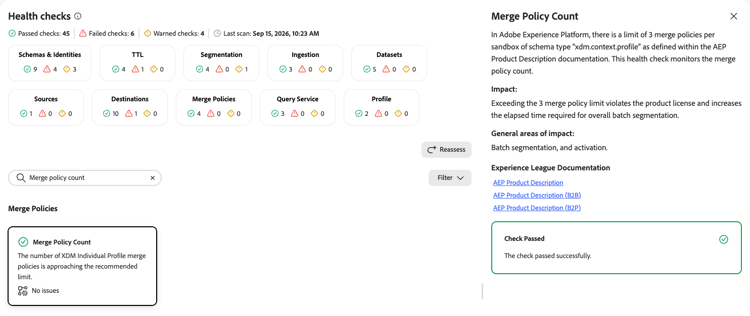
When you select the Merge Policy Count card, a detail panel opens on the right. The panel shows:
- Description: Explains that Experience Platform limits merge policies to 3 per sandbox for schema type “xdm.context.profile,” as defined in the Experience Platform product description documentation. This check monitors the merge policy count.
- Impact: Exceeding the 3 merge policy limit violates the product license and increases the elapsed time required for overall batch segmentation.
- General areas of impact: Batch segmentation and activation.
- Experience League Documentation: Links to the Adobe Experience Platform product description, and the B2B and B2P product description variants.
For more information, see the Adobe Experience Platform product description.
Next steps next-steps
- Return to the health checks overview to explore other check categories.
- Review the merge policies overview to manage your merge policies.