Batch destinations mapping reference
This article describes mandatory attributes, deduplication keys, calculated fields, and known limitations of the Mapping step when you activate audiences to batch profile export destinations.
Mandatory attributes mandatory-attributes
A mandatory attribute is a user-enabled checkbox which ensures all profile records contain the selected attribute. For example: all exported profiles contain an email address.
You can mark attributes as mandatory to ensure that Experience Platform exports only the profiles that include the specific attribute. As a result, it can be used as an additional form of filtering. Marking an attribute as mandatory is not required.
Not selecting a mandatory attribute exports all qualified profiles regardless of their attributes.
It is recommended that one of the attributes is a unique identifier from your schema. For more information about mandatory attributes, see the identity section in the Email marketing destinations documentation.
Deduplication keys deduplication-keys
A deduplication key is a user-defined primary key that determines how profiles are deduplicated. When multiple records exist for the same individual, deduplication ensures only the latest record is exported.
Deduplication keys eliminate the possibility of having multiple records of the same profile in one export file.
There are three ways you can use deduplication keys in Experience Platform:
- Using a single identity namespace as a deduplication key
- Using a single profile attribute from an XDM profile as a deduplication key
- Using a combination of two profile attributes from an XDM profile as a composite key
Deduplication example deduplication-example
This example illustrates how deduplication works, depending on the selected deduplication keys.
Let’s consider the following two profiles.
Profile A
{
  "identityMap": {
    "Email": [
      {
        "id": "johndoe@example.com"
      },
      {
        "id": "doejohn_1@example.com"
      }
    ]
  },
  "segmentMembership": {
    "ups": {
      "fa5c4622-6847-4199-8dd4-8b7c7c7ed1d6": {
        "status": "realized",
        "lastQualificationTime": "2021-03-10 10:03:08"
      }
    }
  },
  "person": {
    "name": {
      "lastName": "Doe",
      "firstName": "John"
    }
  },
  "personalEmail": {
    "address": "johndoe@example.com"
  }
}
Profile B
{
  "identityMap": {
    "Email": [
      {
        "id": "johndoe@example.com"
      },
      {
        "id": "doejohn_2@example.com"
      }
    ]
  },
  "segmentMembership": {
    "ups": {
      "fa5c4622-6847-4199-8dd4-8b7c7c7ed1d6": {
        "status": "realized",
        "lastQualificationTime": "2021-04-10 11:33:28"
      }
    }
  },
  "person": {
    "name": {
      "lastName": "D",
      "firstName": "John"
    }
  },
  "personalEmail": {
    "address": "johndoe@example.com"
  }
}
Deduplication use case 1: no deduplication deduplication-use-case-1
Using no deduplication, the export file would contain the following entries.
Deduplication use case 2: deduplication based on identity namespace deduplication-use-case-2
Assuming deduplication by the Email namespace, the export file would contain the following entries. Profile B is the latest one that qualified for the audience, so it is the only one getting exported.
Deduplication use case 3: deduplication based on a single profile attribute deduplication-use-case-3
Assuming deduplication by the personal Email attribute, the export file would contain the following entry. Profile B is the latest one that qualified for the audience, so it is the only one getting exported.
Deduplication use case 4: deduplication based on two profile attributes deduplication-use-case-4
Assuming deduplication by the composite key personalEmail + lastName, the export file would contain the following entries.
Adobe recommends selecting an identity namespace such as a CRM ID or email address as a deduplication key, to ensure all profile records are uniquely identified.
Deduplication behavior for profiles with the same timestamp deduplication-same-timestamp
When exporting profiles to file-based destinations, deduplication ensures that only one profile is exported when multiple profiles share the same deduplication key and the same reference timestamp. This timestamp represents the moment a profile’s audience membership or identity graph was last updated. For more information on how profiles are updated and exported, see the profile export behavior document.
Key considerations key-considerations
-
Deterministic selection: When multiple profiles have identical deduplication keys and the same reference timestamp, the deduplication logic determines which profile to export by sorting the values of other selected columns (excluding complex types such as arrays, maps, or objects). The sorted values are evaluated in lexicographical order, and the first profile is selected.
-
Example scenario
Consider the following data, where the deduplication key is the Email column:
test1@test.comtest1@test.comtest2@test.comAfter deduplication, the export file will contain:
test1@test.comtest2@test.comExplanation: For test1@test.com, both profiles share the same deduplication key and timestamp. The algorithm sorts the first_name and last_name column values lexicographically. Since the first names are identical, the tie is resolved using the last_name column, where “Doe” comes before “Morris.”
Improved reliability: This updated deduplication process ensures that successive runs with the same coordinates will always produce the same results, improving consistency.
Perform data transformations through calculated fields calculated-fields
You can use the Calculated fields control to perform various data transformations on the data exported to file-based destinations.
Known limitations known-limitations
The new Mapping page has the following known limitations:
Audience membership attribute cannot be selected through the mapping workflow audience-membership-attribute-mapping
Due to a known limitation, you cannot currently use the Select field window to add segmentMembership.seg_namespace.seg_id.status to your file exports. Instead, you need to manually paste the value xdm: segmentMembership.seg_namespace.seg_id.status into the schema field, as shown below.
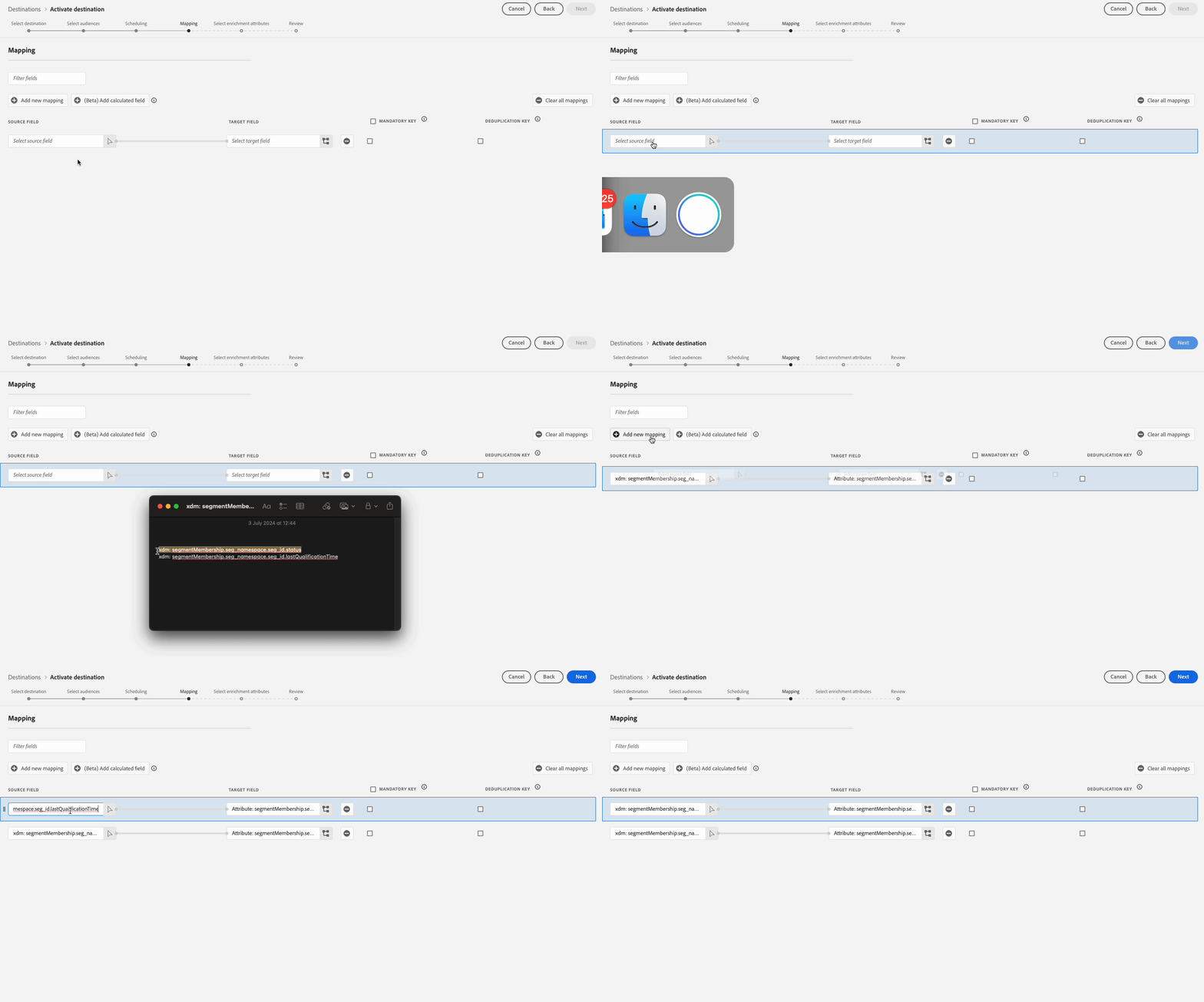
segmentMembership.seg_namespace.seg_id.statussegmentMembership.seg_namespace.seg_id.lastQualificationTime
File exports will vary in the following ways, depending on whether segmentMembership.seg_namespace.seg_id.status is selected:
- If the
segmentMembership.seg_namespace.seg_id.statusfield is selected, exported files include Active members in the initial full snapshot and newly Active and Expired members in subsequent incremental exports. - If the
segmentMembership.seg_namespace.seg_id.statusfield is not selected, exported files include only Active members in the initial full snapshot and in subsequent incremental exports.
Read more about profile export behavior for file-based destinations.
Identity namespaces cannot currently be selected for exports identity-namespaces-export-limitation
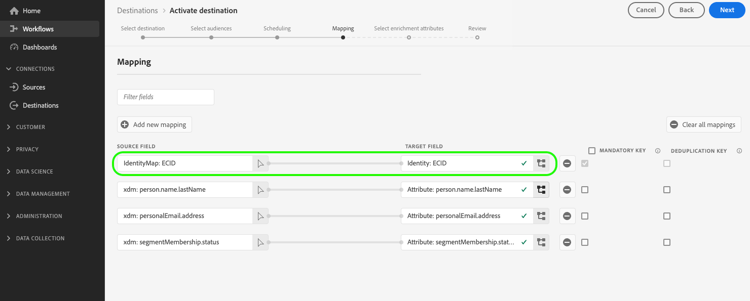
Selecting identity namespaces for export, as shown in the image below, is currently not supported. Selecting any identity namespaces for export will result in an error in the Review step.
As a temporary workaround if you need to add identity namespaces to your exported files during the beta, you can either:
- Use the legacy cloud storage destinations for the dataflows where you want to include identity namespaces in the exports
- Upload identities as attributes into Experience Platform, to then export them to your cloud storage destinations.