Twitter Custom Audiences connection
Overview overview
Target your existing followers and customers in Twitter and create relevant re-marketing campaigns by activating your audiences built within Adobe Experience Platform.
Prerequisites prerequisites
Before you configure your Twitter Custom Audiences destination, make sure to review the following Twitter prerequisites that you need to meet.
- Your Twitter Ads account must be eligible for advertising. New Twitter Ads accounts are not eligible for advertising in the first 2 weeks after they are created.
- Your Twitter user account that you authorized access for in Twitter Audience Manager must have the Partner Audience Manager permission enabled.
Supported identities supported-identities
Twitter Custom Audiences supports the activation of identities described in the table below. Learn more about identities.
Supported audiences supported-audiences
This section describes which types of audiences you can export to this destination.
This category includes all audience origins outside of audiences generated through the Segmentation Service. Read about the various audience origins. Some examples include:
- custom upload audiences imported into Experience Platform from CSV files,
- look-alike audiences,
- federated audiences,
- audiences generated in other Experience Platform apps such as Adobe Journey Optimizer,
- and more.
Supported audiences by audience data type:
Export type and frequency export-type-frequency
Refer to the table below for information about the destination export type and frequency.
Use Cases use-cases
To help you better understand how and when you should use the Twitter Custom Audiences destination, here are sample use cases that Adobe Experience Platform customers can solve by using this destination.
Use Case #1 use-case-1
Target your existing followers and customers in Twitter and create relevant re-marketing campaigns by activating your audiences built within Adobe Experience Platform as List Custom Audiences in Twitter.
Connect to destination connect
To connect to this destination, follow the steps described in the destination configuration tutorial. In the configure destination workflow, fill in the fields listed in the two sections below.
Authenticate to destination authenticate
- Find the Twitter Custom Audiences destination in the destination catalog and select Set Up.
- Select Connect to destination.
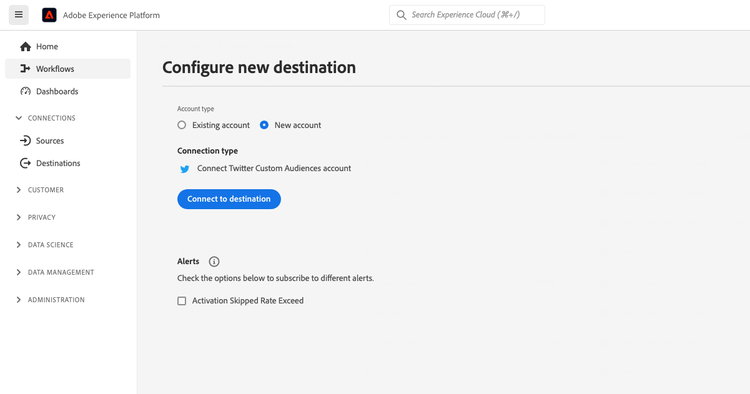
- Enter your Twitter credentials and select Log In.
Fill in destination details destination-details
To configure details for the destination, fill in the required and optional fields below. An asterisk next to a field in the UI indicates that the field is required.
- Name: A name by which you will recognize this destination in the future.
- Description: A description that will help you identify this destination in the future.
- Account ID: Your Twitter Ads account ID. This can be found in your Twitter Ads settings.
Enable alerts enable-alerts
You can enable alerts to receive notifications on the status of the dataflow to your destination. Select an alert from the list to subscribe to receive notifications on the status of your dataflow. For more information on alerts, see the guide on subscribing to destinations alerts using the UI.
When you are finished providing details for your destination connection, select Next.
Activate audiences to this destination activate
- To activate data, you need the View Destinations, Activate Destinations, View Profiles, and View Segments access control permissions. Read the access control overview or contact your product administrator to obtain the required permissions.
- To export identities, you need the View Identity Graph access control permission.
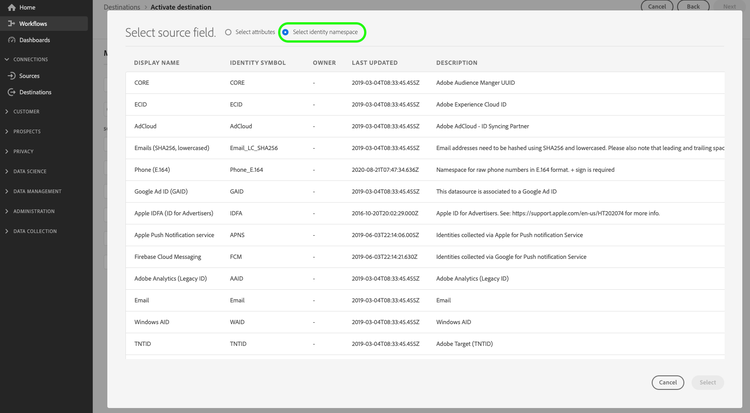
Read Activate profiles and audiences to streaming audience export destinations for instructions on activating audiences to this destination.
Mapping considerations mapping-considerations
When mapping audiences to Twitter, provide human-readable audience mapping names. We recommend using the same name that you used for the Experience Platform segments.
Data usage and governance data-usage-governance
All Adobe Experience Platform destinations are compliant with data usage policies when handling your data. For detailed information on how Adobe Experience Platform enforces data governance, see the Data Governance overview.
Additional resources additional-resources
More information about List Custom Audiences in Twitter can be found in the Twitter documentation.