Zeta Marketing Platform zeta-marketing-platform
Overview overview
The Zeta Marketing Platform (ZMP) is a cloud-based system which helps you acquire, grow, and retain customers more efficiently, powered by intelligence (proprietary data and AI). For more details, see Zeta Global.
With the Zeta Marketing Platform connector available in Adobe Experience Platform, you can seamlessly synchronize your audiences from Experience Platform to the ZMP.
Use cases use-cases
Build audiences use-case-build-audiences
A marketer wants to build unique audience profiles, identify their most valuable audiences, and use them across any digital channels that the Zeta Marketing Platform supports. They want to create a true 360 view of a consumer profile, build and activate meaningful audiences. More details on which channels the Zeta Marketing Platform supports can be found here.
Target users with advertisements use-case-target-users
An advertiser aims to target users within specific audiences through the Zeta Demand Side Platform (DSP), as these users interact with their brands. For more information on the Zeta DSP, click here.
Prerequisites prerequisites
Zeta Marketing Platform prerequisites zmp-prerequisites
-
Before you set up a new connection to the Zeta Marketing Platform destination, you must create an empty customer list in your Zeta Marketing Platform account. You must choose one of these customer lists as the designated target to receive the Adobe Experience Platform audience that you plan to send. You can create an empty customer list in the ZMP by following the instructions here.
-
Although the Adobe Experience Platform permits the activation of multiple audiences to a particular ZMP destination instance, it is mandatory that each ZMP destination instance receives only one Experience Platform audience. To handle multiple audiences from the Experience Platform, create additional ZMP destination instances for each audience and select a different customer list from the dropdown. This approach ensures that the target ZMP audiences does not get overwritten. See Fill in destination details for more details.
-
Use the following credentials to configure the destination:
- Username: api
- Password: Your ZMP REST API Key. You can find your REST API Key by logging in to your ZMP account and navigating to Settings > Integrations > Keys & Apps section. See the ZMP documentation for more details.
Supported identities supported-identities
Zeta Marketing Platform supports the activation of custom user IDs described in the table below. For more details, see identities.
uid target identity. This helps the Zeta Marketing Platform uniquely differentiate each profile.Email standard identity namespace if you want to identify unique profiles using their email addresses. Alternatively, you can opt to map your custom namespace to uid if customer profiles do not have an email.uid (mandatory) to either the same email MD5 values or another appropriate identity namespace.Supported audiences supported-audiences
This section describes which type of audiences you can export to this destination.
This category includes all audience origins outside of audiences generated through the Segmentation Service. Read about the various audience origins. Some examples include:
- custom upload audiences imported into Experience Platform from CSV files,
- look-alike audiences,
- federated audiences,
- audiences generated in other Experience Platform apps such as Adobe Journey Optimizer,
- and more.
Export type and frequency export-type-frequency
See the table below for information about the destination export type and frequency.
Supported audiences by audience data type:
Connect to the destination connect
To connect to this destination, follow the steps described in the destination configuration tutorial. In the configure destination workflow, fill in the fields listed in the two sections below.
Authenticate to destination authenticate
To authenticate to the destination, fill in the required fields and select Connect to destination.
- Username:
api - Password: Your ZMP REST API Key. You can find your REST API Key by logging in to your ZMP account and navigating to Settings > Integrations > Keys & Apps section. See the ZMP documentation for more details.
Fill in destination details destination-details
To configure details for the destination, fill in the required and optional fields below. An asterisk next to a field in the UI indicates that the field is required.
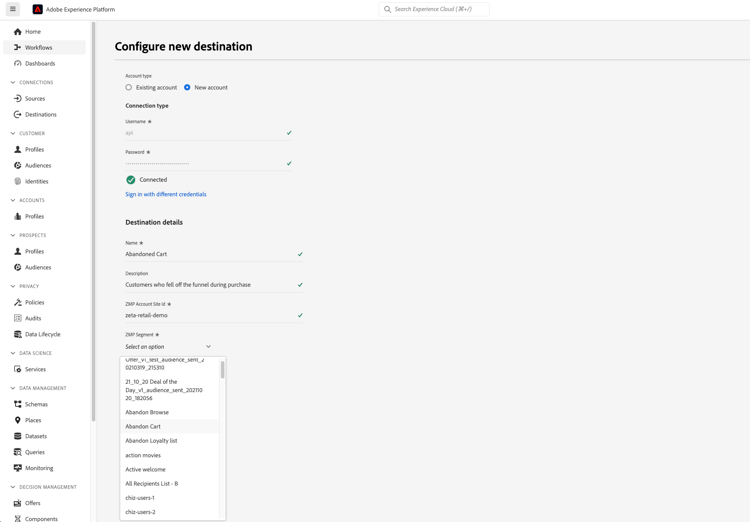
- Name: A name by which you will recognize this destination in the future.
- Description: A description that will help you identify this destination in the future.
- ZMP Account Site Id: Your ZMP Site Id where you want to send your audiences to. You can view your Site Id by navigating to Settings > Integrations > Keys & Apps section. More information can be found here.
- ZMP Segment: The customer list segment in your ZMP Site Id account that you want to be updated with the Experience Platform audience.
Enable alerts enable-alerts
You can enable alerts to receive notifications on the status of the dataflow to your destination. Select an alert from the list to subscribe to receive notifications on the status of your dataflow. For more information on alerts, see the guide on subscribing to destinations alerts using the UI.
When you are finished providing details for your destination connection, select Next.
Activate audiences to this destination activate
- To activate data, you need the Manage Destinations, Activate Destinations, View Profiles, and View Segments access control permissions. Read the access control overview or contact your product administrator to obtain the required permissions.
- To export identities, you need the View Identity Graph access control permission.
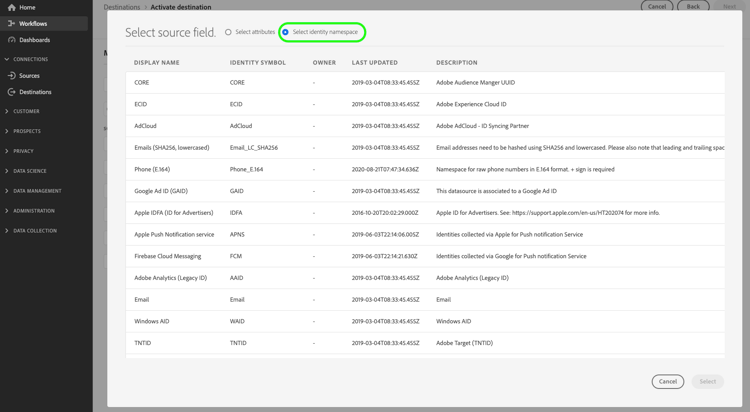
Read Activate audiences to streaming destinations for instructions on activating audiences to this destination.
Map attributes and identities map
Below is an example of correct identity mapping when exporting profiles to Zeta Marketing Platform.
Selecting source fields:
- Select a source identity namespace (custom or standard, such as
Email) that uniquely identifies a profile in Adobe Experience Platform and Zeta Marketing Platform. - Select any XDM source profile attributes that need to be exported to and updated in the Zeta Marketing Platform.
Selecting target fields:
- (Mandatory) Select
uidas the target identity to which you map a source identity namespace. - (Optional) Select
email_md5_idas the target identity to which you mapped the source identity namespace that represents email md5 values. It is essential that email addresses are already in MD5 format within the Experience Platform, as the Experience Platform does not convert plain text to MD5 - Select any additional target mappings if needed.
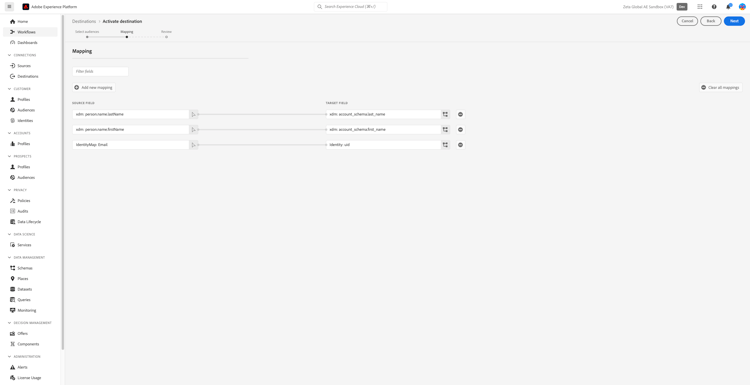
Exported data / Validate data export exported-data
A successful audience activation from Experience Platform to the Zeta Marketing Platform updates the target customer list in the ZMP. The count and the sample profiles in the target customer list will be equal to the number of identities that were successfully activated.
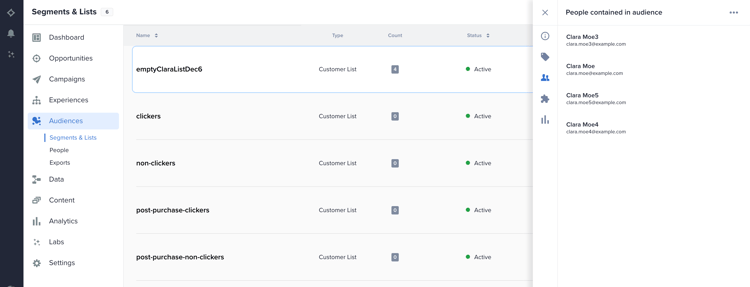
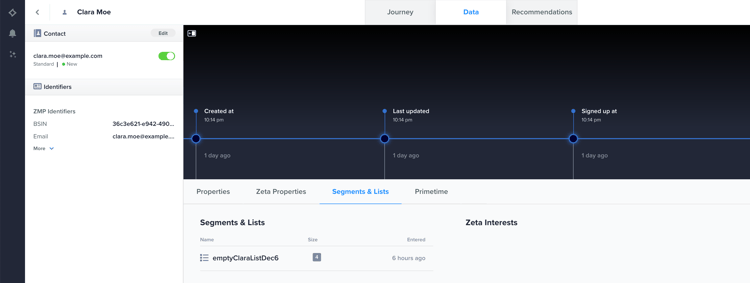
Each audience member that was activated from Experience Platform will also be visible under Audiences > People in the ZMP. You will also be able to view the Customer List segment a profile belongs to in the Single Customer view as shown below.
Data usage and governance data-usage-governance
All Adobe Experience Platform destinations are compliant with data usage policies when handling your data. For detailed information on how Adobe Experience Platform enforces data governance, read the Data Governance overview.